Etiqueta: Swift

  • Daily Swift Combine by example

    Daily Swift Combine by example

    The aim of this post is to get introduced to Combine by comparing it with regular operations that we perform on a daily basis while programming in Swift. It focuses on illustrating how common imperative patterns can be re-expressed using a reactive and declarative approach.

    From Callback to Combine

    Using a traditional completion handler is straightforward and lightweight. It works well for single, isolated asynchronous operations where you just need to return a Result once and move on. It introduces no dependency on Combine and keeps the control flow explicit and easy to follow. However, composition becomes cumbersome as soon as you need to chain multiple async steps, handle retries, debounce input, combine multiple data sources, or coordinate cancellation. Cancellation and flow control must be designed manually, and complex logic can quickly devolve into nested closures or scattered error handling.

    struct User: Decodable {
        let id: Int
        let name: String
    }
    
    final class API {
        func fetchUser(id: Int, completion: @escaping (Result<User, Error>) -> Void) {
            DispatchQueue.global().asyncAfter(deadline: .now() + 0.3) {
                completion(.success(User(id: id, name: "Ada")))
            }
        }
    }

    Wrapping the same API in a Combine Future turns the operation into a Publisher, which enables declarative composition with operators like map, flatMap, retry, and catch. This makes it much easier to build scalable, testable pipelines and maintain architectural consistency (e.g., in MVVM). The trade-offs are additional conceptual complexity, lifecycle management via AnyCancellable, and the fact that Future is eager and single-shot. Moreover, cancellation of a subscription does not automatically cancel the underlying work unless the original API supports it and you explicitly propagate that behavior.

    import Combine
    
    final class APICombine {
        private let api = API()
    
        func fetchUser(id: Int) -> AnyPublisher<User, Error> {
            Future { [api] promise in
                api.fetchUser(id: id) { result in
                    promise(result)
                }
            }
            .eraseToAnyPublisher()
        }
    }
    
    var cancellables = Set<AnyCancellable>()
    
    func fetchUser(id: Int) {
        let api = APICombine()
        api.fetchUser(id: 1)
            .sink(
                receiveCompletion: { completion in
                    if case let .failure(error) = completion {
                        print("Error:", error)
                    }
                },
                receiveValue: { user in
                    print("User:", user.name)
                }
            )
            .store(in: &cancellables)
    }

    Real Networking: URLSession.dataTaskPublisher

    Using URLSession.dataTaskPublisher provides a highly declarative and composable approach to networking. It integrates natively into the Combine pipeline, allowing you to chain operators such as map, tryMap, decode, retry, catch, and receive(on:) in a single, expressive stream. This makes transformation, error propagation, threading, and cancellation first-class concerns. It also improves testability when paired with dependency injection and custom URLSession configurations, and it aligns naturally with reactive UI layers (e.g., SwiftUI with @Published). The main advantages are composability, consistency with reactive architecture, built-in cancellation via AnyCancellable, and clearer data-flow semantics.

    import Foundation
    import Combine
    
    struct Post: Decodable {
        let id: Int
        let title: String
    }
    
    enum APIError: Error {
        case badStatus(Int)
    }
    
    final class PostsService {
        func fetchPosts() -> AnyPublisher<[Post], Error> {
            let url = URL(string: "https://jsonplaceholder.typicode.com/posts")!
    
            return URLSession.shared.dataTaskPublisher(for: url)
                .tryMap { output -> Data in
                    if let http = output.response as? HTTPURLResponse,
                       !(200...299).contains(http.statusCode) {
                        throw APIError.badStatus(http.statusCode)
                    }
                    return output.data
                }
                .decode(type: [Post].self, decoder: JSONDecoder())
                .eraseToAnyPublisher()
        }
    }

    However, dataTaskPublisher introduces additional abstraction and complexity compared to a traditional completion-handler approach. The generic types in Combine pipelines can become difficult to read, often requiring eraseToAnyPublisher() to manage API surface complexity. Debugging reactive chains can also be more challenging due to operator layering and asynchronous propagation. Moreover, for simple one-off requests, a completion handler or even Swift’s modern async/await syntax may be more readable and straightforward. Combine shines in scenarios involving multiple asynchronous streams, transformation pipelines, or UI bindings, but it may feel unnecessarily heavy for basic networking tasks.

    let service = PostsService()
    
    func PostServiceUsage() {
    
        service.fetchPosts()
            .receive(on: DispatchQueue.main) // UI updates
            .sink(
                receiveCompletion: { print("Completion:", $0) },
                receiveValue: { posts in print("Posts:", posts.count) }
            )
            .store(in: &cancellables)
    }

    NotificationCenter in Combine

    Using NotificationCenter with the classic addObserver API is straightforward and has minimal abstraction overhead. It works well for simple, fire-and-forget events and does not require knowledge of reactive programming. However, it is loosely typed (the notification’s payload is typically extracted from userInfo), which increases the risk of runtime errors. It also requires manual lifecycle management: you must ensure observers are removed appropriately (unless relying on the block-based API introduced in iOS 9+), and there is no built-in way to declaratively transform, filter, or compose events. As the number of notifications grows, code can become fragmented and harder to reason about.

    import Foundation
    import UIKit
    
    func classicUsage() {
        NotificationCenter.default.addObserver(
            forName: UIApplication.didBecomeActiveNotification,
            object: nil,
            queue: .main
        ) { _ in
            print("App activa")
        }
    }

    The Combine-based NotificationCenter.Publisher approach integrates notifications into a reactive stream, enabling strong composition through operators like map, filter, debounce, and merge. This allows you to declaratively transform and coordinate notification-driven events within a unified asynchronous pipeline. Memory management is also more explicit and predictable via AnyCancellable, and cancellation semantics are clearer. The trade-offs are increased conceptual complexity and a steeper learning curve, particularly for teams unfamiliar with reactive paradigms. Additionally, for very simple use cases, Combine may introduce unnecessary abstraction compared to the traditional observer pattern.

    func combineUsage() {
        NotificationCenter.default.publisher(for: UIApplication.didBecomeActiveNotification)
            .sink { _ in
                print("App active")
            }
            .store(in: &cancellables)
    }
    

    Timer as a Publlisher

    Using Timer.publish(every:on:in:) from Combine provides a declarative, composable approach to time-based events. Instead of imperatively scheduling a Timer and manually invalidating it, you model time as a stream of values that can be transformed with operators like map, scan, throttle, or debounce. This makes it especially powerful when the timer is just one part of a larger reactive pipeline (e.g., polling a network endpoint, driving UI state, or coordinating multiple asynchronous streams). Memory management is also more uniform: cancellation is handled via AnyCancellable, which integrates naturally with other Combine subscriptions. The main advantage is composability and consistency within a reactive architecture.

    import Combine
    
    func setupTimer() {
        Timer.publish(every: 1.0, on: .main, in: .common)
            .autoconnect()
            .scan(0) { count, _ in count + 1 }  // contador
            .sink { value in
                print("Segundos:", value)
            }
            .store(in: &cancellables)
    }

    In contrast, the traditional Timer.scheduledTimer approach is simpler and often more readable for isolated, imperative use cases—particularly when you just need a repeating callback with minimal transformation logic. It has less conceptual overhead and avoids introducing reactive abstractions where they may not be justified. However, it requires manual lifecycle management (invalidating the timer at the correct moment), is less expressive for chaining asynchronous behavior, and does not integrate naturally with other reactive data flows. Therefore, the imperative timer is often preferable for small, self-contained tasks, while the Combine publisher approach scales better in complex, event-driven architectures.

    Search with debounce

    Using a reactive approach with Combine (e.g., debounce, removeDuplicates, flatMap) centralizes the entire search pipeline into a single declarative data flow. The main advantage is composability: input normalization, rate limiting, cancellation of in-flight requests, error handling, and threading can all be expressed as operators in a predictable chain. This significantly reduces race conditions and makes it easier to reason about asynchronous behavior. Additionally, flatMap combined with switchToLatest (if used) allows automatic cancellation of outdated requests, which is critical in fast-typing scenarios. The architecture also scales well, especially in MVVM, because the ViewModel cleanly separates input streams from output state.

    import Combine
    import UIKit
    
    final class SearchViewModel {
    
        let query = PassthroughSubject<String, Never>()
    
        @Published private(set) var results: [String] = []
    
        private var cancellables = Set<AnyCancellable>()
    
        init() {
            query
                .map { $0.trimmingCharacters(in: .whitespacesAndNewlines) }
                .removeDuplicates()
                .debounce(for: .milliseconds(300), scheduler: DispatchQueue.main)
                .filter { !$0.isEmpty }
                .flatMap { q in
                    Self.searchPublisher(query: q)
                        .catch { _ in Just([]) }
                }
                .assign(to: &$results)
        }
    
        private static func searchPublisher(query: String) -> AnyPublisher<[String], Error> {
            Future { promise in
                DispatchQueue.global().asyncAfter(deadline: .now() + 0.2) {
                    promise(.success(["\(query) 1", "\(query) 2", "\(query) 3"]))
                }
            }
            .eraseToAnyPublisher()
        }
    }

    The main drawback is cognitive overhead and complexity. Combine introduces advanced abstractions (Publishers, Subscribers, Subjects, operator chains) that can be harder to debug and understand compared to imperative callbacks or simple target–action patterns. Error propagation and type signatures can become verbose, and misuse of operators (e.g., forgetting to manage cancellation or incorrectly handling threading) may introduce subtle bugs. For small or straightforward search implementations, a manual debounce using DispatchWorkItem or Timer can be simpler and easier to maintain, particularly for teams not already comfortable with reactive programming paradigms.

    final class SearchVC: UIViewController {
        private let vm = SearchViewModel()
        private var cancellables = Set<AnyCancellable>()
        private let textField = UITextField()
    
        override func viewDidLoad() {
            super.viewDidLoad()
    
            textField.addTarget(self, action: #selector(textChanged), for: .editingChanged)
    
            vm.$results
                .receive(on: DispatchQueue.main)
                .sink { results in
                    print("Resultados:", results)
                }
                .store(in: &cancellables)
        }
    
        @objc private func textChanged() {
            vm.query.send(textField.text ?? "")
        }
    }

    Conclusions

    With the following examples, I did not intend to directly replace traditional development patterns with Combine, but rather to identify development scenarios where the Combine framework is an appropriate and valuable option.

    You can find the source code for this example in the following GitHub repository.

    References

    • Combine

      Apple Developer Documentation
  • Different Aproximations with MVVM

    Different Aproximations with MVVM

    Implement MVVM using UIKit, RxSwift, Combine, and SwiftUI is interesting because it shows how a single architectural pattern adapts across very different UI and reactive paradigms. By comparing these approaches, readers can clearly distinguish MVVM’s core responsibilities.

    This perspective reflects the real evolution of iOS codebases, helps developers reason about architectural trade-offs, and demonstrates that MVVM is a long-lasting design mindset rather than a framework-dependent trend.

    MVVM Pattern

    MVVM splits your app into three layers so UI code stays simple and testable:

    • Model

      • Your domain data + business rules (e.g., User, Order, validation, persistence entities).

      • No UI knowledge.

    • View

      • The UI layer (SwiftUI View or UIKit UIViewController/UIView).

      • Displays state and forwards user events (tap, refresh, text input).

      • Should contain minimal logic—mostly layout + binding.

    • ViewModel

      • The “presentation logic” layer.

      • Transforms Models into UI-ready state (strings, sections, flags like isLoading, errorMessage).

      • Handles user intents (e.g., loginTapped(), load()), calls services, updates state.

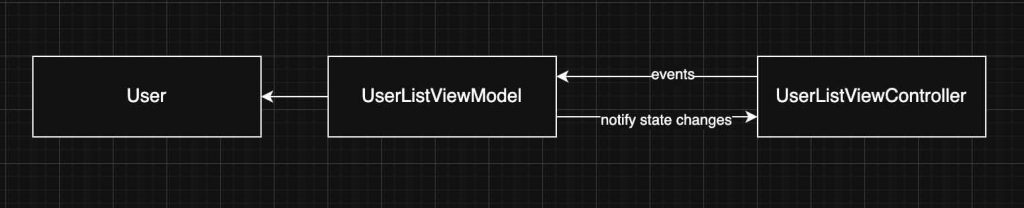
    Class diagram

    Observing the class diagram is easier to see a possile retain cycle can occur between the View and the ViewModel, but only if they reference each other strongly. This typically happens in UIKit when the ViewModel exposes closures (e.g., callbacks for UI updates) and the View captures self strongly inside those closures; the View holds the ViewModel, and the ViewModel indirectly holds the View through the closure. To avoid this, capture self weakly ([weak self]) in closures. In SwiftUI, retain cycles are much less common because the View is a value type (struct) and the framework manages the lifecycle, but you still need to be careful with long-lived objects, timers, or async tasks inside the ViewModel that capture references strongly.

    UIKit

    UIKit UIViewController displays a list of users in a table view using the MVVM pattern: the controller owns a UserListViewModel, sets up the UI and table view configuration in viewDidLoad, and establishes a binding via a closure (onDataUpdate) so that when the ViewModel finishes fetching users and updates its data, the table view is reloaded. The closure captures self weakly to avoid a retain cycle between the view controller and the ViewModel, and the actual data-fetching logic is delegated to the ViewModel through fetchUsers(), keeping presentation logic separated from UI concerns.

    class UserListViewController: UIViewController {
        
        private let tableView = UITableView()
        private let viewModel = UserListViewModel()
        private let cellId = "UserCell"
    
        override func viewDidLoad() {
            super.viewDidLoad()
            setupUI()
            setupBindings()
            viewModel.fetchUsers()
        }
        
        private func setupBindings() {
            viewModel.onDataUpdate = { [weak self] in
                self?.tableView.reloadData()
            }
        }
        
        private func setupUI() {
            title = "Usuarios"
            view.addSubview(tableView)
            tableView.frame = view.bounds
    
            tableView.dataSource = self
            tableView.register(UITableViewCell.self, forCellReuseIdentifier: cellId)
        }
    }
    
    // MARK: - TableView DataSource
    extension UserListViewController: UITableViewDataSource {
        func tableView(_ tableView: UITableView, numberOfRowsInSection section: Int) -> Int {
            return viewModel.numberOfUsers
        }
        
        func tableView(_ tableView: UITableView, cellForRowAt indexPath: IndexPath) -> UITableViewCell {
            let cell = tableView.dequeueReusableCell(withIdentifier: cellId, for: indexPath)
            let user = viewModel.user(at: indexPath.row)
            
            // Configuramos la celda usando los datos procesados por el ViewModel
            var content = cell.defaultContentConfiguration()
            content.text = user.name
            content.secondaryText = user.email
            cell.contentConfiguration = content
            
            return cell
        }
    }

    The ViewModel for an MVVM architecture that manages a private list of User models and exposes table-friendly accessors (numberOfUsers and user(at:)) to the View, while using a closure (onDataUpdate) as a simple binding mechanism to notify the View when data changes. The fetchUsers() method simulates an asynchronous API call, updates the internal user list after a delay, and triggers the callback so the UI (such as a table view) can refresh without the ViewModel depending on any UIKit components.


    import Foundation
    
    class UserListViewModel {
        private var users: [User] = []
        
        var onDataUpdate: (() -> Void)?
    
        var numberOfUsers: Int {
            return users.count
        }
        
        func user(at index: Int) -> User {
            return users[index]
        }
        
        func fetchUsers() {
            DispatchQueue.main.asyncAfter(deadline: .now() + 1.5) {
                self.users = [
                    User(name: "Alice", email: "alice@example.com"),
                    User(name: "Bob", email: "bob@example.com"),
                    User(name: "Charlie", email: "charlie@example.com")
                ]
                self.onDataUpdate?()
            }
        }
    }

    RxSwift

    RxSwift is a reactive framework for Swift that represents asynchronous events as observable streams, enabling a declarative and composable way to handle data flow, UI updates, and state changes without relying on callbacks or delegates.

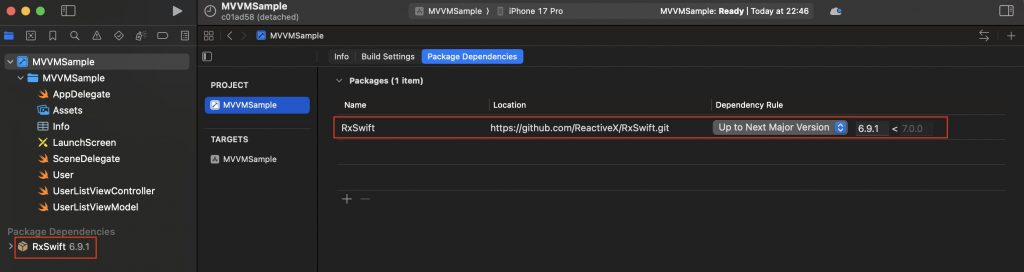
    RxSwift is a 3rd party and first step is include it in the project:

    With plain UIKit, MVVM uses imperative bindings like closures or delegates to update the View, while with RxSwift it uses declarative reactive streams that automatically propagate changes, resulting in cleaner data flow but more abstraction.

    This code defines a UIKit UIViewController that uses RxSwift and RxCocoa to apply the MVVM pattern in a reactive style. The view controller displays a table view and connects it to a stream of User data coming from the ViewModel, so the table updates automatically whenever the data changes. It also listens for row selection events to respond to user actions, manages memory using a DisposeBag, and keeps the controller focused on UI setup while data updates and events are handled through reactive bindings instead of manual callbacks.

    import UIKit
    import RxSwift
    import RxCocoa
    
    class UserListViewController: UIViewController {
        
        private let tableView = UITableView()
        private let viewModel = UserListViewModel()
        private let disposeBag = DisposeBag()
        private let cellId = "UserCell"
    
        override func viewDidLoad() {
            super.viewDidLoad()
            setupUI()
            setupBindings()
            viewModel.fetchUsers()
        }
        
        private func setupBindings() {
            viewModel.users
                .bind(to: tableView.rx.items(cellIdentifier: cellId, cellType: UITableViewCell.self)) { (row, user, cell) in
                    var content = cell.defaultContentConfiguration()
                    content.text = user.name
                    content.secondaryText = user.email
                    cell.contentConfiguration = content
                }
                .disposed(by: disposeBag)
            
            tableView.rx.modelSelected(User.self)
                .subscribe(onNext: { user in
                    print("Usuario seleccionado: \(user.name)")
                })
                .disposed(by: disposeBag)
        }
        
        private func setupUI() {
            title = "Usuarios Rx"
            view.addSubview(tableView)
            tableView.frame = view.bounds
            tableView.register(UITableViewCell.self, forCellReuseIdentifier: cellId)
        }
    }

    ViewModel using RxSwift that manages and exposes a list of User models as a reactive data stream: it stores the users in a BehaviorRelay, which always holds the latest value, exposes it to the View as a read-only Observable, and updates the stream in fetchUsers() by accepting new data, causing any subscribed Views (such as a table view) to automatically receive the updated user list and refresh without manual callbacks or delegates.

    import RxSwift
    import RxRelay
    
    class UserListViewModel {
    
        private let usersRelay = BehaviorRelay<[User]>(value: [])
        
        var users: Observable<[User]> {
            return usersRelay.asObservable()
        }
        
        func fetchUsers() {
            let mockData = [
                User(name: "Alice", email: "alice@example.com"),
                User(name: "Bob", email: "bob@example.com"),
                User(name: "Charlie", email: "charlie@example.com")
            ]
            usersRelay.accept(mockData)
        }
    }

    Combine

    Combine is Apple’s native reactive framework for handling asynchronous data with publishers and subscribers. Compared to RxSwift in MVVM, Combine is more tightly integrated with Swift and SwiftUI and uses less boilerplate, while RxSwift is more mature, feature-rich, and cross-platform but requires a third-party dependency.

    This code defines a UIKit UIViewController that uses Combine to implement MVVM-style data binding: it observes the @Published users property exposed by the ViewModel via the $users publisher, ensures updates are delivered on the main thread, and reloads the table view automatically whenever the user list changes, while managing the subscription lifecycle with a set of AnyCancellable objects and keeping the ViewController focused on UI setup and rendering rather than data-fetching logic.

    import UIKit
    import Combine
    
    class UserListViewController: UIViewController {
        
        private let tableView = UITableView()
        private let viewModel = UserListViewModel()
        private let cellId = "UserCell"
        
        private var cancellables = Set<AnyCancellable>()
    
        override func viewDidLoad() {
            super.viewDidLoad()
            setupUI()
            setupBindings()
            viewModel.fetchUsers()
        }
        
        private func setupBindings() {
            viewModel.$users
                .receive(on: RunLoop.main)
                .sink { [weak self] _ in
                    self?.tableView.reloadData()
                }
                .store(in: &cancellables)
        }
        
        private func setupUI() {
            title = "Usuarios con Combine"
            view.addSubview(tableView)
            tableView.frame = view.bounds
            tableView.dataSource = self
            tableView.register(UITableViewCell.self, forCellReuseIdentifier: cellId)
        }
    }

    This code defines a ViewModel using Combine that manages a list of User models for an MVVM architecture: it exposes the users array as a read-only @Published property so any subscribers are automatically notified when it changes, and simulates an asynchronous data fetch in fetchUsers() by updating the users after a delay on the main thread, which triggers Combine’s publisher to emit a new value and allows bound Views to refresh their UI reactively.

    import Foundation
    import Combine
    
    class UserListViewModel {
        @Published private(set) var users: [User] = []
        
        func fetchUsers() {
            DispatchQueue.main.asyncAfter(deadline: .now() + 1.0) {
                self.users = [
                    User(name: "Ana Combine", email: "ana@apple.com"),
                    User(name: "Pedro Publisher", email: "pedro@apple.com"),
                    User(name: "Sara Subscriber", email: "sara@apple.com")
                ]
            }
        }
    }

    SwiftUI

    SwiftUI is naturally aligned with the MVVM pattern because its declarative UI model is designed to observe and react to state changes exposed by ViewModels: the View is a lightweight struct that binds to an ObservableObject ViewModel, the ViewModel uses properties like @Published to expose state derived from Models, and SwiftUI automatically updates the UI whenever that state changes. As a result, MVVM in SwiftUI requires very little glue code, encourages clear separation of concerns, and makes reactive data flow the default rather than an added architectural layer.

    This SwiftUI view displays a list of users using the MVVM pattern by owning a @StateObject UserListViewModel, conditionally rendering a loading indicator while data is being fetched and a List of user details once loading completes, and triggering the data load in onAppear; SwiftUI automatically re-renders the UI whenever the ViewModel’s published state (users or isLoading) changes, keeping the view declarative and free of data-fetching or presentation logic.

    import SwiftUI
    
    struct UserListView: View {
        @StateObject private var viewModel = UserListViewModel()
        
        var body: some View {
            NavigationView {
                Group {
                    if viewModel.isLoading {
                        ProgressView("Loading users...")
                    } else {
                        List(viewModel.users) { user in
                            VStack(alignment: .leading) {
                                Text(user.name)
                                    .font(.headline)
                                Text(user.email)
                                    .font(.subheadline)
                                    .foregroundColor(.secondary)
                            }
                        }
                    }
                }
                .navigationTitle("Users")
                .onAppear {
                    viewModel.fetchUsers()
                }
            }
        }
    }

    This code defines a SwiftUI-compatible ViewModel that conforms to ObservableObject and manages user list state for an MVVM architecture: it exposes the users array and a loading flag as @Published properties so SwiftUI views automatically react to changes, sets isLoading to true when a simulated asynchronous fetch starts, updates the users after a delay on the main thread, and then resets the loading state, enabling the UI to seamlessly switch between loading and content states.

    import Foundation
    import Combine
    
    class UserListViewModel: ObservableObject {
        @Published var users: [User] = []
        @Published var isLoading = false
        
        func fetchUsers() {
            isLoading = true
            
            DispatchQueue.main.asyncAfter(deadline: .now() + 1.5) {
                self.users = [
                    User(name: "Ana SwiftUI", email: "ana@apple.com"),
                    User(name: "Pedro State", email: "pedro@apple.com"),
                    User(name: "Sara Binding", email: "sara@apple.com")
                ]
                self.isLoading = false
            }
        }
    }

    Conclusions

    MVVM is a pattern that has been present since the early days of Swift and has been easily adopted across different eras of iOS development, from UIKit to SwiftUI, including reactive approaches with RxSwift and Combine.

    You can find the source code for this example in the followingGitHub repository. There is a commit per approach.

    References

  • Rules to write Clean Code in Swift

    Rules to write Clean Code in Swift

    In this post we will focusfocus on showing how principles like KISS, DRY, and SOLID directly improve Swift code in everyday situations—such as structuring a ViewModel, reducing boilerplate in SwiftUI views, or designing protocols for networking.

    In this post we will revieew some roles principles by examples in Swift. This is could be considerered a continuation of a past post called ‘S.O.L.I.D. principles in Swift’

    Clean Code

    Clean code is code that is simple to read, easy to understand, and straightforward to maintain. It avoids unnecessary complexity by following principles like clarity, consistency, and separation of concerns, ensuring that each part of the code has a clear purpose. Clean code favors meaningful names, small and focused functions, and eliminates duplication, making it easier for other developers (and your future self) to work with. The goal is not just to make the computer run the program, but to make the code itself communicate its intent clearly to humans.

    Clean Code is the overarching goal of writing software that is easy to read, understand, and maintain, while the SOLID principles are a concrete set of guidelines that help achieve this goal by structuring classes and dependencies in a clear, flexible way. In essence, Clean Code defines what good code should feel like, and SOLID offers how to design object-oriented code that stays true to that vision, ensuring maintainability, scalability, and clarity.

    SOC – Separation Of Concepts

    Separation of Concerns (SoC) is a clean code principle that says each part of your code should focus on a single, well-defined responsibility. By splitting concerns, you reduce complexity, improve readability, and make code easier to maintain and test. In iOS/Swift, this often means separating data models, networking logic, business logic (ViewModel), and UI (View) instead of mixing them in one place.

    import SwiftUI
    import Foundation
    
    // MARK: - Model (data only)
    struct Post: Decodable, Identifiable {
        let id: Int
        let title: String
    }
    
    // MARK: - Networking (concern: fetching data)
    final class PostService {
        func fetchPosts() async throws -> [Post] {
            let url = URL(string: "https://jsonplaceholder.typicode.com/posts")!
            let (data, _) = try await URLSession.shared.data(from: url)
            return try JSONDecoder().decode([Post].self, from: data)
        }
    }
    
    // MARK: - ViewModel (concern: state & business logic)
    @MainActor
    final class PostListViewModel: ObservableObject {
        @Published var posts: [Post] = []
        @Published var errorMessage: String?
    
        private let service = PostService()
    
        func loadPosts() async {
            do {
                posts = try await service.fetchPosts()
            } catch {
                errorMessage = "Failed to load posts"
            }
        }
    }
    
    // MARK: - View (concern: UI)
    struct PostListView: View {
        @StateObject private var vm = PostListViewModel()
    
        var body: some View {
            NavigationView {
                List(vm.posts) { post in
                    Text(post.title)
                }
                .navigationTitle("Posts")
                .task { await vm.loadPosts() }
            }
        }
    }
    

    Where’s the SoC?

    • Model (Post) → defines the data only.

    • Service (PostService) → knows how to fetch posts from the network.

    • ViewModel (PostListViewModel) → manages state and error handling.

    • View (PostListView) → displays UI and reacts to state changes.

    Each layer does one thing well, instead of mixing networking, logic, and UI together.

    DRY – Do not repeat yourself

    DRY (Don’t Repeat Yourself) is a clean code principle that says you should avoid duplicating logic across your codebase. Instead, extract common behavior into reusable functions, extensions, or abstractions. This reduces errors, makes updates easier, and improves maintainability.

    ❌ Without DRY (duplicated logic)

    struct User {
        let name: String
        let email: String
    }
    
    struct Product {
        let title: String
        let price: Double
    }
    
    func printUser(_ user: User) {
        print("----")
        print("Name: \(user.name)")
        print("Email: \(user.email)")
        print("----")
    }
    
    func printProduct(_ product: Product) {
        print("----")
        print("Title: \(product.title)")
        print("Price: \(product.price)")
        print("----")
    }
    

    The logic for printing the separators (----) and formatting output is repeated in both functions.

    ✅ With DRY (reusable abstraction)

    protocol Printable {
        var descriptionLines: [String] { get }
    }
    
    struct User: Printable {
        let name: String
        let email: String
        
        var descriptionLines: [String] {
            [
                "Name: \(name)",
                "Email: \(email)"
            ]
        }
    }
    
    struct Product: Printable {
        let title: String
        let price: Double
        
        var descriptionLines: [String] {
            [
                "Title: \(title)",
                "Price: \(price)"
            ]
        }
    }
    
    // Generic reusable function
    func printEntity(_ entity: Printable) {
        print("----")
        entity.descriptionLines.forEach { print($0) }
        print("----")
    }
    
    // Usage
    let user = User(name: "Alice", email: "alice@email.com")
    let product = Product(title: "iPhone", price: 999.99)
    
    printEntity(user)
    printEntity(product)
    

    Now, the separator and printing logic exist in one place (printEntity). If we want to change the format, we update it once, not in every function.

    KISS-Keep it simple stupid

    KISS (Keep It Simple, Stupid) is a clean code principle that emphasizes writing code in the simplest way possible, avoiding unnecessary complexity or over-engineering. The goal is clarity: solve the problem directly instead of anticipating extra cases you don’t need yet.

    ❌ Not KISS (too complex for a simple counter)

    import SwiftUI
    
    struct ComplexCounterView: View {
        @State private var count = 0
        
        var body: some View {
            VStack {
                Text("Count: \(count)")
                    .font(.largeTitle)
                
                HStack {
                    Button("Increment") { updateCount(by: 1) }
                    Button("Decrement") { updateCount(by: -1) }
                }
            }
        }
        
        // Over-abstracted logic for a simple task
        private func updateCount(by value: Int) {
            let newValue = count + value
            if newValue >= 0 {
                count = newValue
            } else {
                count = 0
            }
        }
    }
    

    Too much abstraction (updateCount) and rules for a trivial counter.


    ✅ KISS (straightforward and clear)

    import SwiftUI
    
    struct SimpleCounterView: View {
        @State private var count = 0
        
        var body: some View {
            VStack {
                Text("Count: \(count)")
                    .font(.largeTitle)
                
                HStack {
                    Button("−") { if count > 0 { count -= 1 } }
                    Button("+") { count += 1 }
                }
            }
        }
    }
    

    The code is direct, easy to read, and does only what’s needed.

    DYC-Document your code

    DYC (Document Your Code) is a clean code principle that emphasizes writing code that is self-explanatory whenever possible, but also adding clear, concise documentation when something isn’t obvious. In Swift, this is often done with /// doc comments, which Xcode uses to show inline documentation when hovering over symbols. The idea is to make the code not just work, but also easy to understand and use for other developers (or your future self).

    ✅ Example in Swift using DYC

    import Foundation
    
    /// Represents a user in the system.
    struct User {
        /// Unique identifier for the user.
        let id: Int
        
        /// The user's display name.
        let name: String
        
        /// The user's email address.
        let email: String
    }
    
    /// Protocol defining operations to fetch users.
    protocol UserRepository {
        /// Fetches all available users from a data source.
        /// - Returns: An array of `User` objects.
        /// - Throws: An error if fetching fails.
        func fetchUsers() async throws -> [User]
    }
    
    /// Remote implementation of `UserRepository` that calls an API.
    final class RemoteUserRepository: UserRepository {
        private let baseURL: URL
        
        /// Creates a new repository with the given API base URL.
        /// - Parameter baseURL: The base URL of the remote API.
        init(baseURL: URL) {
            self.baseURL = baseURL
        }
        
        /// Calls the `/users` endpoint and decodes the response into a list of `User`.
        /// - Throws: `URLError` if the network call fails or the response is invalid.
        /// - Returns: An array of users retrieved from the server.
        func fetchUsers() async throws -> [User] {
            let url = baseURL.appendingPathComponent("users")
            let (data, response) = try await URLSession.shared.data(from: url)
            
            guard (response as? HTTPURLResponse)?.statusCode == 200 else {
                throw URLError(.badServerResponse)
            }
            
            return try JSONDecoder().decode([User].self, from: data)
        }
    }
    

    Why this follows DYC

    • Each type and method has a short description of what it does.

    • Methods document parameters, return values, and possible errors.

    • Xcode can show these comments in Quick Help (Option + Click) for better developer experience.

    YAGNI-You’re not going to need it

    YAGNI (You Aren’t Gonna Need It) is a clean code principle that reminds developers not to add functionality until it’s actually needed. Writing “just in case” code leads to complexity, unused features, and harder maintenance. Instead, implement only what the current requirements demand, and extend later when there’s a real need.


    ❌ Violating YAGNI (adding unnecessary features)

    import SwiftUI
    
    struct OverEngineeredCounterView: View {
        @State private var count = 0
        
        var body: some View {
            VStack {
                Text("Count: \(count)")
                    .font(.largeTitle)
                
                HStack {
                    Button("Increment") { updateCount(by: 1) }
                    Button("Decrement") { updateCount(by: -1) }
                    Button("Reset") { resetCount() }          // Not needed (yet)
                    Button("Multiply ×2") { multiplyCount() } // Not needed (yet)
                }
            }
        }
        
        private func updateCount(by value: Int) {
            count += value
        }
        
        private func resetCount() { count = 0 }
        private func multiplyCount() { count *= 2 }
    }
    

    Only increment and decrement are required, but reset and multiply were added “just in case.”


    ✅ Following YAGNI (keep it simple until needed)

    import SwiftUI
    
    struct SimpleCounterView: View {
        @State private var count = 0
        
        var body: some View {
            VStack {
                Text("Count: \(count)")
                    .font(.largeTitle)
                
                HStack {
                    Button("−") { count -= 1 }
                    Button("+") { count += 1 }
                }
            }
        }
    }
    

    The code contains only the features needed today. If requirements change, new functionality can be added later.

    LoD-Law of Demeter

    The Law of Demeter (LoD), also called the principle of least knowledge, says:
    A unit of code should only talk to its immediate collaborators (“friends”), not to the internals of those collaborators (“friends of friends”)’.

    In practice, this means avoiding long chains like order.customer.address.city, because it creates tight coupling and makes the code fragile if internal structures change. Instead, each object should expose only what is necessary.

    ❌ Violating the Law of Demeter

    struct Address {
        let city: String
    }
    
    struct Customer {
        let address: Address
    }
    
    struct Order {
        let customer: Customer
    }
    
    func printOrderCity(order: Order) {
        // ❌ Too many “hops” (order → customer → address → city)
        print(order.customer.address.city)
    }
    

    If the internal structure of Customer or Address changes, this function breaks.


    ✅ Following the Law of Demeter

    struct Address {
        let city: String
    }
    
    struct Customer {
        private let address: Address
        
        init(address: Address) {
            self.address = address
        }
        
        /// Expose only what’s needed
        func getCity() -> String {
            return address.city
        }
    }
    
    struct Order {
        private let customer: Customer
        
        init(customer: Customer) {
            self.customer = customer
        }
        
        /// Expose only what’s needed
        func getCustomerCity() -> String {
            return customer.getCity()
        }
    }
    
    func printOrderCity(order: Order) {
        // ✅ Only talks to Order, not Order’s internals
        print(order.getCustomerCity())
    }
    

    Now printOrderCity only knows about Order. The details of Customer and Address are hidden, so changes in those types won’t ripple outward.

    Lesson:

    • ❌ Don’t chain through multiple objects (a.b.c.d).

    • ✅ Provide methods that expose the needed behavior directly.

    Conclusions

    We have demonstrated how the Clean principles align with Swift, so there is no excuse for not applying them. 

  • S.O.L.I.D. principles in Swift

    S.O.L.I.D. principles in Swift

    Applying SOLID principles to Swift is valuable because it enhances code quality, maintainability, and scalability while leveraging Swift’s unique features like protocols, value types, and strong type safety. Swift’s modern approach to object-oriented and protocol-oriented programming aligns well with SOLID, making it essential for developers aiming to write modular, testable, and flexible code.

    In this post we will revieew 5 principles by examples.

    S.O.L.I.D. principles

    The SOLID principles are a set of five design guidelines that help developers create more maintainable, flexible, and scalable software. These principles were introduced by Robert C. Martin, also known as Uncle Bob, and are widely adopted in object-oriented programming. The acronym SOLID stands for: Single Responsibility Principle (SRP)Open/Closed Principle (OCP)Liskov Substitution Principle (LSP)Interface Segregation Principle (ISP), and Dependency Inversion Principle (DIP). Each principle addresses a specific aspect of software design, such as ensuring that a class has only one reason to change (SRP), allowing systems to be extended without modifying existing code (OCP), ensuring derived classes can substitute their base classes without altering behavior (LSP), creating smaller, more specific interfaces instead of large, general ones (ISP), and depending on abstractions rather than concrete implementations (DIP).

    By adhering to the SOLID principles, developers can reduce code complexity, improve readability, and make systems easier to test, debug, and extend. For example, SRP encourages breaking down large classes into smaller, more focused ones, which simplifies maintenance. OCP promotes designing systems that can evolve over time without requiring extensive rewrites. LSP ensures that inheritance hierarchies are robust and predictable, while ISP prevents classes from being burdened with unnecessary dependencies. Finally, DIP fosters loose coupling, making systems more modular and adaptable to change. Together, these principles provide a strong foundation for writing clean, efficient, and sustainable code.

    SRP-Single responsability principle

    The Single Responsibility Principle (SRP) is one of the SOLID principles of object-oriented design, stating that a class or module should have only one reason to change, meaning it should have only one responsibility or job. This principle emphasizes that each component of a system should focus on a single functionality, making the code easier to understand, maintain, and test. By isolating responsibilities, changes to one part of the system are less likely to affect others, reducing the risk of unintended side effects and improving overall system stability. In essence, SRP promotes modularity and separation of concerns, ensuring that each class or module is cohesive and focused on a specific task.

    // Violating SRP
    class EmployeeNonSRP {
        let name: String
        let position: String
        let salary: Double
        
        init(name: String, position: String, salary: Double) {
            self.name = name
            self.position = position
            self.salary = salary
        }
        
        func calculateTax() -> Double {
            // Tax calculation logic
            return salary * 0.2
        }
        
        func saveToDatabase() {
            // Database saving logic
            print("Saving employee to database")
        }
        
        func generateReport() -> String {
            // Report generation logic
            return "Employee Report for \(name)"
        }
    }
    
    // Adhering to SRP
    class Employee {
        let name: String
        let position: String
        let salary: Double
        
        init(name: String, position: String, salary: Double) {
            self.name = name
            self.position = position
            self.salary = salary
        }
    }
    
    class TaxCalculator {
        func calculateTax(for employee: Employee) -> Double {
            return employee.salary * 0.2
        }
    }
    
    class EmployeeDatabase {
        func save(_ employee: Employee) {
            print("Saving employee to database")
        }
    }
    
    class ReportGenerator {
        func generateReport(for employee: Employee) -> String {
            return "Employee Report for \(employee.name)"
        }
    }

    In the first example, the Employee class violates SRP by handling multiple responsibilities: storing employee data, calculating taxes, saving to a database, and generating reports.

    The second example adheres to SRP by separating these responsibilities into distinct classes. Each class now has a single reason to change, making the code more modular and easier to maintain.

    OCP-Open/Close principle

    The Open/Closed Principle (OCP) is one of the SOLID principles of object-oriented design, stating that software entities (such as classes, modules, and functions) should be open for extension but closed for modification. This means that the behavior of a system should be extendable without altering its existing code, allowing for new features or functionality to be added with minimal risk of introducing bugs or breaking existing functionality. To achieve this, developers often rely on abstractions (e.g., interfaces or abstract classes) and mechanisms like inheritance or polymorphism, enabling them to add new implementations or behaviors without changing the core logic of the system. By adhering to OCP, systems become more flexible, maintainable, and scalable over time.

    protocol Shape {
        func area() -> Double
    }
    
    struct Circle: Shape {
        let radius: Double
        func area() -> Double {
            return 3.14 * radius * radius
        }
    }
    
    struct Square: Shape {
        let side: Double
        func area() -> Double {
            return side * side
        }
    }
    
    // Adding a new shape without modifying existing code
    struct Triangle: Shape {
        let base: Double
        let height: Double
        func area() -> Double {
            return 0.5 * base * height
        }
    }
    
    // Usage
    let shapes: [Shape] = [
        Circle(radius: 5),
        Square(side: 4),
        Triangle(base: 6, height: 3)
    ]
    
    for shape in shapes {
        print("Area: \(shape.area())")
    }

    In this example the Shape protocol defines a contract for all shapes. New shapes like CircleSquare, and Triangle can be added by conforming to the protocol without modifying existing code. This adheres to OCP by ensuring the system is open for extension (new shapes) but closed for modification (existing code remains unchanged).

    LSP-Liksov substitution principle

    The Liskov Substitution Principle (LSP) is one of the SOLID principles of object-oriented design, named after Barbara Liskov. It states that objects of a superclass should be replaceable with objects of a subclass without affecting the correctness of the program. In other words, a subclass should adhere to the contract established by its superclass, ensuring that it can be used interchangeably without causing unexpected behavior or violating the assumptions of the superclass. This principle emphasizes the importance of designing inheritance hierarchies carefully, ensuring that derived classes extend the base class’s functionality without altering its core behavior. Violations of LSP can lead to fragile code, bugs, and difficulties in maintaining and extending the system.

    protocol Vehicle {
        func move()
    }
    
    class Car: Vehicle {
        func move() {
            print("Car is moving")
        }
        
        func honk() {
            print("Honk honk!")
        }
    }
    
    class Bicycle: Vehicle {
        func move() {
            print("Bicycle is moving")
        }
        
        func ringBell() {
            print("Ring ring!")
        }
    }
    
    func startJourney(vehicle: Vehicle) {
        vehicle.move()
    }
    
    let car = Car()
    let bicycle = Bicycle()
    
    startJourney(vehicle: car)      // Output: Car is moving
    startJourney(vehicle: bicycle)  // Output: Bicycle is moving

    In this example, both Car and Bicycle conform to the Vehicle protocol, allowing them to be used interchangeably in the startJourney function without affecting the program’s behavior

    ISP-Interface segregation principle

    The Interface Segregation Principle (ISP) is one of the SOLID principles of object-oriented design, which states that no client should be forced to depend on methods it does not use. In other words, interfaces should be small, specific, and tailored to the needs of the classes that implement them, rather than being large and monolithic. By breaking down large interfaces into smaller, more focused ones, ISP ensures that classes only need to be aware of and implement the methods relevant to their functionality. This reduces unnecessary dependencies, minimizes the impact of changes, and promotes more modular and maintainable code. For example, instead of having a single interface with methods for printing, scanning, and faxing, ISP would suggest separate interfaces for each responsibility, allowing a printer class to implement only the printing-related methods.

    // Violating ISP
    protocol Worker {
        func work()
        func eat()
    }
    
    class Human: Worker {
        func work() {
            print("Human is working")
        }
        func eat() {
            print("Human is eating")
        }
    }
    
    class Robot: Worker {
        func work() {
            print("Robot is working")
        }
        func eat() {
            // Robots don't eat, but forced to implement this method
            fatalError("Robots don't eat!")
        }
    }
    
    // Following ISP
    protocol Workable {
        func work()
    }
    
    protocol Eatable {
        func eat()
    }
    
    class Human: Workable, Eatable {
        func work() {
            print("Human is working")
        }
        func eat() {
            print("Human is eating")
        }
    }
    
    class Robot: Workable {
        func work() {
            print("Robot is working")
        }
    }

    In this example, we first violate ISP by having a single Worker protocol that forces Robot to implement an unnecessary eat() method. Then, we follow ISP by splitting the protocol into Workable and Eatable, allowing Robot to only implement the relevant work() method.

    DIP-Dependency injection principle

    The Dependency Inversion Principle (DIP) is one of the SOLID principles of object-oriented design, which states that high-level modules (e.g., business logic) should not depend on low-level modules (e.g., database access or external services), but both should depend on abstractions (e.g., interfaces or abstract classes). Additionally, abstractions should not depend on details; rather, details should depend on abstractions. This principle promotes loose coupling by ensuring that systems rely on well-defined contracts (interfaces) rather than concrete implementations, making the code more modular, flexible, and easier to test or modify. For example, instead of a high-level class directly instantiating a low-level database class, it would depend on an interface, allowing the database implementation to be swapped or mocked without affecting the high-level logic.

    protocol Engine {
        func start()
    }
    
    class ElectricEngine: Engine {
        func start() {
            print("Electric engine starting")
        }
    }
    
    class Car {
        private let engine: Engine
        
        init(engine: Engine) {
            self.engine = engine
        }
        
        func startCar() {
            engine.start()
        }
    }
    
    let electricEngine = ElectricEngine()
    let car = Car(engine: electricEngine)
    car.startCar() // Output: Electric engine starting

    In this example, the Car class depends on the Engine protocol (abstraction) rather than a concrete implementation, adhering to the DIP

    Conclusions

    We have demonstrated how the SOLID principles align with Swift, so there is no excuse for not applying them. You can find source code used for writing this post in following repository

  • Copy-on-Write in Swift: Managing Value Types

    Copy-on-Write in Swift: Managing Value Types

    Copy on Write (CoW) is an interesting concept because it helps developers understand how Swift optimizes memory management by avoiding unnecessary data duplication. CoW ensures that objects are only copied when modified, saving resources and improving performance. This concept is particularly relevant when working with value types like structs or arrays, where multiple references can exist to the same data.

    By providing an example—such as modifying a struct inside an array—we aim to demonstrate how CoW prevents redundant copying, enhancing both efficiency and memory usage in iOS apps.

    CoW – Copy-on-Write

    Copy on Write (CoW) is an optimization technique used in Swift for value types, particularly for collections like Arrays, Strings, and Dictionaries. It allows these value types to share the same underlying storage until a mutation occurs, improving performance and memory efficiency.

    How Copy on Write Works

    1. Initial Assignment: When a value type is assigned to a new variable, Swift performs a shallow copy, creating a new reference to the same underlying data3.

    2. Shared Storage: Multiple instances of the value type share the same memory location, reducing unnecessary copying.

    3. Mutation Trigger: When one instance attempts to modify its contents, Swift creates a full copy of the data for that instance.

    4. Preserved Originals: The original instance remains unchanged, maintaining value semantics.

    Benefits

    • Performance Optimization: Avoids unnecessary copying of large data structures.

    • Memory Efficiency: Reduces memory usage by sharing data until modification is required.

    • Value Semantics: Maintains the expected behavior of value types while improving efficiency.

    Implementation

    CoW is built into Swift’s standard library for Arrays, Strings, and Dictionaries. For custom value types, developers can implement CoW behavior using techniques like:

    1. Using isUniquelyReferenced to check if a copy is needed before mutation.

    2. Wrapping the value in a reference type (e.g., a class) and managing copies manually.

    It’s important to note that CoW is not automatically available for custom value types and requires explicit implementation.

    Example code this time is provided via Playground:

    import UIKit
    
    final class Wrapper {
        var data: [Int]
        
        init(data: [Int]) {
            self.data = data
        }
    }
    
    struct CoWExample {
        private var storage: Wrapper
    
        init(data: [Int]) {
            self.storage = Wrapper(data: data)
        }
    
        mutating func modifyData() {
            print("Memory @ before updating: \(Unmanaged.passUnretained(storage).toOpaque())")
            
            if !isKnownUniquelyReferenced(&storage) {
                print("Making a copy of the data before modifying it.")
                storage = Wrapper(data: storage.data) // Created a copy
            } else {
                print("Update without copy, unique reference.")
            }
    
            storage.data.append(4)  // Modify array from class inside
            print("@ Memory after updaing: \(Unmanaged.passUnretained(storage).toOpaque())")
        }
    
        func printData(_ prefix: String) {
            print("\(prefix) Data: \(storage.data) | Memory @: \(Unmanaged.passUnretained(storage).toOpaque())")
        }
    }
    
    // Use  Copy-on-Write
    var obj1 = CoWExample(data: [1, 2, 3])
    var obj2 = obj1  // Both instances share same memory @
    
    print("Before updating obj2:")
    obj1.printData("obj1:")
    obj2.printData("obj2:")
    
    print("\nUpdating obj2:")
    obj2.modifyData() // Here will take place copy when there's a new reference
    
    print("\nAfter updating obj1:")
    obj1.printData("obj1:")
    obj2.printData("obj2:")

    Key Components:

    1. Wrapper Class:

      • final class that holds an array of integers (data).

      • It is used as the underlying storage for the CoWExample struct.

    2. CoWExample Struct:

      • Contains a private property storage of type Wrapper.

      • Implements the Copy-on-Write mechanism in the modifyData() method.

      • Provides a method printData(_:) to print the current data and memory address of the storage object.

    3. modifyData() Method:

      • Checks if the storage object is uniquely referenced using isKnownUniquelyReferenced(&storage).

      • If the storage object is not uniquely referenced (i.e., it is shared), a new copy of the Wrapper object is created before modifying the data.

      • If the storage object is uniquely referenced, the data is modified directly without creating a copy.

      • Appends the value 4 to the data array.

    4. Memory Address Tracking:

      • The memory address of the storage object is printed before and after modification to demonstrate whether a copy was made.

    Run playground

    Lets run the playground and analyze logs:

    After obj2=obj1 assignation, both share exactly same memory @ddress. But when obj2 is being updated:

    Is at that moment when obj2 is allocated in a different @dress space and then updated.

    Conclusions

    A quick answer is that the difference between Value Types and Reference Types lies in how they are assigned. When a Value Type is assigned, an isolated copy is created. However, in reality, after assignment, Value Types behave similarly to Reference Types. The key difference emerges when an update occurs—at that point, a new allocation is performed.

    You can find source code used for writing this post in following repository

    References

  • Breaking Retain Cycles in Swift

    Breaking Retain Cycles in Swift

    Detecting and preventing retain cycles is crucial, as they lead to memory leaks, degrade app performance, and cause unexpected behaviors. Many developers, especially those new to Swift and UIKit, struggle with understanding strong reference cycles in closures, delegates, and class relationships.

    We will present two classic retain cycle bugs in a sample iOS app, explore the tools that Xcode provides for detecting them, and share some advice on how to avoid them.

    Memory Graph Debuger

    The sample application consists of two view screens. The pushed screen contains injected retain cycles, leading to memory leaks. A memory leak occurs when memory references cannot be deallocated. In this app, the leak happens when the pushed screen is popped back but remains in memory.

    Build and deploy app on simulator (or real device): 

    Open Memory Graph Debuger

    In this case is clear where do we have a retain cycle.

    class MyViewModel: ObservableObject {
        @Published var count: Int = 0
        var classA: ClassA  = ClassA()
        
        var incrementClosure: (() -> Void)?
        
        init() {
    ...
            
            #if true
            incrementClosure = {
                self.count += 1
            }
            #else
    ...
            }
            #endif
        }
        
        deinit {
            print("MyViewModel is being deallocated")
        }
    }
    
    struct SecondView: View {
        @StateObject private var viewModel = MyViewModel()
        var body: some View {

    In SecondView, MyViewModel is referenced using viewModel, MyViewModel.incrementalClosure, and self, which also references MyViewModel indirectly. When the view is popped, this class cannot be removed from memory because it is retained due to an internal reference from self.count.

    If you set a breakpoint in the deinit method, you will notice that it is never triggered. This indicates that the class is still retained, leading to a memory leak. As a result, the memory allocated for MyViewModel will never be deallocated or reused, reducing the available memory for the app. When the app runs out of memory, iOS will forcefully terminate it.

    The only way to break this retain cycle is to make one of these references weak. Using a weak reference ensures that it is not counted toward the retain count. When the view is popped, SecondView holds the only strong reference, allowing iOS to deallocate MyViewModel and free up memory.

    This is the correct solution:

    class MyViewModel: ObservableObject {
        @Published var count: Int = 0
        var classA: ClassA  = ClassA()
        
        var incrementClosure: (() -> Void)?
        
        init() {
            ...
            
            #if false
          ....
            #else
            incrementClosure = { [weak self] in
                self?.count += 1
            }
            #endif
        }
        
        deinit {
            print("MyViewModel is being deallocated")
        }
    }

    Set a breakpoint in deinit to verify that the debugger stops when the view is popped. This confirms that the class has been properly deallocated

    Next retain cycle is a memory reference cycle, when we have a chain of refenced classes and once of them is referencing back it generates a loop of references. For implementing this memory leak we have created a classA that references a classB that references a classC that finally refences back to classA.

    Here we can see clear that same memory address is referenced. But if we take a look at Debug Memory Inspector

    It is not as clear as the previous case. This is a prepared sample app, but in a real-world application, the graph could become messy and make detecting memory leaks very difficult. Worst of all, with this kind of memory leak, when the view is removed, the deinit method is still being executed.

    For detecting such situations we will have to deal with another tool.

    Insruments

    Xcode Instruments is a powerful performance analysis and debugging tool provided by Apple for developers to profile and optimize their iOS, macOS, watchOS, and tvOS applications. It offers a suite of tools that allow developers to track memory usage, CPU performance, disk activity, network usage, and other system metrics in real-time. Instruments work by collecting data through time-based or event-based profiling, helping identify performance bottlenecks, memory leaks, and excessive resource consumption. Integrated within Xcode, it provides visual timelines, graphs, and detailed reports, making it an essential tool for fine-tuning app efficiency and responsiveness.

    In XCode Product menu select Profile:

    For measuring memory leaks select ‘Leaks»:

    Press record button for deploying on simulator and start recording traces.

    In following video, you will see that when view is pushed back then memory leak is detected:

    Is programed  to check memory every 10 seconds, when we click on red cross mark then bottom area shows the classes affected:

    Conclusions

    In this post, I have demonstrated how to detect memory leaks using the Memory Graph Debugger and Inspector. However, in my opinion, preventing memory leaks through good coding practices is even more important than detecting them.

    In Swift, memory leaks typically occur due to retain cycles, especially when using closures and strong references. To avoid memory leaks, you can use weak references where appropriate.

    You can find source code used for writing this post in following repository

    References

  • iOS NFC Development: From URLs to Deeplinks

    iOS NFC Development: From URLs to Deeplinks

    Writing a URL or deep link into an NFC tag enables seamless integration between the physical and digital worlds. It offers instant access to online content and enhanced user experiences. Additionally, it creates automation opportunities, simplifying interactions such as opening web pages, accessing app-specific features, or triggering IoT actions. These capabilities make NFC tags valuable for marketing, smart environments, and personalization. This technology finds applications in retail, events, tourism, and healthcare, bringing convenience, innovation, and a modern touch.

    In this post, we will continue evolving the app created in the “Harnessing NFC Technology in Your iOS App” post by adding two more functionalities: one for storing a regular web URL and another for adding a deep link to open the same app. By the end of this guide, you’ll be equipped to expand your app’s NFC capabilities and create an even more seamless user experience.

    Storing web url into NFC tag

    Add a new function to handle the write URL operation:
        func startWritingURL() async {
            nfcOperation = .writeURL
            startSesstion()
        }
        
        private func startSesstion() {
            nfcSession = NFCNDEFReaderSession(delegate: self, queue: nil, invalidateAfterFirstRead: false)
            nfcSession?.begin()
        }
    We ran out of Boolean operations, so I created an enum to implement the three current NFC operations: read, write, and write URL. For this process, we set the operation to perform and initiate an NFC session.
    The readerSession delegate function handles connecting to the NFC tag and querying its status.
    func readerSession(_ session: NFCNDEFReaderSession, didDetect tags: [NFCNDEFTag]) {
            guard let tag = tags.first else { return }
            
            session.connect(to: tag) { error in
                if let error = error {
                    session.invalidate(errorMessage: "Connection error: \(error.localizedDescription)")
                    return
                }
                
                tag.queryNDEFStatus { status, capacity, error in
                    guard error == nil else {
                        session.invalidate(errorMessage: "Error checking NDEF status")
                        return
                    }
                    
                    switch status {
                    case .notSupported:
                        session.invalidate(errorMessage: "Not compatible tat")
                    case  .readOnly:
                        session.invalidate(errorMessage: "Tag is read-only")
                    case .readWrite:
                        switch self.nfcOperation {
                        case .read:
                            self.read(session: session, tag: tag)
                        case .write:
                            self.write(session: session, tag: tag)
                        case .writeURL:
                            self.writeUrl(session: session, tag: tag)
                        }
                        
                    @unknown default:
                        session.invalidate(errorMessage: "Unknown NDEF status")
                    }
                }
            }
        }
    When a writable NFC tag is detected and the operation is set to .writeURL, the method responsible for writing the URL to the tag will be called.
        private func writeUrl(session: NFCNDEFReaderSession, tag: NFCNDEFTag) {
            guard let url = URL(string: "https://javios.eu/portfolio/"),
                let payload = NFCNDEFPayload.wellKnownTypeURIPayload(string: url.absoluteString) else {
                session.invalidate(errorMessage: "No se pudo crear el payload NDEF.")
                return
            }
    
            write(session, tag, payload) { error in
                guard  error == nil else { return }
                print(">>> Write: \(url.absoluteString)")
            }
        }
        
        private func write(_ session: NFCNDEFReaderSession,
                           _ tag: NFCNDEFTag,
                           _ nfcNdefPayload: NFCNDEFPayload, completion: @escaping ((Error?) -> Void)) {
            
            let NDEFMessage = NFCNDEFMessage(records: [nfcNdefPayload])
            tag.writeNDEF(NDEFMessage) { error in
                if let error = error {
                    session.invalidate(errorMessage: "Writing error: \(error.localizedDescription)")
                    completion(error)
                } else {
                    session.alertMessage = "Writing succeeded"
                    session.invalidate()
                    completion(nil)
                }
            }
        }
    
    This Swift code facilitates writing a URL as an NFC NDEF payload onto an NFC tag. The writeUrl function generates an NDEF payload containing a well-known type URI record that points to the URL «https://javios.eu/portfolio/«. If the payload is valid, the function invokes the write method, passing the NFC session, tag, and payload as parameters. The write function then creates an NFC NDEF message containing the payload and writes it to the NFC tag.
    Once the URL is placed within the tag, you can use the tag to open the web link, functioning similarly to scanning a QR code that redirects you to a website.

    Deeplinks

    A deeplink in iOS is a type of link that directs users to a specific location within an app, rather than just opening the app’s home screen. This helps enhance the user experience by providing a direct path to particular content or features within the app.

    In this example, we will create a deeplink that will open our current NFCApp directly:

    When iOS detects the ‘nfcreader://jca.nfcreader.open’ deep link, it will open the currently post development app on iOS.

    @main
    struct NFCAppApp: App {
        var body: some Scene {
            WindowGroup {
                ContentView()
                    .onOpenURL { url in
                    handleDeeplink(url: url)
                }
            }
        }
    
        func handleDeeplink(url: URL) {
            // Maneja el deeplink aquí
            print("Se abrió la app con el URL: \(url)")
        }
    }

    By adding the .onOpenURL modifier, the app will be able to detect when it is launched (or awakened) via a deep link.

    Finally, implement the deep link writing functionality by adapting the previously created writeUrl method:

        private func writeUrl(session: NFCNDEFReaderSession, tag: NFCNDEFTag, urlString: String) {
            guard let url = URL(string: urlString),
                let payload = NFCNDEFPayload.wellKnownTypeURIPayload(string: url.absoluteString) else {
                session.invalidate(errorMessage: "No se pudo crear el payload NDEF.")
                return
            }
    
            write(session, tag, payload) { error in
                guard  error == nil else { return }
                print(">>> Write: \(url.absoluteString)")
            }
        }

    It would be called in the following way for creating deeplink

                    case .readWrite:
                        switch self.nfcOperation {
                        case .read:
                            self.read(session: session, tag: tag)
                        case .write:
                            self.write(session: session, tag: tag)
                        case .writeURL:
                            self.writeUrl(session: session, tag: tag, urlString: "https://javios.eu/portfolio/")
                        case .writeDeeplink:
                            self.writeUrl(session: session, tag: tag, urlString: "nfcreader://jca.nfcreader.open")
                        }
                        

    Deploy project on a real device for validating behaviour

    Once the tag is written, when the deep link is triggered, the app will be closed and then reopened. You will be prompted to open the app again.

    Conclusions

    In this post, I have extended the functionalities we can implement with NFC tags by using URLs. You can find source code used for writing this post in following repository.

    References

  • Harnessing NFC Technology in your iOS App

    Harnessing NFC Technology in your iOS App

    Near Field Communication (NFC) is a short-range wireless technology that enables communication between two compatible devices when brought within a few centimeters of each other. This technology powers various applications, including contactless payments, data sharing, and access control, offering faster and more convenient transactions. NFC’s ease of use eliminates the need for complex pairing processes, enabling seamless interactions between devices and making it accessible to a broad audience.

    In this post, we will create a basic iOS application that reads from and writes to an NFC tag.

    Requirements

    To successfully use this technology, two requirements must be met:
    1. iOS Device Compatibility: You need to deploy it on a real iOS device running iOS 13 or later. All iPhone 7 models and newer can read and write NFC tags.
    2. NFC Tags: Ensure that the NFC tags you use are compatible with iOS. I’ve purchased these tags—double-check their compatibility if you decide to experiment with them.

    Base project and NFC configuration

    Setting up NFC on any iOS app requires a minimum of two steps. The first step is to set the ‘NFC scan usage description’ text message in Build settings (or in the Info.plist file if you’re working with an older iOS project).

    The second enhancement is to add ‘Near Field Communication (NFC) Tag’ capability to the signing capabilities.

    Finally setup entitlements for allowing working with NDEF tags:

    NFC sample application

    The app features a straightforward interface consisting of an input box for entering the value to be stored on the NFC tag, a button for reading, and another for writing. At the bottom, it displays the value retrieved from the tag.

    From the coding perspective, the app serves as both a view and a manager for handling NFC operations. Below is an introduction to the NFC Manager:

    final class NFCManager: NSObject, ObservableObject,
                            @unchecked Sendable  {
        
        @MainActor
        static let shared = NFCManager()
        @MainActor
        @Published var tagMessage = ""
        
        private var internalTagMessage: String = "" {
            @Sendable didSet {
                Task { [internalTagMessage] in
                    await MainActor.run {
                        self.tagMessage = internalTagMessage
                    }
                }
            }
        }
        
        var nfcSession: NFCNDEFReaderSession?
        var isWrite = false
        private var userMessage: String?
        
        @MainActor override init() {
        }
    }

    The code is compatible with Swift 6. I had to rollback the use of @GlobalActor for this class because some delegated methods were directly causing the app to crash. The tagMessage attribute, which holds the content of the NFC tag, is a @Published property that is ultimately displayed in the view.

    This attribute is marked with @MainActor, but the Manager operates in a different, isolated domain. To avoid forcing updates to this attribute on @MainActor directly from any delegated method, I created a mirrored property, internalTagMessage. This property resides in the same isolated domain as the NFC Manager. Whenever internalTagMessage is updated, its value is then safely transferred to @MainActor. This approach ensures that the delegate methods remain cleaner and avoids cross-domain synchronization issues.

    // MARK :- NFCManagerProtocol
    extension NFCManager: NFCManagerProtocol {
        
        func startReading() async {
            self.nfcSession = NFCNDEFReaderSession(delegate: self, queue: nil, invalidateAfterFirstRead: false)
            self.isWrite = false
            self.nfcSession?.begin()
        }
        
        func startWriting(message: String) async {
            nfcSession = NFCNDEFReaderSession(delegate: self, queue: nil, invalidateAfterFirstRead: false)
            isWrite = true
            userMessage = message
            nfcSession?.begin()
        }
    }

    The NFCManagerProtocol defines the operations requested by the view. Each time a new read or write operation is initiated, a new NFC NDEF reader session is started, and the relevant delegate methods are invoked to handle the operation.

    // MARK :- NFCNDEFReaderSessionDelegate
    extension NFCManager:  NFCNDEFReaderSessionDelegate {
    
        func readerSession(_ session: NFCNDEFReaderSession, didDetectNDEFs messages: [NFCNDEFMessage]) {
    
        }
        
        func readerSession(_ session: NFCNDEFReaderSession, didDetect tags: [NFCNDEFTag]) {
            guard let tag = tags.first else { return }
            
            session.connect(to: tag) { error in
                if let error = error {
                    session.invalidate(errorMessage: "Connection error: \(error.localizedDescription)")
                    return
                }
                
                tag.queryNDEFStatus { status, capacity, error in
                    guard error == nil else {
                        session.invalidate(errorMessage: "Error checking NDEF status")
                        return
                    }
                    
                    switch status {
                    case .notSupported:
                        session.invalidate(errorMessage: "Not compatible tat")
                    case  .readOnly:
                        session.invalidate(errorMessage: "Tag is read-only")
                    case .readWrite:
                        if self.isWrite {
                            self.write(session: session, tag: tag)
                        } else {
                            self.read(session: session, tag: tag)
                        }
                        
                    @unknown default:
                        session.invalidate(errorMessage: "Unknown NDEF status")
                    }
                }
            }
        }
        
        private func read(session: NFCNDEFReaderSession, tag: NFCNDEFTag) {
            tag.readNDEF { [weak self] message, error in
                if let error {
                    session.invalidate(errorMessage: "Reading error: \(error.localizedDescription)")
                    return
                }
                
                guard let message else {
                    session.invalidate(errorMessage: "No recrods found")
                    return
                }
                
                if let record = message.records.first {
                    let tagMessage = String(data: record.payload, encoding: .utf8) ?? ""
                    print(">>> Read: \(tagMessage)")
                    session.alertMessage = "ReadingSucceeded: \(tagMessage)"
                    session.invalidate()
                    self?.internalTagMessage = tagMessage
                }
            }
        }
        
        private func write(session: NFCNDEFReaderSession, tag: NFCNDEFTag) {
            guard let userMessage  = self.userMessage else { return }
            let payload = NFCNDEFPayload(
                format: .nfcWellKnown,
                type: "T".data(using: .utf8)!,
                identifier: Data(),
                payload: userMessage.data(using: .utf8)!
            )
            let message = NFCNDEFMessage(records: [payload])
            tag.writeNDEF(message) { error in
                if let error = error {
                    session.invalidate(errorMessage: "Writing error: \(error.localizedDescription)")
                } else {
                    print(">>> Write: \(userMessage)")
                    session.alertMessage = "Writing succeeded"
                    session.invalidate()
                }
            }
        }
        
        func readerSessionDidBecomeActive(_ session: NFCNDEFReaderSession) {}
        
        func readerSession(_ session: NFCNDEFReaderSession, didInvalidateWithError error: Error) {
            print( "Session Error: \(error.localizedDescription)")
        }
    }
    • readerSession(_:didDetectNDEFs:) This method is a placeholder for handling detected NDEF messages. Currently, it doesn’t contain implementation logic.
    • readerSession(_:didDetect:) This method is triggered when NFC tags are detected. It connects to the first detected tag and determines its NDEF status (read/write capabilities). Depending on the status, it decides whether to read or write data using the read or write methods.
    • readerSessionDidBecomeActive(_:) This method is called when the NFC reader session becomes active. It has no custom logic here.
    • readerSession(_:didInvalidateWithError:) This method handles session invalidation due to errors, logging the error message.

    Finally, deploying the app on a real device should exhibit the following behavior:

    Store the text «Hello world!» in an NFC tag. Later, retrieve the text from the tag and display it at the bottom of the view.

    Conclusions

    This example takes a minimalist approach to demonstrate how easy it is to start experimenting with this technologyy.You can find source code used for writing this post in following repository.

    References

  • Safely migrating persisted models in iOS to prevent crashes

    Safely migrating persisted models in iOS to prevent crashes

    Most mobile native apps (iOS/Android) support evolving businesses, and must be ready to accommodate changes. Evolving persisted data in an app is crucial for maintaining a good user experience and preventing obsolescence as business requirements change. In my personal experience with production crashes, this is one of the most common issues encountered after a production release. While removing and reinstalling the app often fixes the issue, this is not an ideal solution.

    The aim of this post is to demonstrate a possible method for handling migration in non-database persisted data. We will explain how to migrate JSON stored in user defaults, though this approach could also apply to data stored in files or keychain. It’s important to note that we’re focusing on non-database storage because database frameworks typically provide their own migration mechanisms that should be followed.

    The starting point

    The base application used as the foundation for this post simply displays a button. When pressed, it saves a structure to UserDefaults. Upon restarting the app after it has been closed, the previously stored content is retrieved from UserDefaults.

    Let me introduce the persisted structure. It has been simplified for better understanding, but is not what you would find in a real production app:

    struct Person: Codable {
        let name: String
        let age: String
    }

    New requirements

    The business has decided that an email address is also required. Therefore, we will proceed to implement this feature.

    struct Person: Codable {
        let name: String
        let age: String
        let email: String
    }
    Build and run, but suddenly something unexpected happens…

    Initially, the app stored the data in the format {name, age}. However, it has since been updated to expect the format {name, age, email}. This discrepancy means that previously persisted data cannot be decoded properly, leading to an exception being thrown.

    A common mistake during development at this stage is to simply remove the app from the simulator, reinstall the new version, and move on, effectively ignoring the issue. This is a poor decision, as it fails to address the root problem. Eventually, this oversight will come back to haunt you when the same issue occurs on hundreds, thousands, or an unacceptably large number of real app installations. This will result in a very poor user experience.

    The first step to properly address this issue is to add a version field to the data structure. This allows for better handling of future changes to the structure.

    struct Person: Codable {
        var version: Int {
            return 1
        }
        let name: String
        let age: String
        let email: String
    }

    We will implement a Migration Manager responsible for handling migrations

    @MainActor
    protocol MigrationManagerProtocol {
        func applyMigration()
    }
    
    @MainActor
    final class MigrationManager: ObservableObject {
        @Published var migrationPenging = true
        @Published var migrationFailed = false
        
        struct PersonV0: Codable {
            let name: String
            let age: String
        }
        
        typealias PersonV1 = Person
    }

    In this class, we will include a copy of the original Person structure, referred to as PersonV0. The current Person structure is named PersonV1

    extension MigrationManager: MigrationManagerProtocol {
        func applyMigration() {
            defer { migrationPenging = false }
            applyPersonMigration()
        }
        
        private func isPersonMigrationPending() -> Bool {
            let userDefaultsManager = appSingletons.userDefaultsManager
            return userDefaultsManager.get(Person.self, forKey: UserDefaultsManager.key.person) == nil
        }
        
        private func applyPersonMigration() {
            let userDefaultsManager = appSingletons.userDefaultsManager
    
            guard isPersonMigrationPending() else {
                return // No migration needed
            }
            let currentStoredPersonVersion = storedPersonVersion()
            if currentStoredPersonVersion == 0,
                let personV0 = userDefaultsManager.get(PersonV0.self, forKey: UserDefaultsManager.key.person) {
                let person = PersonV1(name: personV0.name, age: personV0.age, email: "---")
                saveInUserDefaults(person, UserDefaultsManager.key.person, &migrationFailed)
            }
        }
        
        private func storedPersonVersion() -> Int {
                return 0
        }
    ...
    }

    The migration process begins by determining the version of the Person structure stored using the storedPersonVersion() function. At this stage in the application’s evolution, the version is 0.

    If the current stored version is 0, the process involves fetching PersonV0 from UserDefaults and performing a migration. This migration entails transforming PersonV0 into PersonV1 by adding an email field with a default value.

    struct JSONPersistedMigrationApp: App {
        var body: some Scene {
            WindowGroup {
                ContentView()
                    .onAppear {
    #if DEBUG
                        setupDebugSwift()
    #endif
                    }
                    .onShake {
    #if DEBUG
                        DebugSwift.show()
    #endif
                    }
                    .task {
                        appSingletons.migrationManager.applyMigration()
                    }
            }
        }

    Finally, we call migrationManager.applyMigration() within the .task modifier to ensure it executes only once during the app’s startup.

    For debugging purposes, I found the DebugSwift tool very useful. I explain in more detail how to integrate this tool and its main features in the following post.

    Now, build and run the app:

    Migration is currently being executed, and the app is displaying data properly.

    When we open the DebugView tool to review user defaults, we observe that the migration has been completed exactly as expected.

    Did we really finish? Well, not yet. It is mandatory to implement a test case that ensures the Person object can be migrated from V0 to V1.

    Updating an attribute

    Once the infrastructure for running migrations is ready, the next changes to the persisted structure should involve either a Tic-Tac-Toe game or an easy recipe.

    Now, the business has requested that we rename the «name» field to «alias.» The first step is to update the structure by increasing the version number and renaming the field.

    struct Person: Codable {
        var version: Int {
            return 2
        }
        
        let alias: String
        let age: String
        let email: String
    }
    

    Second, add PersonV1 to the Migration Manager and set PersonV2 as the current Person structure.

    @MainActor
    final class MigrationManager: ObservableObject {
        @Published var migrationPenging = true
        @Published var migrationFailed = false
        
        struct PersonV0: Codable {
            let name: String
            let age: String
        }
        
        struct PersonV1: Codable {
            var version: Int {
                return 1
            }
            let name: String
            let age: String
            let email: String
        }
        
        typealias PersonV2 = Person
    }

    The third step is to update storedPersonVersion(). This time, the stored Person version could be either V0 or V1.

        private func storedPersonVersion() -> Int {
            let userDefaultsManager = appSingletons.userDefaultsManager
            if let personV1 = userDefaultsManager.get(PersonV1.self, forKey: UserDefaultsManager.key.person) {
                return 1
            } else {
                return 0
            }
        }

    The fourth step is to implement the migration-if-block inside applyPersonMigration.

        private func applyPersonMigration() {
            let userDefaultsManager = appSingletons.userDefaultsManager
    
            guard isPersonMigrationPending() else {
                return // No migration needed
            }
            let currentStoredPersonVersion = storedPersonVersion()
            if currentStoredPersonVersion == 0,
                let personV0 = userDefaultsManager.get(PersonV0.self, forKey: UserDefaultsManager.key.person) {
                let person = PersonV1(name: personV0.name, age: personV0.age, email: "---")
                saveInUserDefaults(person, UserDefaultsManager.key.person, &migrationFailed)
            }
            if currentStoredPersonVersion <= 1,
                let personV1 = userDefaultsManager.get(PersonV1.self, forKey: UserDefaultsManager.key.person) {
                let person = PersonV2(alias: personV1.name, age: personV1.age, email: personV1.email)
                saveInUserDefaults(person, UserDefaultsManager.key.person, &migrationFailed)
            }
        }

    It has to be an independent if-block,. In case the app were V0 both if-blocks would be executed, and in case were V1 the tha last block woud be executed.

    Fifth and last step, do unit test, now appears a new test case. One for testing migration from V0 to V2 and another for V1 to V2:

    Remember, five steps one after the other.

    Removing an attribute

    Now, we will remove the age attribute. One, update the person structure.

    struct Person: Codable {
        var version: Int {
            return 3
        }
        
        let alias: String
        let email: String
    }

    Two, add PersonV2 to MigrationManager and set PersonV3 as the current Person structure.

    @MainActor
    final class MigrationManager: ObservableObject {
        @Published var migrationPenging = true
        @Published var migrationFailed = false
        
        struct PersonV0: Codable {
            let name: String
            let age: String
        }
        
        struct PersonV1: Codable {
            var version: Int {
                return 1
            }
            
            let name: String
            let age: String
            let email: String
        }
        
        struct PersonV2: Codable {
            var version: Int {
                return 2
            }
            
            let alias: String
            let age: String
            let email: String
        }
        
        typealias PersonV3 = Person
    }

    Three, update storedPersonVersion(). This time, the stored Person version could be V0, V1, or V2:

        private func storedPersonVersion() -> Int {
            let userDefaultsManager = appSingletons.userDefaultsManager
            if let _ = userDefaultsManager.get(PersonV2.self, forKey: UserDefaultsManager.key.person) {
                return 2
            } else if let _ = userDefaultsManager.get(PersonV1.self, forKey: UserDefaultsManager.key.person) {
                return 1
            } else {
                return 0
            }
        }

    Four, the migration-if-block inside applyPersonMigration:

    private func applyPersonMigration() {
            let userDefaultsManager = appSingletons.userDefaultsManager
    
            guard isPersonMigrationPending() else {
                return // No migration needed
            }
            let currentStoredPersonVersion = storedPersonVersion()
            if currentStoredPersonVersion == 0,
                let personV0 = userDefaultsManager.get(PersonV0.self, forKey: UserDefaultsManager.key.person) {
                let person = PersonV1(name: personV0.name, age: personV0.age, email: "---")
                saveInUserDefaults(person, UserDefaultsManager.key.person, &migrationFailed)
            }
            if currentStoredPersonVersion <= 1,
                let personV1 = userDefaultsManager.get(PersonV1.self, forKey: UserDefaultsManager.key.person) {
                let person = PersonV2(alias: personV1.name, age: personV1.age, email: personV1.email)
                saveInUserDefaults(person, UserDefaultsManager.key.person, &migrationFailed)
            }
            if currentStoredPersonVersion <= 2,
                let personV2 = userDefaultsManager.get(PersonV2.self, forKey: UserDefaultsManager.key.person) {
                let person = PersonV3(alias: personV2.alias, email: personV2.email)
                saveInUserDefaults(person, UserDefaultsManager.key.person, &migrationFailed)
            }
        }

    Five: Perform unit tests. A new test case has now been added, which tests migration from V0 to V3, V1 to V3, and V2 to V3.

    Conclusions

    In this post, you learned how to migrate non-database persisted data in your app. You can find the base project for developing this post in this repository.

  • iOS start up sequencer pattern

    iOS start up sequencer pattern

    In mobile native apps (iOS/Android), it is quite common to execute a series of tasks before the app is ready for the user. These tasks might include checking if the app requires an update, fetching remote app configurations, presenting the «What’s New» information for the latest release, and requesting user login if the user is not already logged in. All of this needs to be done as quickly as possible, often with animations playing to keep the user engaged during the wait.

    This post introduces what I call the sequencer pattern. By leveraging NSOperation, we can encapsulate each task into a self-contained unit and define dependencies among them. This approach establishes the initial execution order of the tasks. An added advantage is that when two or more tasks have no dependencies, iOS can execute them in parallel, further reducing startup times.

    Adding splash screen

    The first task we will add is responsible for presenting the splash screen. First, we will modify the ContentView.

    struct ContentView: View {
        @StateObject var sequencer = appSingletons.sequencer
        var body: some View {
            if sequencer.isDone {
                HomeView()
            } else {
                sequencer.currentView
            }
        }    
    }

    Sequencer at the end is another singleton, but gathered in a global structure. I explain the benefits of this aproach in the post Safely gathering singletons while avoiding data races. And then basically while sqeuencer has not finished (!sequencer.isDone) is the responsible for providing view depending on task executed. When is done then is delegated whole view hierarchy to HomeView.

    Let’s see what is on Sequencer:

    final class Sequencer: ObservableObject {
        @MainActor
        @Published var isDone: Bool = false
    
        @MainActor
        @Published var currentView: AnyView = AnyView(Text("Initial View"))
    
        @MainActor
        func updateView(to newView: AnyView) {
            currentView = newView
        }
    
        @MainActor
        static let shared = Sequencer()
    
        fileprivate let operationQueue = OperationQueue()
    
        private init() { }
    
        @MainActor
        func start() {
            Task {
                await self.regularInitialSequence()
            }
        }
    
        @GlobalManager
        func regularInitialSequence() {
            let presentSplashOperation = PresentSplashOperation()
            let operations = [presentSplashOperation]
            
            // Add operation dependencies
    
            operationQueue.addOperations(operations, waitUntilFinished: false)
        }
    
        func cancel() {
            operationQueue.cancelAllOperations()
        }
    }

    The Sequencer is an ObservableObject that publishes the current view associated with any task, as well as its readiness status. The start method creates tasks and initiates their execution. Currently, only the splash view task is being executed.

    The PresentSplashOperation performs the following functions:

        override func main() {
            os_log("Start: PresentSplashOperation", log: log, type: .debug)
            Task { @MainActor in
                Sequencer.shared.updateView(to: AnyView(SequencerView()))
            }
            sleep(5)
            os_log("End: PresentSplashOperation", log: log, type: .debug)
            self.state = .Finished
            Task { @MainActor in
                Sequencer.shared.isDone = true
            }
        }

    Provides the view to be displayed while the PresentingSplashOperation is being executed. Afterward, there is a delay of 5 seconds before marking the task as finished. Once completed:

    1. isDone is set to true, allowing view control to transition to ContentView and present HomeView.
    2. self.state is set to .Finish, enabling the NSOperations engine to execute the next task, if another operation depends on this one to start.

    To initiate the process, simply call the start method from the sequencer to begin the sequence.

    @main
    struct SequencerPatternApp: App {
        var body: some Scene {
            WindowGroup {
                ContentView()
                    .task {
                    appSingletons.sequencer.start()
                }
            }
        }
    }

    Build and run on a simulator or real device, and the result should be:

    What’s new screen

    It is quite common that whenever there is an app software update introducing new user features, a page viewer is displayed once to showcase what’s new in the app. First of all, let’s set the app version in a centralized location, as explained in Force update iOS Apps when… post:

    Then we are going to implement a task that carries on this task:

    @GlobalManager
    final class WhatsNewOperation: ConcurrentOperation, @unchecked Sendable {
        
        
        override init() {
            super.init()
        }
    
        @MainActor
        func WhatsNewView() -> some View {
            VStack {
                HStack {
                    Spacer()
                    Button {
                        Sequencer.shared.isDone = true
                        self.state = .Finished
                    } label: {
                        Image(systemName: "xmark")
                            .font(.system(size: 20, weight: .bold))
                            .foregroundColor(.white)
                            .frame(width: 40, height: 40)
                            .background(Color.red)
                            .clipShape(Circle())
                            .shadow(radius: 5)
                    }
                }
               // Spacer()
                TabView{
                    VStack {
                        Text("What's new feature A")
                    }
                    VStack {
                        Text("What's new feature B")
                    }
                    VStack {
                        Text("What's new feature C")
                    }
                }
                .font(.system(size: 20, weight: .bold))
                .tabViewStyle(.page)
                .indexViewStyle(.page(backgroundDisplayMode: .always))
            }
            .padding()
        }
        
        override func main() {
            @AppStorage("appVersion") var appVersion = "0.0.0"
            
            os_log("Start: WhatsNewOperation", log: log, type: .debug)
            let marketingVersion = Bundle.main.infoDictionary?["CFBundleShortVersionString"] as? String ?? ""
            let isLatest = appVersion == marketingVersion
            if !isLatest {
                appVersion = marketingVersion
                Task { @MainActor in
                    Sequencer.shared.updateView(to: AnyView(WhatsNewView()))
                }
            } else {
                self.state = .Finished
                Task { @MainActor in
                    Sequencer.shared.isDone = true
                }
            }
            os_log("End: WhatsNewOperation", log: log, type: .debug)
        }
    }
     

    We fetch the appVersion from the App Store (via UserDefaults, as implemented previously). This is compared against the current app version stored in the project configuration (MARKETING_VERSION). If the versions differ, a «What’s New» view is presented. After this, the new MARKETING_VERSION value is stored in AppStorage.

    An important note: the last task in the sequencer is now WhatsNewOperation. As a result, this operation is responsible for setting Sequencer.shared.isDone to true. PresentSplashOperation is no longer responsible for setting this flag. Be sure to remove any code in PresentSplashOperation that sets this flag; otherwise, HomeView will be presented as soon as PresentSplashOperation finishes.

        override func main() {
            os_log("Start: PresentSplashOperation", log: log, type: .debug)
            Task { @MainActor in
                Sequencer.shared.updateView(to: AnyView(SequencerView()))
            }
            sleep(5)
            os_log("End: PresentSplashOperation", log: log, type: .debug)
            self.state = .Finished
    //        Task { @MainActor in
    //            Sequencer.shared.isDone = true
    //        }
        }

    Look out! The self.state = .Finished remains untouched. Now, this will allow the NSOperation engine to process the next operation (PresentSplashOperation). It is now time to create a new operation, set its dependencies, and update the regularInitialSequence() method.

        @GlobalManager
        func regularInitialSequence() {
            let presentSplashOperation = PresentSplashOperation()
            let whatsNewOperation = WhatsNewOperation()
            
            // DO NOT FORGET ADD OPERATION IN operations array. XDDDDD
            let operations = [presentSplashOperation,
                              whatsNewOperation]
            
            // Add operation dependencies
            whatsNewOperation.addDependency(presentSplashOperation)
            
            operationQueue.addOperations(operations, waitUntilFinished: false)
        }

    Add a new WhatsNewOperation() to the operations array. It’s important to set the whatsNewOperation to depend on the completion of the presentSplashOperation.

    Build and run. The expected result should be:

    The ‘What’s New’ section is displayed only once upon the app’s first startup and does not appear on subsequent launches.

    Force update

    We are now going to insert a force update operation between the previous steps. Specifically, the sequence will be: PresentSplash, followed by ForceUpdateOperation, and then What’s New.

    The implementation of the force update operation is as follows:

    @GlobalManager
    final class ForceUpdateOperation: ConcurrentOperation, @unchecked Sendable {
    
        override init() {
            super.init()
        }
    
        @MainActor
        func ForceUpdateRequiredView() -> some View {
            VStack {
              //  ProgressView()
                Text("Software Update Required!!!")
                    .font(.largeTitle)
                    .fontWeight(.bold)
                Button("Download it from Apple Store...") {}
                    .buttonStyle(.borderedProminent)
            }
                .padding()
        }
    
        override func main() {
            let required = true
            os_log("Start: ForceUpdateOperation", log: log, type: .debug)
            sleep(5)
            if required {
                Task { @MainActor in
                    Sequencer.shared.updateView(to: AnyView(ForceUpdateRequiredView()))
                }
            } else {
                self.state = .Finished
            }
            os_log("End: ForceUpdateOperation", log: log, type: .debug)
        }
    }

    To emulate behavior, we initially included a 5-second sleep. Using a hardcoded flag, we determined whether a force update was required.

    Now that we have a long-running operation, we can remove the sleep delay in the PresentSplash operation.

        override func main() {
            os_log("Start: PresentSplashOperation", log: log, type: .debug)
            Task { @MainActor in
                Sequencer.shared.updateView(to: AnyView(SequencerView()))
            }
    //        sleep(5)
            os_log("End: PresentSplashOperation", log: log, type: .debug)
            self.state = .Finished
    //        Task { @MainActor in
    //            Sequencer.shared.isDone = true
    //        }
        }
    }

    It’s time to reorganize operations. Open the Sequencer and update the regularInitialSequence method.

        @GlobalManager
        func regularInitialSequence() {
            let presentSplashOperation = PresentSplashOperation()
            let forceUpdateOperation = ForceUpdateOperation()
            let whatsNewOperation = WhatsNewOperation()
            
            // DO NOT FORGET ADD OPERATION IN operations array. XDDDDD
            let operations = [presentSplashOperation,
                              forceUpdateOperation,
                              whatsNewOperation]
            
            // Add operation dependencies
            forceUpdateOperation.addDependency(presentSplashOperation)
            whatsNewOperation.addDependency(forceUpdateOperation)
            
            operationQueue.addOperations(operations, waitUntilFinished: false)
        }

    Simply add a new ForceUpdateOperation to the operations array and reorganize the operation dependencies. The WhatsNewOperation should depend on the ForceUpdateOperation, and the ForceUpdateOperation should depend on the PresentSplashOperation.

    After making these changes, build and run the application.

    I will now set the required flag in the ForceUpdateOperation to false, so it doesn’t block the app startup sequence. We will then review the logs to assess the execution sequence of the operations.

    Fetch configuration

    Up until now, we have been sequencing operations, but sometimes it is possible to parallelize operations to reduce startup sequence time. In this case, we have created a simulated FetchConfiguration operation:

    @GlobalManager
    final class FetchConfigurationOperation: ConcurrentOperation, @unchecked Sendable {
    
        override init() {
            super.init()
        }
    
        override func main() {
            let required = true
            os_log("Start: FetchConfigurationOperation", log: log, type: .debug)
            sleep(8)
            self.state = .Finished
            os_log("End: FetchConfigurationOperation", log: log, type: .debug)
        }
    }

    To emulate the behavior, we initially included an 8-second sleep. This operation will be executed in parallel with the Force Update operation. Let’s create the operation and add its dependencies.

        @GlobalManager
        func regularInitialSequence() {
            let presentSplashOperation = PresentSplashOperation()
            let forceUpdateOperation = ForceUpdateOperation()
            let fetchConfigurationOperation = FetchConfigurationOperation()
            let whatsNewOperation = WhatsNewOperation()
            let operations = [presentSplashOperation,
                              forceUpdateOperation,
                              fetchConfigurationOperation,
                              whatsNewOperation]
            
            // Add operation dependencies
            forceUpdateOperation.addDependency(presentSplashOperation)
            
            fetchConfigurationOperation.addDependency(presentSplashOperation)
            
            whatsNewOperation.addDependency(forceUpdateOperation)
            whatsNewOperation.addDependency(fetchConfigurationOperation)
    
            operationQueue.addOperations(operations, waitUntilFinished: false)
        }

    Create a FetchConfigurationOperation and add it to the operations array. Ensure that it has the same dependencies as the ForceUpdateConfiguration operation. Additionally, the WhatsNewOperation must also depend on FetchConfiguration.

    Build the project, run the operation, and review the logs.

    ForceUpdateOperation and FetchConfiguration start simultaneously, and it is only when FetchConfiguration finishes that the WhatsNewOperation is executed.

    Conclusions

    I have used this pattern in two real production iOS projects with reasonable success, and I encourage you to try it out in your personal projects. You can find the codebase used to write this post in this repository.