Autor: admin

  • Daily Swift Combine by example

    Daily Swift Combine by example

    The aim of this post is to get introduced to Combine by comparing it with regular operations that we perform on a daily basis while programming in Swift. It focuses on illustrating how common imperative patterns can be re-expressed using a reactive and declarative approach.

    From Callback to Combine

    Using a traditional completion handler is straightforward and lightweight. It works well for single, isolated asynchronous operations where you just need to return a Result once and move on. It introduces no dependency on Combine and keeps the control flow explicit and easy to follow. However, composition becomes cumbersome as soon as you need to chain multiple async steps, handle retries, debounce input, combine multiple data sources, or coordinate cancellation. Cancellation and flow control must be designed manually, and complex logic can quickly devolve into nested closures or scattered error handling.

    struct User: Decodable {
        let id: Int
        let name: String
    }
    
    final class API {
        func fetchUser(id: Int, completion: @escaping (Result<User, Error>) -> Void) {
            DispatchQueue.global().asyncAfter(deadline: .now() + 0.3) {
                completion(.success(User(id: id, name: "Ada")))
            }
        }
    }

    Wrapping the same API in a Combine Future turns the operation into a Publisher, which enables declarative composition with operators like map, flatMap, retry, and catch. This makes it much easier to build scalable, testable pipelines and maintain architectural consistency (e.g., in MVVM). The trade-offs are additional conceptual complexity, lifecycle management via AnyCancellable, and the fact that Future is eager and single-shot. Moreover, cancellation of a subscription does not automatically cancel the underlying work unless the original API supports it and you explicitly propagate that behavior.

    import Combine
    
    final class APICombine {
        private let api = API()
    
        func fetchUser(id: Int) -> AnyPublisher<User, Error> {
            Future { [api] promise in
                api.fetchUser(id: id) { result in
                    promise(result)
                }
            }
            .eraseToAnyPublisher()
        }
    }
    
    var cancellables = Set<AnyCancellable>()
    
    func fetchUser(id: Int) {
        let api = APICombine()
        api.fetchUser(id: 1)
            .sink(
                receiveCompletion: { completion in
                    if case let .failure(error) = completion {
                        print("Error:", error)
                    }
                },
                receiveValue: { user in
                    print("User:", user.name)
                }
            )
            .store(in: &cancellables)
    }

    Real Networking: URLSession.dataTaskPublisher

    Using URLSession.dataTaskPublisher provides a highly declarative and composable approach to networking. It integrates natively into the Combine pipeline, allowing you to chain operators such as map, tryMap, decode, retry, catch, and receive(on:) in a single, expressive stream. This makes transformation, error propagation, threading, and cancellation first-class concerns. It also improves testability when paired with dependency injection and custom URLSession configurations, and it aligns naturally with reactive UI layers (e.g., SwiftUI with @Published). The main advantages are composability, consistency with reactive architecture, built-in cancellation via AnyCancellable, and clearer data-flow semantics.

    import Foundation
    import Combine
    
    struct Post: Decodable {
        let id: Int
        let title: String
    }
    
    enum APIError: Error {
        case badStatus(Int)
    }
    
    final class PostsService {
        func fetchPosts() -> AnyPublisher<[Post], Error> {
            let url = URL(string: "https://jsonplaceholder.typicode.com/posts")!
    
            return URLSession.shared.dataTaskPublisher(for: url)
                .tryMap { output -> Data in
                    if let http = output.response as? HTTPURLResponse,
                       !(200...299).contains(http.statusCode) {
                        throw APIError.badStatus(http.statusCode)
                    }
                    return output.data
                }
                .decode(type: [Post].self, decoder: JSONDecoder())
                .eraseToAnyPublisher()
        }
    }

    However, dataTaskPublisher introduces additional abstraction and complexity compared to a traditional completion-handler approach. The generic types in Combine pipelines can become difficult to read, often requiring eraseToAnyPublisher() to manage API surface complexity. Debugging reactive chains can also be more challenging due to operator layering and asynchronous propagation. Moreover, for simple one-off requests, a completion handler or even Swift’s modern async/await syntax may be more readable and straightforward. Combine shines in scenarios involving multiple asynchronous streams, transformation pipelines, or UI bindings, but it may feel unnecessarily heavy for basic networking tasks.

    let service = PostsService()
    
    func PostServiceUsage() {
    
        service.fetchPosts()
            .receive(on: DispatchQueue.main) // UI updates
            .sink(
                receiveCompletion: { print("Completion:", $0) },
                receiveValue: { posts in print("Posts:", posts.count) }
            )
            .store(in: &cancellables)
    }

    NotificationCenter in Combine

    Using NotificationCenter with the classic addObserver API is straightforward and has minimal abstraction overhead. It works well for simple, fire-and-forget events and does not require knowledge of reactive programming. However, it is loosely typed (the notification’s payload is typically extracted from userInfo), which increases the risk of runtime errors. It also requires manual lifecycle management: you must ensure observers are removed appropriately (unless relying on the block-based API introduced in iOS 9+), and there is no built-in way to declaratively transform, filter, or compose events. As the number of notifications grows, code can become fragmented and harder to reason about.

    import Foundation
    import UIKit
    
    func classicUsage() {
        NotificationCenter.default.addObserver(
            forName: UIApplication.didBecomeActiveNotification,
            object: nil,
            queue: .main
        ) { _ in
            print("App activa")
        }
    }

    The Combine-based NotificationCenter.Publisher approach integrates notifications into a reactive stream, enabling strong composition through operators like map, filter, debounce, and merge. This allows you to declaratively transform and coordinate notification-driven events within a unified asynchronous pipeline. Memory management is also more explicit and predictable via AnyCancellable, and cancellation semantics are clearer. The trade-offs are increased conceptual complexity and a steeper learning curve, particularly for teams unfamiliar with reactive paradigms. Additionally, for very simple use cases, Combine may introduce unnecessary abstraction compared to the traditional observer pattern.

    func combineUsage() {
        NotificationCenter.default.publisher(for: UIApplication.didBecomeActiveNotification)
            .sink { _ in
                print("App active")
            }
            .store(in: &cancellables)
    }
    

    Timer as a Publlisher

    Using Timer.publish(every:on:in:) from Combine provides a declarative, composable approach to time-based events. Instead of imperatively scheduling a Timer and manually invalidating it, you model time as a stream of values that can be transformed with operators like map, scan, throttle, or debounce. This makes it especially powerful when the timer is just one part of a larger reactive pipeline (e.g., polling a network endpoint, driving UI state, or coordinating multiple asynchronous streams). Memory management is also more uniform: cancellation is handled via AnyCancellable, which integrates naturally with other Combine subscriptions. The main advantage is composability and consistency within a reactive architecture.

    import Combine
    
    func setupTimer() {
        Timer.publish(every: 1.0, on: .main, in: .common)
            .autoconnect()
            .scan(0) { count, _ in count + 1 }  // contador
            .sink { value in
                print("Segundos:", value)
            }
            .store(in: &cancellables)
    }

    In contrast, the traditional Timer.scheduledTimer approach is simpler and often more readable for isolated, imperative use cases—particularly when you just need a repeating callback with minimal transformation logic. It has less conceptual overhead and avoids introducing reactive abstractions where they may not be justified. However, it requires manual lifecycle management (invalidating the timer at the correct moment), is less expressive for chaining asynchronous behavior, and does not integrate naturally with other reactive data flows. Therefore, the imperative timer is often preferable for small, self-contained tasks, while the Combine publisher approach scales better in complex, event-driven architectures.

    Search with debounce

    Using a reactive approach with Combine (e.g., debounce, removeDuplicates, flatMap) centralizes the entire search pipeline into a single declarative data flow. The main advantage is composability: input normalization, rate limiting, cancellation of in-flight requests, error handling, and threading can all be expressed as operators in a predictable chain. This significantly reduces race conditions and makes it easier to reason about asynchronous behavior. Additionally, flatMap combined with switchToLatest (if used) allows automatic cancellation of outdated requests, which is critical in fast-typing scenarios. The architecture also scales well, especially in MVVM, because the ViewModel cleanly separates input streams from output state.

    import Combine
    import UIKit
    
    final class SearchViewModel {
    
        let query = PassthroughSubject<String, Never>()
    
        @Published private(set) var results: [String] = []
    
        private var cancellables = Set<AnyCancellable>()
    
        init() {
            query
                .map { $0.trimmingCharacters(in: .whitespacesAndNewlines) }
                .removeDuplicates()
                .debounce(for: .milliseconds(300), scheduler: DispatchQueue.main)
                .filter { !$0.isEmpty }
                .flatMap { q in
                    Self.searchPublisher(query: q)
                        .catch { _ in Just([]) }
                }
                .assign(to: &$results)
        }
    
        private static func searchPublisher(query: String) -> AnyPublisher<[String], Error> {
            Future { promise in
                DispatchQueue.global().asyncAfter(deadline: .now() + 0.2) {
                    promise(.success(["\(query) 1", "\(query) 2", "\(query) 3"]))
                }
            }
            .eraseToAnyPublisher()
        }
    }

    The main drawback is cognitive overhead and complexity. Combine introduces advanced abstractions (Publishers, Subscribers, Subjects, operator chains) that can be harder to debug and understand compared to imperative callbacks or simple target–action patterns. Error propagation and type signatures can become verbose, and misuse of operators (e.g., forgetting to manage cancellation or incorrectly handling threading) may introduce subtle bugs. For small or straightforward search implementations, a manual debounce using DispatchWorkItem or Timer can be simpler and easier to maintain, particularly for teams not already comfortable with reactive programming paradigms.

    final class SearchVC: UIViewController {
        private let vm = SearchViewModel()
        private var cancellables = Set<AnyCancellable>()
        private let textField = UITextField()
    
        override func viewDidLoad() {
            super.viewDidLoad()
    
            textField.addTarget(self, action: #selector(textChanged), for: .editingChanged)
    
            vm.$results
                .receive(on: DispatchQueue.main)
                .sink { results in
                    print("Resultados:", results)
                }
                .store(in: &cancellables)
        }
    
        @objc private func textChanged() {
            vm.query.send(textField.text ?? "")
        }
    }

    Conclusions

    With the following examples, I did not intend to directly replace traditional development patterns with Combine, but rather to identify development scenarios where the Combine framework is an appropriate and valuable option.

    You can find the source code for this example in the following GitHub repository.

    References

    • Combine

      Apple Developer Documentation

  • Different Aproximations with MVVM

    Different Aproximations with MVVM

    Implement MVVM using UIKit, RxSwift, Combine, and SwiftUI is interesting because it shows how a single architectural pattern adapts across very different UI and reactive paradigms. By comparing these approaches, readers can clearly distinguish MVVM’s core responsibilities.

    This perspective reflects the real evolution of iOS codebases, helps developers reason about architectural trade-offs, and demonstrates that MVVM is a long-lasting design mindset rather than a framework-dependent trend.

    MVVM Pattern

    MVVM splits your app into three layers so UI code stays simple and testable:

    • Model

      • Your domain data + business rules (e.g., User, Order, validation, persistence entities).

      • No UI knowledge.

    • View

      • The UI layer (SwiftUI View or UIKit UIViewController/UIView).

      • Displays state and forwards user events (tap, refresh, text input).

      • Should contain minimal logic—mostly layout + binding.

    • ViewModel

      • The “presentation logic” layer.

      • Transforms Models into UI-ready state (strings, sections, flags like isLoading, errorMessage).

      • Handles user intents (e.g., loginTapped(), load()), calls services, updates state.

    Class diagram

    Observing the class diagram is easier to see a possile retain cycle can occur between the View and the ViewModel, but only if they reference each other strongly. This typically happens in UIKit when the ViewModel exposes closures (e.g., callbacks for UI updates) and the View captures self strongly inside those closures; the View holds the ViewModel, and the ViewModel indirectly holds the View through the closure. To avoid this, capture self weakly ([weak self]) in closures. In SwiftUI, retain cycles are much less common because the View is a value type (struct) and the framework manages the lifecycle, but you still need to be careful with long-lived objects, timers, or async tasks inside the ViewModel that capture references strongly.

    UIKit

    UIKit UIViewController displays a list of users in a table view using the MVVM pattern: the controller owns a UserListViewModel, sets up the UI and table view configuration in viewDidLoad, and establishes a binding via a closure (onDataUpdate) so that when the ViewModel finishes fetching users and updates its data, the table view is reloaded. The closure captures self weakly to avoid a retain cycle between the view controller and the ViewModel, and the actual data-fetching logic is delegated to the ViewModel through fetchUsers(), keeping presentation logic separated from UI concerns.

    class UserListViewController: UIViewController {
        
        private let tableView = UITableView()
        private let viewModel = UserListViewModel()
        private let cellId = "UserCell"
    
        override func viewDidLoad() {
            super.viewDidLoad()
            setupUI()
            setupBindings()
            viewModel.fetchUsers()
        }
        
        private func setupBindings() {
            viewModel.onDataUpdate = { [weak self] in
                self?.tableView.reloadData()
            }
        }
        
        private func setupUI() {
            title = "Usuarios"
            view.addSubview(tableView)
            tableView.frame = view.bounds
    
            tableView.dataSource = self
            tableView.register(UITableViewCell.self, forCellReuseIdentifier: cellId)
        }
    }
    
    // MARK: - TableView DataSource
    extension UserListViewController: UITableViewDataSource {
        func tableView(_ tableView: UITableView, numberOfRowsInSection section: Int) -> Int {
            return viewModel.numberOfUsers
        }
        
        func tableView(_ tableView: UITableView, cellForRowAt indexPath: IndexPath) -> UITableViewCell {
            let cell = tableView.dequeueReusableCell(withIdentifier: cellId, for: indexPath)
            let user = viewModel.user(at: indexPath.row)
            
            // Configuramos la celda usando los datos procesados por el ViewModel
            var content = cell.defaultContentConfiguration()
            content.text = user.name
            content.secondaryText = user.email
            cell.contentConfiguration = content
            
            return cell
        }
    }

    The ViewModel for an MVVM architecture that manages a private list of User models and exposes table-friendly accessors (numberOfUsers and user(at:)) to the View, while using a closure (onDataUpdate) as a simple binding mechanism to notify the View when data changes. The fetchUsers() method simulates an asynchronous API call, updates the internal user list after a delay, and triggers the callback so the UI (such as a table view) can refresh without the ViewModel depending on any UIKit components.


    import Foundation
    
    class UserListViewModel {
        private var users: [User] = []
        
        var onDataUpdate: (() -> Void)?
    
        var numberOfUsers: Int {
            return users.count
        }
        
        func user(at index: Int) -> User {
            return users[index]
        }
        
        func fetchUsers() {
            DispatchQueue.main.asyncAfter(deadline: .now() + 1.5) {
                self.users = [
                    User(name: "Alice", email: "alice@example.com"),
                    User(name: "Bob", email: "bob@example.com"),
                    User(name: "Charlie", email: "charlie@example.com")
                ]
                self.onDataUpdate?()
            }
        }
    }

    RxSwift

    RxSwift is a reactive framework for Swift that represents asynchronous events as observable streams, enabling a declarative and composable way to handle data flow, UI updates, and state changes without relying on callbacks or delegates.

    RxSwift is a 3rd party and first step is include it in the project:

    With plain UIKit, MVVM uses imperative bindings like closures or delegates to update the View, while with RxSwift it uses declarative reactive streams that automatically propagate changes, resulting in cleaner data flow but more abstraction.

    This code defines a UIKit UIViewController that uses RxSwift and RxCocoa to apply the MVVM pattern in a reactive style. The view controller displays a table view and connects it to a stream of User data coming from the ViewModel, so the table updates automatically whenever the data changes. It also listens for row selection events to respond to user actions, manages memory using a DisposeBag, and keeps the controller focused on UI setup while data updates and events are handled through reactive bindings instead of manual callbacks.

    import UIKit
    import RxSwift
    import RxCocoa
    
    class UserListViewController: UIViewController {
        
        private let tableView = UITableView()
        private let viewModel = UserListViewModel()
        private let disposeBag = DisposeBag()
        private let cellId = "UserCell"
    
        override func viewDidLoad() {
            super.viewDidLoad()
            setupUI()
            setupBindings()
            viewModel.fetchUsers()
        }
        
        private func setupBindings() {
            viewModel.users
                .bind(to: tableView.rx.items(cellIdentifier: cellId, cellType: UITableViewCell.self)) { (row, user, cell) in
                    var content = cell.defaultContentConfiguration()
                    content.text = user.name
                    content.secondaryText = user.email
                    cell.contentConfiguration = content
                }
                .disposed(by: disposeBag)
            
            tableView.rx.modelSelected(User.self)
                .subscribe(onNext: { user in
                    print("Usuario seleccionado: \(user.name)")
                })
                .disposed(by: disposeBag)
        }
        
        private func setupUI() {
            title = "Usuarios Rx"
            view.addSubview(tableView)
            tableView.frame = view.bounds
            tableView.register(UITableViewCell.self, forCellReuseIdentifier: cellId)
        }
    }

    ViewModel using RxSwift that manages and exposes a list of User models as a reactive data stream: it stores the users in a BehaviorRelay, which always holds the latest value, exposes it to the View as a read-only Observable, and updates the stream in fetchUsers() by accepting new data, causing any subscribed Views (such as a table view) to automatically receive the updated user list and refresh without manual callbacks or delegates.

    import RxSwift
    import RxRelay
    
    class UserListViewModel {
    
        private let usersRelay = BehaviorRelay<[User]>(value: [])
        
        var users: Observable<[User]> {
            return usersRelay.asObservable()
        }
        
        func fetchUsers() {
            let mockData = [
                User(name: "Alice", email: "alice@example.com"),
                User(name: "Bob", email: "bob@example.com"),
                User(name: "Charlie", email: "charlie@example.com")
            ]
            usersRelay.accept(mockData)
        }
    }

    Combine

    Combine is Apple’s native reactive framework for handling asynchronous data with publishers and subscribers. Compared to RxSwift in MVVM, Combine is more tightly integrated with Swift and SwiftUI and uses less boilerplate, while RxSwift is more mature, feature-rich, and cross-platform but requires a third-party dependency.

    This code defines a UIKit UIViewController that uses Combine to implement MVVM-style data binding: it observes the @Published users property exposed by the ViewModel via the $users publisher, ensures updates are delivered on the main thread, and reloads the table view automatically whenever the user list changes, while managing the subscription lifecycle with a set of AnyCancellable objects and keeping the ViewController focused on UI setup and rendering rather than data-fetching logic.

    import UIKit
    import Combine
    
    class UserListViewController: UIViewController {
        
        private let tableView = UITableView()
        private let viewModel = UserListViewModel()
        private let cellId = "UserCell"
        
        private var cancellables = Set<AnyCancellable>()
    
        override func viewDidLoad() {
            super.viewDidLoad()
            setupUI()
            setupBindings()
            viewModel.fetchUsers()
        }
        
        private func setupBindings() {
            viewModel.$users
                .receive(on: RunLoop.main)
                .sink { [weak self] _ in
                    self?.tableView.reloadData()
                }
                .store(in: &cancellables)
        }
        
        private func setupUI() {
            title = "Usuarios con Combine"
            view.addSubview(tableView)
            tableView.frame = view.bounds
            tableView.dataSource = self
            tableView.register(UITableViewCell.self, forCellReuseIdentifier: cellId)
        }
    }

    This code defines a ViewModel using Combine that manages a list of User models for an MVVM architecture: it exposes the users array as a read-only @Published property so any subscribers are automatically notified when it changes, and simulates an asynchronous data fetch in fetchUsers() by updating the users after a delay on the main thread, which triggers Combine’s publisher to emit a new value and allows bound Views to refresh their UI reactively.

    import Foundation
    import Combine
    
    class UserListViewModel {
        @Published private(set) var users: [User] = []
        
        func fetchUsers() {
            DispatchQueue.main.asyncAfter(deadline: .now() + 1.0) {
                self.users = [
                    User(name: "Ana Combine", email: "ana@apple.com"),
                    User(name: "Pedro Publisher", email: "pedro@apple.com"),
                    User(name: "Sara Subscriber", email: "sara@apple.com")
                ]
            }
        }
    }

    SwiftUI

    SwiftUI is naturally aligned with the MVVM pattern because its declarative UI model is designed to observe and react to state changes exposed by ViewModels: the View is a lightweight struct that binds to an ObservableObject ViewModel, the ViewModel uses properties like @Published to expose state derived from Models, and SwiftUI automatically updates the UI whenever that state changes. As a result, MVVM in SwiftUI requires very little glue code, encourages clear separation of concerns, and makes reactive data flow the default rather than an added architectural layer.

    This SwiftUI view displays a list of users using the MVVM pattern by owning a @StateObject UserListViewModel, conditionally rendering a loading indicator while data is being fetched and a List of user details once loading completes, and triggering the data load in onAppear; SwiftUI automatically re-renders the UI whenever the ViewModel’s published state (users or isLoading) changes, keeping the view declarative and free of data-fetching or presentation logic.

    import SwiftUI
    
    struct UserListView: View {
        @StateObject private var viewModel = UserListViewModel()
        
        var body: some View {
            NavigationView {
                Group {
                    if viewModel.isLoading {
                        ProgressView("Loading users...")
                    } else {
                        List(viewModel.users) { user in
                            VStack(alignment: .leading) {
                                Text(user.name)
                                    .font(.headline)
                                Text(user.email)
                                    .font(.subheadline)
                                    .foregroundColor(.secondary)
                            }
                        }
                    }
                }
                .navigationTitle("Users")
                .onAppear {
                    viewModel.fetchUsers()
                }
            }
        }
    }

    This code defines a SwiftUI-compatible ViewModel that conforms to ObservableObject and manages user list state for an MVVM architecture: it exposes the users array and a loading flag as @Published properties so SwiftUI views automatically react to changes, sets isLoading to true when a simulated asynchronous fetch starts, updates the users after a delay on the main thread, and then resets the loading state, enabling the UI to seamlessly switch between loading and content states.

    import Foundation
    import Combine
    
    class UserListViewModel: ObservableObject {
        @Published var users: [User] = []
        @Published var isLoading = false
        
        func fetchUsers() {
            isLoading = true
            
            DispatchQueue.main.asyncAfter(deadline: .now() + 1.5) {
                self.users = [
                    User(name: "Ana SwiftUI", email: "ana@apple.com"),
                    User(name: "Pedro State", email: "pedro@apple.com"),
                    User(name: "Sara Binding", email: "sara@apple.com")
                ]
                self.isLoading = false
            }
        }
    }

    Conclusions

    MVVM is a pattern that has been present since the early days of Swift and has been easily adopted across different eras of iOS development, from UIKit to SwiftUI, including reactive approaches with RxSwift and Combine.

    You can find the source code for this example in the followingGitHub repository. There is a commit per approach.

    References

  • Maximizing enum in Swift Development

    Maximizing enum in Swift Development

    Maximizing enum usage in Swift is compelling because it moves beyond treating them as simple lists of constants and showcases their power as first-class citizens. This approach not only makes a codebase more expressive and readable but also teaches developers how to leverage Swift’s robust type system to model complex business logic with minimal overhead.

    default and @unknown default

    To set the stage, let’s warm up by distinguishing between default and @unknown default. While both serve as a safety net for unlisted cases in a switch statement, they play very different roles.

    The default Case

    The default keyword is a «catch-all» that silences the compiler’s requirement for exhaustiveness. It tells Swift: «I don’t care what else might be in this enum; treat everything else the same way.»

    • When to use it: Use default when you genuinely want to group a large number of existing cases together, or when you are switching over types that aren’t enums (like Strings or Ints).

    • The Risk: If you add a new case to your enum later, the compiler will not warn you. The new case will simply fall into the default block, which can lead to «silent» logic bugs.

    enum UserRole {
        case admin, editor, viewer, guest
    }
    
    let role = UserRole.guest
    
    switch role {
    case .admin:
        print("Full Access")
    default: 
        // Covers editor, viewer, and guest identically
        print("Limited Access")
    }
    @unknown

    @unknown default is a «cautionary» catch-all. It handles any cases that aren’t explicitly defined, but it triggers a compiler warning if you haven’t accounted for all known cases.

    • When to use it: Use it when dealing with enums that might change in the future (especially those from Apple’s frameworks like UNAuthorizationStatus).

    • The Benefit: It provides the best of both worlds: your code still compiles if a new case is added (preventing a crash), but the compiler warns you that you need to go back and handle that specific new case properly.

    import NotificationCenter
    
    let status: UNAuthorizationStatus = .authorized
    
    switch status {
    case .authorized:
        print("Authorized")
    case .denied:
        print("Denied")
    case .notDetermined:
        print("Not Determined")
    case .provisional, .ephemeral:
        print("Trial/Limited")
    @unknown default:
        // If Apple adds a new status in iOS 20, this code still runs,
        // but the compiler will show a warning saying: 
        // "Switch implies matching of 'newFutureCase'..."
        print("Handle unknown future state")
    }

    Beyond Swift.Result switching…

    While Swift.Result is typically handled by switching over basic .success and .failure cases, we can unlock more power by inspecting the data within those cases. In the following example, we take it a step further: we handle the .failure state while splitting the .success state into two distinct logic paths—one for a populated list of items and another for when no data is received.

    Here is how you can implement this using pattern matching to keep your code clean and expressive:

    public func processFeedRequest() {
        fetchFeed() { result in
            switch result {
            case .success(.some(let feedResponse)):
                print("Feed Response: \(String(describing: feedResponse))")
            case .success(.none):
                print("No feed response")
            case .failure(let error):
                print("Error: \(error)")
            }
        }
    }

    In Swift, an Optional is actually an enum under the hood! When you write FeedResponse?, the compiler sees it as Optional<FeedResponse>.

    • .none: This is exactly the same as nil. It represents the absence of a value.

    • .some(let value): This represents the presence of a value. The value is «wrapped» inside the enum, and the let feedResponse syntax «unwraps» it so you can use it directly.

    Switching Tuples

    Actually, you have been able to evaluate tuples in Swift’s switch statements since Swift 1.0, released in 2014.

    Swift was designed from the ground up with Pattern Matching as a core feature. This allows the switch statement to decompose complex data structures, like tuples and enums with associated values, very easily.

    You can combine an enum and another variable into a tuple right inside the switch statement. This is incredibly useful for conditional logic that depends on two different factors.

    Using tuples in your enum logic is a «pro move» because it allows you to avoid nested if statements. Instead of checking the enum and then checking a secondary condition, you can express the entire business rule in a single, readable line.

        func testExample() throws {
            let expectedResult: ResultImageURL = .success(aFeed)
            let exp = expectation(description: "Wait for cache retrieval")
            
            fetchFeed { retrievedResult in
                switch (expectedResult, retrievedResult) {
                case (.success(.none), .success(.none)),
                     (.failure, .failure):
                    break
                    
                case let (.success(.some(expected)), .success(.some(retrieved))):
                    XCTAssertEqual(retrieved.feeds, expected.feeds)
                    XCTAssertEqual(retrieved.timestamp, expected.timestamp)
                    
                default:
                    XCTFail("Expected to retrieve \(expectedResult), got \(retrievedResult) instead")
                }
                exp.fulfill()
            }
            
            wait(for: [exp], timeout: 1.0)
        }

    This asynchronous XCTest verifies that fetchFeed completes with the expected Result by waiting on an expectation, comparing the retrieved result against a predefined expected one, and asserting correct behavior for all valid cases: both being failures, both being successful with no cached value, or both being successful with a cached value whose contents (feeds and timestamp) are validated for equality; any mismatch between expected and retrieved outcomes causes the test to fail explicitly, ensuring both correctness of the async flow and the integrity of the returned data.

    Of course, this function could be refactored into a helper not only to validate the happy-path scenario, but also to cover the empty and error cases as well.

    where clause in case

    In Swift, a where clause in a case branch adds an additional boolean condition that must be satisfied for that pattern to match, allowing you to refine or differentiate the same enum case based on contextual rules (such as values, ranges, or predicates) without introducing nested if statements; this makes the control flow more declarative, improves readability, and keeps the conditional logic tightly coupled to the pattern being matched.

    enum NetworkResult {
        case success(Data, HTTPURLResponse)
        case failure(Error)
    
        var isValid: Bool {
            switch self {
            case let .success(_, response)
                where (200..<300).contains(response.statusCode):
                return true
    
            case let .success(_, response)
                where response.statusCode == 401:
                return false
    
            case .failure:
                return false
    
            default:
                return false
            }
        }
    }

    This code defines an enum NetworkResult with a computed property isValid that uses a switch on self to derive a Boolean value based on both the enum case and associated values: when the result is .success, the switch further refines the match using where clauses to inspect the HTTP status code, returning true for successful 2xx responses and false for an unauthorized 401, while any .failure or other non-matching success cases also return false, making isValid a calculated variable that encapsulates response-validation logic directly within the enum.

    Conclusions

    Switch enum structures in Swift are more than a control-flow construct that selects and executes a specific block of code based on matching a value against a set of predefined patterns or cases. In this post, I have presented a few examples to illustrate that.

    You can find the source code for this example in the following GitHub repository.

    References

  • Stopping DoS Attacks: Vapor + Redis

    Stopping DoS Attacks: Vapor + Redis

    Many iOS apps rely on custom APIs built with Vapor, and when those services become unavailable due to a DoS attack, the user blames the app, not the server. Showing iOS developers how to design safer backend interactions, implement rate-limiting with Redis, and understand threat models helps them build more resilient apps, anticipate real-world traffic spikes, and avoid outages that can ruin user experience.

    In this post, we’ll build a simple Vapor service encapsulated in a Docker container, and then integrate and configure Redis to help protect the service from DoS attacks.

    Hello Vapor Server

    Start by creating a new Vapor project using the following command:

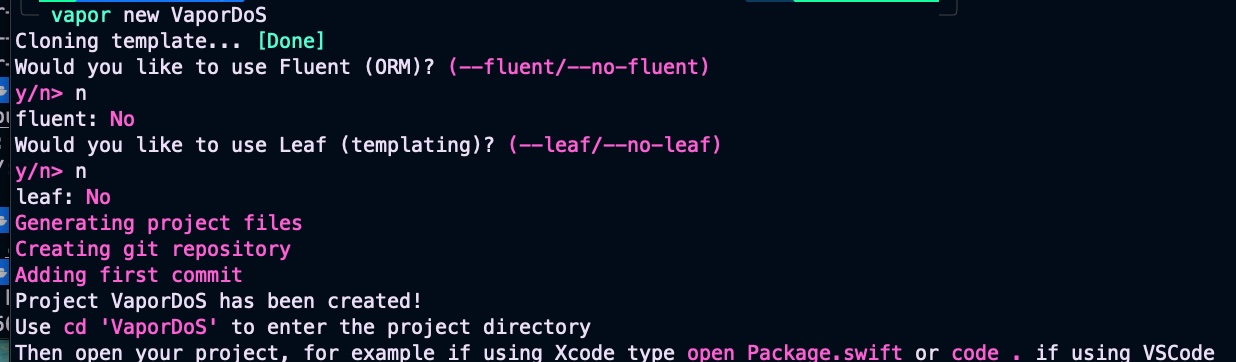
    vapor new VaporDoS

    You will be asked about Fluent and Leaf, but we will not be working with databases (Fluent) or HTML templates (Leaf).

    Screenshot

    Navigate to the newly created folder. In this example, we’ll use Visual Studio Code as our source editor. Let’s begin by defining the dependencies and targets for our Vapor project:

    // swift-tools-version:5.9
    import PackageDescription
    
    let package = Package(
        name: "VaporDockerExample",
        platforms: [
            .macOS(.v13)
        ],
        dependencies: [
            .package(url: "https://github.com/vapor/vapor.git", from: "4.92.0")
        ],
        targets: [
            .target(
                name: "App",
                dependencies: [
                    .product(name: "Vapor", package: "vapor")
                ],
                path: "Sources/App"
            ),
            .executableTarget(
                name: "Run",
                dependencies: [
                    .target(name: "App")
                ],
                path: "Sources/Run"
            )
        ]
    )

    This Swift Package Manager manifest defines a Vapor-based server project called VaporDockerExample, specifying that it runs on macOS 13 or later and depends on the Vapor framework (version 4.92.0 or newer). It organizes the project into two targets: an App target that contains the application logic and imports the Vapor product, and a Run executable target that depends on the App target and serves as the entry point for launching the server. The file essentially tells SwiftPM how to build, structure, and run the Vapor application.

    Later on, we’ll continue by defining the configuration in configuration.swift:

    import Vapor
    
    public func configure(_ app: Application) throws {
        // Hostname: en Docker debe ser 0.0.0.0
        if let host = Environment.get("HOSTNAME") {
            app.http.server.configuration.hostname = host
        } else {
            app.http.server.configuration.hostname = "0.0.0.0"
        }
    
        // Puerto desde variable de entorno (útil para Docker / cloud)
        if let portEnv = Environment.get("PORT"), let port = Int(portEnv) {
            app.http.server.configuration.port = port
        } else {
            app.http.server.configuration.port = 8080
        }
    
        // Rutas
        try routes(app)
    }

    It configures a Vapor application by setting up its HTTP server hostname and port based on environment variables, which is particularly useful when running inside Docker or cloud environments. It first checks for a HOSTNAME variable to determine the server’s bind address, defaulting to 0.0.0.0 so the service is accessible from outside the container. It then reads the PORT environment variable to set the listening port, falling back to port 8080 if none is provided. Finally, it registers the application’s routes by calling routes(app), completing the server’s basic setup.

    Next, let’s define a new route for our hello endpoint:

    import Vapor
    
    func routes(_ app: Application) throws {
        app.get("hello") { req -> String in
            return "Hola desde Vapor dentro de Docker 👋"
        }
    
        app.get { req -> String in
            "Service OK"
        }
    }

    This code defines two HTTP routes for a Vapor application. The first route, accessible at /hello, responds to GET requests with the text “Hola desde Vapor dentro de Docker 👋”. The second route is the root endpoint /, which also responds to GET requests and returns “Service OK”. Together, these routes provide simple test endpoints to verify that the Vapor service is running correctly, especially when deployed inside Docker.

     
    import App
    import Vapor
    
    @main
    struct Run {
        static func main() throws {
            var env = try Environment.detect()
            try LoggingSystem.bootstrap(from: &env)
            let app = Application(env)
            defer { app.shutdown() }
            try configure(app)
            try app.run()
        }
    }

    This code defines the main entry point for a Vapor application, handling its full lifecycle from startup to shutdown. It begins by detecting the current runtime environment (such as development or production), initializes the logging system accordingly, and then creates an Application instance based on that environment. After ensuring the application will shut down cleanly when execution finishes, it calls configure(app) to set up server settings and routes, and finally starts the server with app.run(), making the Vapor service ready to accept incoming requests.

    Once we’ve finished implementing our Vapor code, the next step is to define a Dockerfile that will build and package our application into a lightweight image ready to run in any containerized environment.

    # Phase 1: build
    FROM swift:5.10-jammy AS build
    
    WORKDIR /app
    
    # Copy Package.swift and Source folder
    COPY Package.swift ./
    COPY Sources ./Sources
    
    # (Optional) resolve dependencies before, for cache
    RUN swift package resolve
    
    # Compile in release mode
    RUN swift build -c release --static-swift-stdlib
    
    # Phase 2: runtime
    FROM ubuntu:22.04 AS run
    
    # Minimal runtime dependencies for binary in Swift
    RUN apt-get update && \
        apt-get install -y \
        libbsd0 \
        libcurl4 \
        libxml2 \
        libz3-4 \
        && rm -rf /var/lib/apt/lists/*
    
    WORKDIR /run
    
    COPY --from=build /app/.build/release/Run ./
    
    EXPOSE 8080
    
    # In order vapor listens inside Docker
    ENV PORT=8080
    ENV HOSTNAME=0.0.0.0
    
    CMD ["./Run"]
    

    This Dockerfile builds and packages a Vapor application into a lightweight, production-ready container using a two-phase approach. The first phase uses the official Swift 5.10 image to compile the app in release mode with static Swift libraries, producing a small and efficient binary. It copies the project’s manifest and source code, resolves dependencies, and builds the executable. The second phase creates a minimal Ubuntu 22.04 runtime image, installs only the system libraries required by the Swift binary, and copies in the compiled Run executable from the build stage. It exposes port 8080, sets the necessary environment variables to ensure Vapor listens correctly inside Docker, and finally launches the server.

    This setup isn’t strictly necessary yet, but it prepares the project for a smooth integration of Redis in the next section.

    version: "3.8"
    
    services:
      vapor-app:
        build: .
        container_name: vapor-docker-example
        ports:
          - "8080:8080"
        environment:
          # Must match with what is being used in configure.swift
          PORT: "8080"
          HOSTNAME: "0.0.0.0"
        restart: unless-stopped

    This docker-compose.yml file defines a single service called vapor-app, which builds a Docker image from the current directory and runs the Vapor application inside a container named vapor-docker-example. It maps port 8080 on the host to port 8080 in the container so the Vapor server is accessible externally, and it sets the environment variables PORT and HOSTNAME to ensure the app listens correctly, matching the logic in configure.swift. The service is configured to automatically restart unless it’s explicitly stopped, making it more resilient in development or production environments.

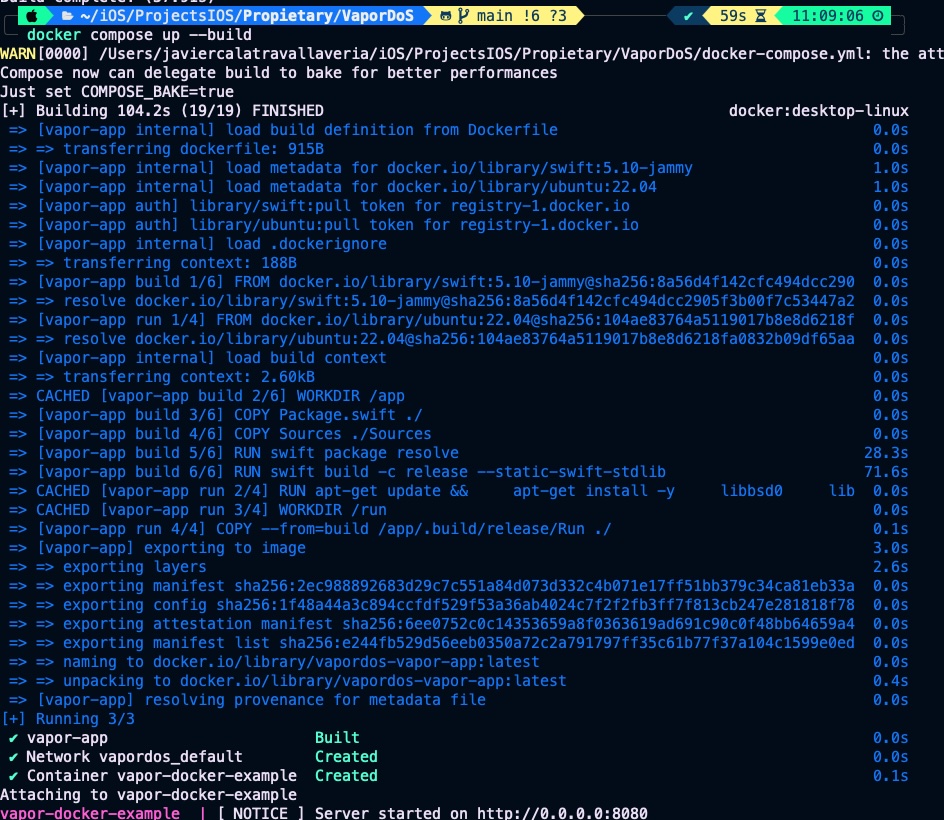
    Build docker image and launch container by typing;

    docker composeup --build
    Screenshot

    Vapor server is ready, now lets call the endpoint for chacking that all is in place:

    Screenshot

    Configure Redis for avoiding DoS attacks

    A Denial-of-Service (DoS) attack occurs when a service is overwhelmed with excessive or malicious requests, exhausting its resources and preventing legitimate users from accessing it. Redis helps mitigate these attacks by serving as a fast, in-memory store that enables efficient rate limiting and request tracking; Vapor can use Redis to count requests per user or IP and reject or throttle those that exceed safe limits. By blocking abusive traffic early and cheaply, Redis prevents the application from being overloaded, keeping the service stable and responsive even under high or hostile load.

    First step is adding Redis library in Package.swift:

    // swift-tools-version:5.9
    import PackageDescription
    
    let package = Package(
       ...
        dependencies: [
           ...
            .package(url: "https://github.com/vapor/redis.git", from: "4.0.0")
        ],
        targets: [
            .target(
                name: "App",
                dependencies: [
                   ...
                    .product(name: "Redis", package: "redis")
                ],
                ...
        ]
    )
    

    Next step is configure Redis in configure.swift:

    import Vapor
    import Redis
    
    public func configure(_ app: Application) throws {
        ...
        // Config Redis
        let redisHostname = Environment.get("REDIS_HOST") ?? "redis"
        let redisPort = Environment.get("REDIS_PORT").flatMap(Int.init) ?? 6379
    
        app.redis.configuration = try .init(
            hostname: redisHostname,
            port: redisPort
        )
    
        // Middleware de rate limit
        app.middleware.use(RateLimitMiddleware())
    
        // Rutas
        try routes(app)
    }
    

    This code configures a Vapor application to connect to a Redis instance by reading its host and port from environment variables, which is useful when running in Docker or cloud environments. It retrieves REDIS_HOST and REDIS_PORT, falling back to "redis" and port 6379 if they aren’t provided, ensuring sensible defaults when using a Redis container. It then applies these values to app.redis.configuration, enabling the application to communicate with Redis for features such as caching, rate limiting, or request tracking.

    For easy testing, we’ll define a simple DoS protection rule stating that the /hello endpoint cannot be called more than twice every 30 seconds. This rule is implemented in RateLimitMiddleware.swift.

    import Vapor
    import Redis
    
    struct RateLimitMiddleware: AsyncMiddleware {
    
        // Maximum 2 request every 30 secs
        private let maxRequests = 2
        private let windowSeconds = 30
    
        func respond(
            to request: Request,
            chainingTo next: AsyncResponder
        ) async throws -> Response {
    
            // Only apply to /hello service
            guard request.url.path == "/hello" else {
                return try await next.respond(to: request)
            }
    
            let ip = request.remoteAddress?.ipAddress ?? "unknown"
            let key = "rate:\(ip)"
    
            // INCR key
            let incrResponse = try await request.redis.send(
                command: "INCR",
                with: [RESPValue(from: key)]
            )
    
            let newCount = incrResponse.int ?? 0
    
            // When is first time, we set window expiration
            if newCount == 1 {
                _ = try await request.redis.send(
                    command: "EXPIRE",
                    with: [
                        RESPValue(from: key),
                        RESPValue(from: windowSeconds)
                    ]
                )
            }
    
            // Limit overpassed
            if newCount > maxRequests {
                throw Abort(
                    .tooManyRequests,
                    reason: "You exeded the limit of 2 request every 30 secs on /hello endpoint."
                )
            }
    
            return try await next.respond(to: request)
        }
    }
    

    It defines an asynchronous rate-limiting middleware for Vapor that restricts access to the /hello endpoint by tracking requests in Redis. It identifies the client by IP address, increments a Redis counter (INCR) associated with that IP, and, on the first request within the time window, sets an expiration (EXPIRE) so the counter resets after 30 seconds. If the number of requests exceeds 2 within 30 seconds, the middleware throws a 429 Too Many Requests error with a descriptive message; otherwise, it allows the request to continue through the normal processing chain. This mechanism helps prevent abuse or DoS-like behavior on that specific route.

    Last but not least, we need to update our Docker configuration. The first step is to add the Redis environment variables to the Dockerfile.

    ...
    # In order vapor listens inside Docker
    ENV PORT=8080
    ENV HOSTNAME=0.0.0.0
    ENV REDIS_HOST=redis
    ENV REDIS_PORT=6379
    
    CMD ["./Run"]
    

    And finally update docker-compose.yml for adding Redis service and connect vapor-app with Redis.

    version: "3.8"
    
    services:
      vapor-app:
        build: .
        ports:
          - "8080:8080"
        environment:
          PORT: "8080"
          HOSTNAME: "0.0.0.0"
          REDIS_HOST: "redis"
          REDIS_PORT: "6379"
        depends_on:
          - redis
        restart: unless-stopped
    
      redis:
        image: redis:7-alpine
        container_name: redis-vapor
        ports:
          - "6379:6379"
        restart: unless-stopped

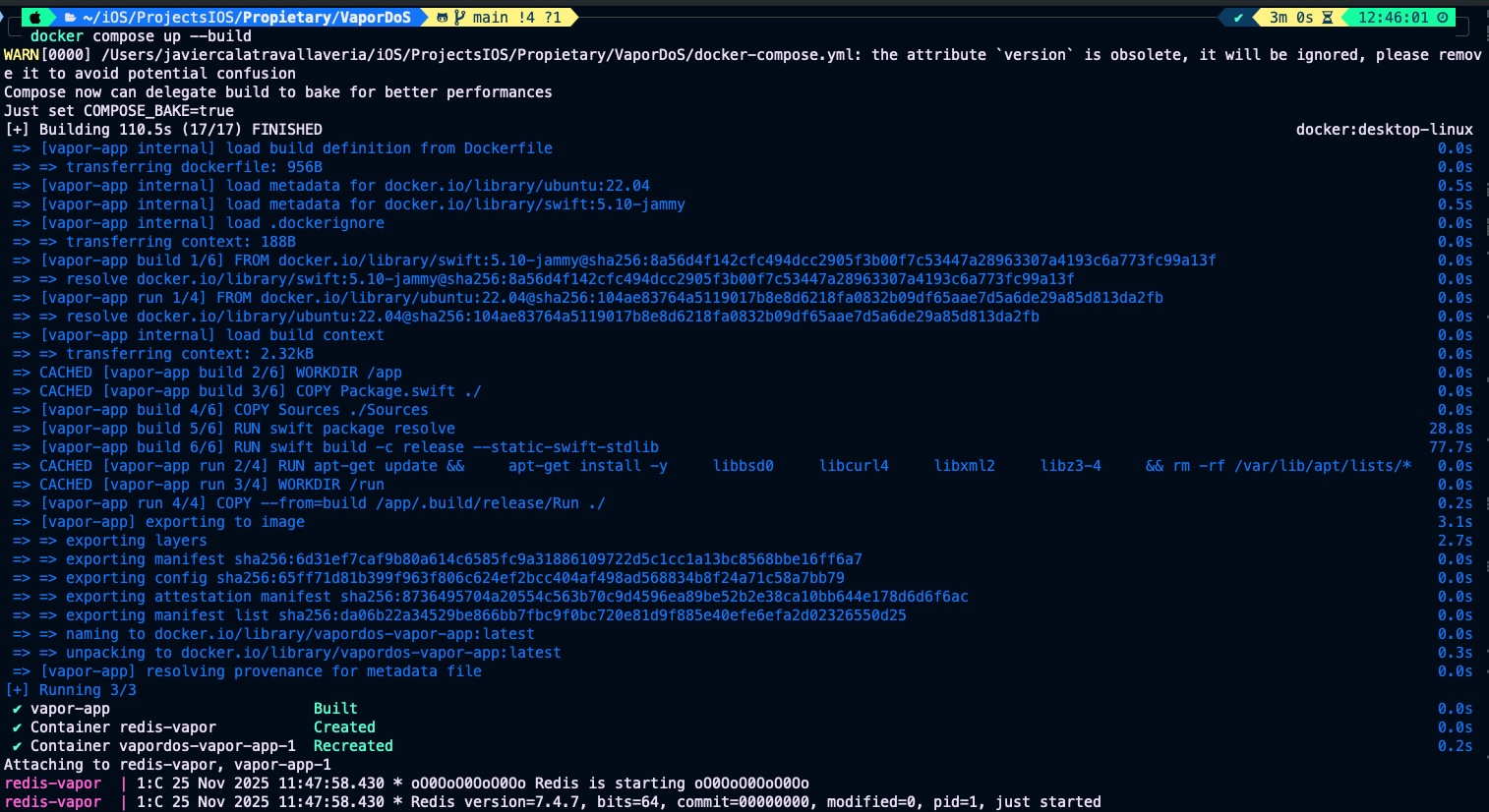
    Rebuild the image and launch the container:

    Screenshot

    Call /hello endpoint 3 times:

    Screenshot

    The rule that we have set is not very realistic, but is a clear example

    Conclusions

    Once you start implementing backend services, protecting your code against potential attacks becomes essential. The goal of this post was to show you how to build a simple defense mechanism against DoS attacks when working with Vapor, helping you keep your services stable, secure, and resilient under unexpected or malicious traffic.

    You can find source code used for writing this post in following repository

    References

  • Customizing Vapor Server Configurations

    Customizing Vapor Server Configurations

    Customizing environment variables and secrets for a Dockerized Vapor server bridges mobile app development with backend security and DevOps best practices. iOS developers working with Swift-based Vapor servers need to securely manage API keys, database credentials, and other sensitive configurations, especially in containerized environments. This post explores how to set up, inject, and manage these secrets effectively within Docker, helping developers build more secure and scalable backend solutions while enhancing their understanding of environment-based configuration management.

    In this post, we will configure a simple Vapor server and demonstrate how to set up custom environment variables and provide secrets to the app.

    Hello Vapor Server

    The first step is to create a Vapor project by entering the following command:

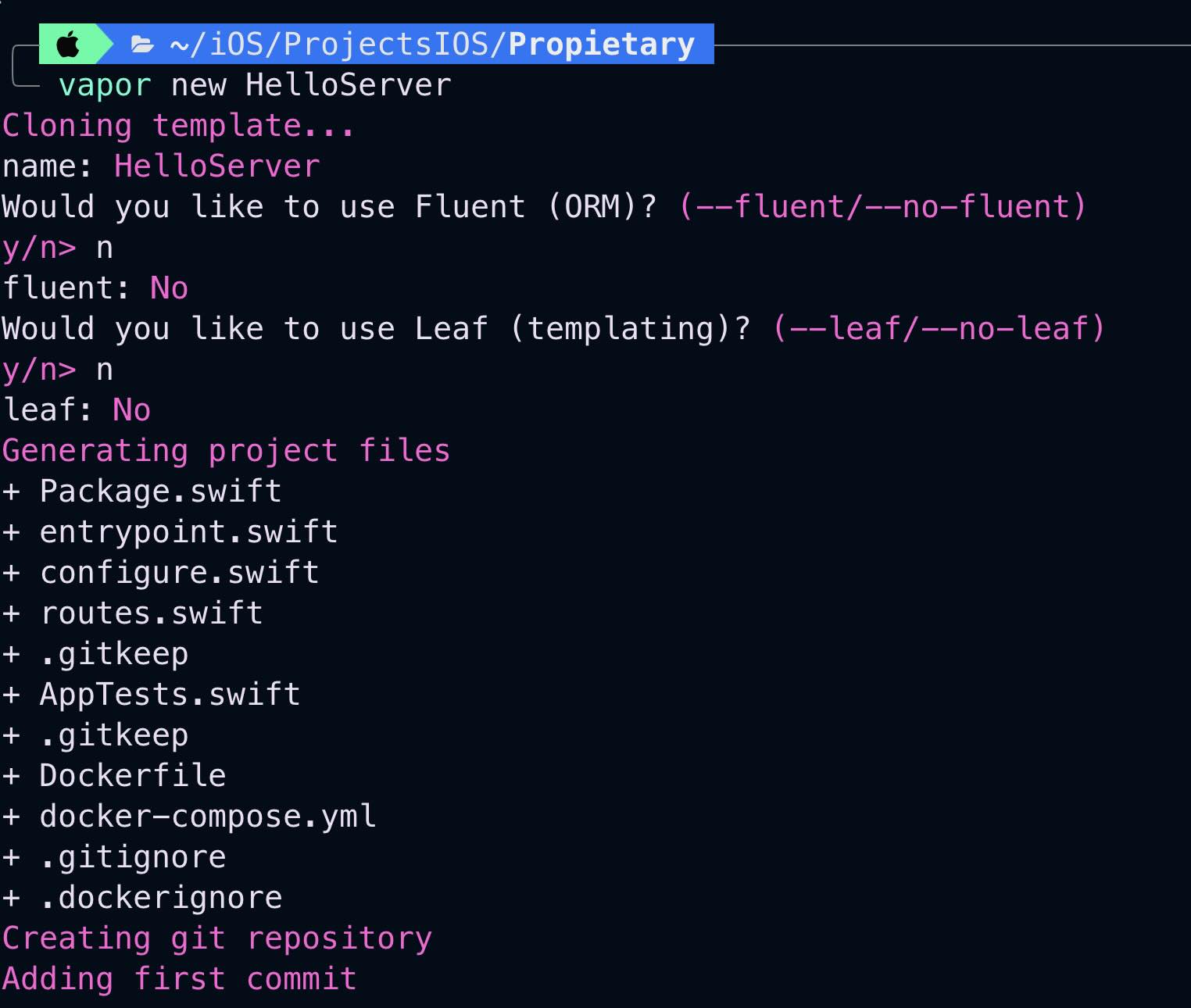
    vapor new HelloServer

    You will be asked about Fluent and Leaf, but we will not be working with databases (Fluent) or HTML templates (Leaf).

    Screenshot

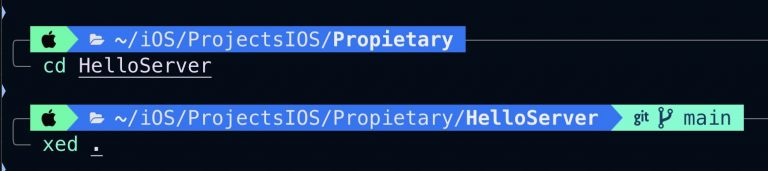
    Navigate to the created folder. In our case, we will use Xcode as the source code editor.

    Open routes.swift file:

    import Vapor
    
    func routes(_ app: Application) throws {
        app.get("hello") { req -> String in
            let name = Environment.get("CUSTOM_VARIABLE") ?? "World"
            return "Hello, \(name)!"
        }
    }

    The given Swift code defines a simple web route using the Vapor framework. It sets up a GET endpoint at «/hello», which returns a greeting message. The message includes a name retrieved from an environment variable called "CUSTOM_VARIABLE"; if this variable is not set, it defaults to "World". So, when a user accesses GET /hello, the server responds with "Hello, [name]!", where [name] is either the value of "CUSTOM_VARIABLE" or "World" if the variable is absent

    Custom Configuration variables

    During project creation one of the files generated was a Dockerfile, this file without any update will be used for building a Docker image:

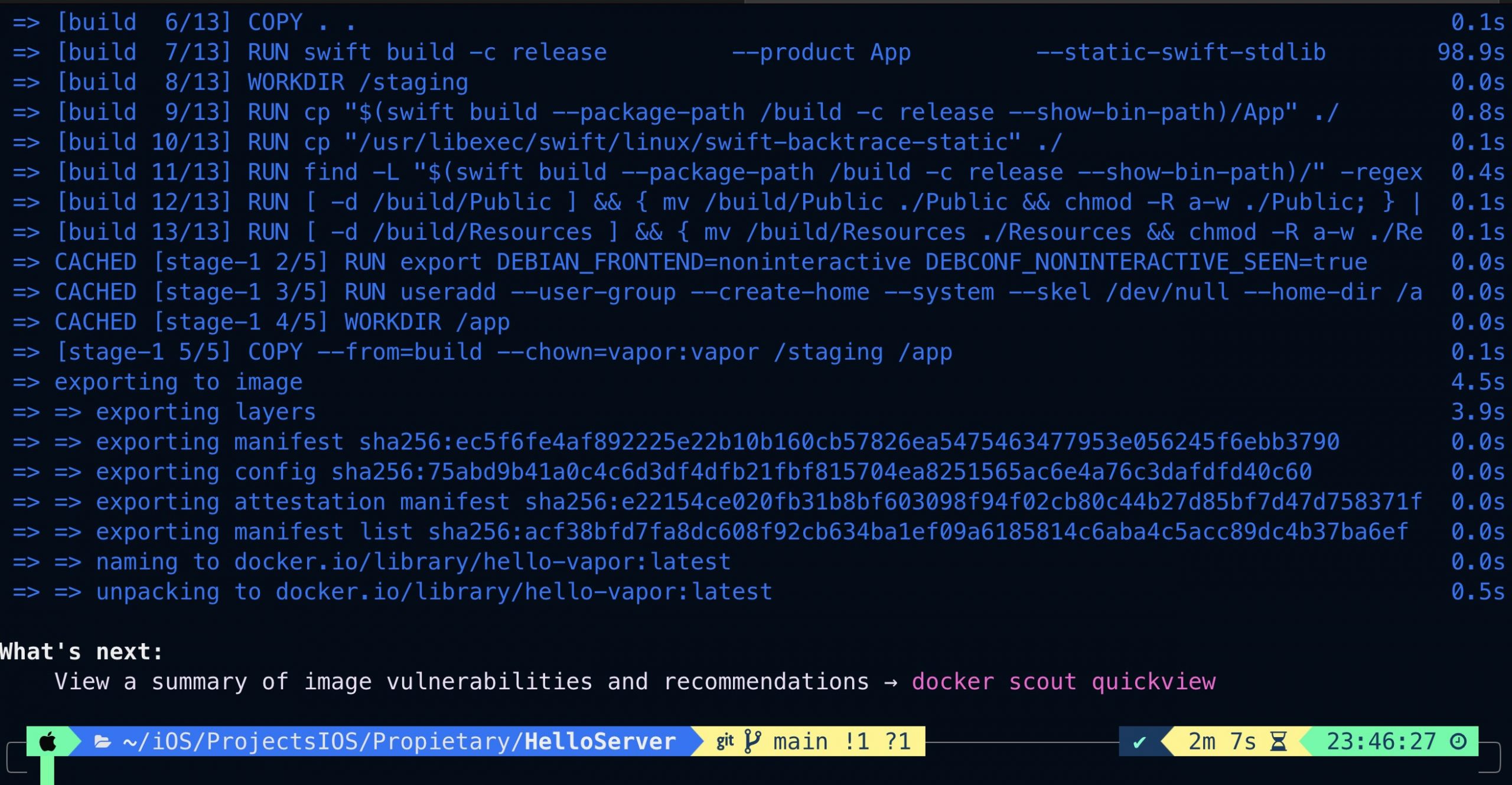
    docker build -t hello-vapor .

    Finally we will run the container:

    docker run -e CUSTOM_VARIABLE="Custom variable Value" -p 8080:8080 hello-vapor

    The command docker run -e CUSTOM_VARIABLE="Custom variable Value" -p 8080:8080 hello-vapor runs a Docker container from the hello-vapor image. It sets an environment variable CUSTOM_VARIABLE with the value "Custom variable Value" inside the container using the -e flag. The -p 8080:8080 flag maps port 8080 of the container to port 8080 on the host machine, allowing external access to any service running on that port inside the container.

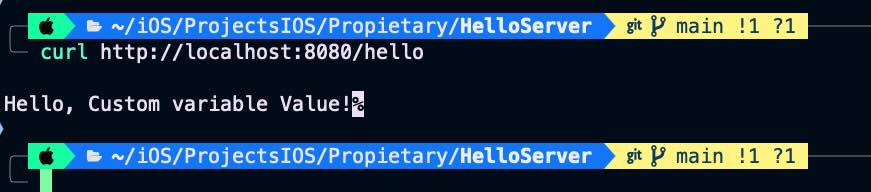
    The Vapor server is up and waiting for ‘hello’ GET requests. Open an new terminal session window and type following command.

    curl http://localhost:8080/hello

    When we get back to server terminal window:

    The endpoint implementation accesses the CUSTOM_VARIABLE environment variable and prints its contents.

    Secrets

    When we talk about transferring sensitive information such as keys, passwords, and API tokens, there is no perfect solution, as even the most secure methods come with potential vulnerabilities. Here’s an overview of common approaches and their security concerns:

    1. Storing secrets in a .env file: This approach keeps secrets separate from the code but still requires careful management of the .env file to prevent unauthorized access.

    2. Using Docker Secrets with Docker Compose: Docker Secrets allow you to store sensitive data in encrypted files, which can be mounted into containers. However, careful access control is necessary to prevent unauthorized retrieval.

    3. Implementing a sidecar container for secret management: A separate container can handle secret retrieval and securely pass them to the main application container. Access control rules can be applied to limit access to a specific set of users.

    4. Employing external secret management tools: Solutions like HashiCorp Vault or cloud-based key management services provide robust secret handling and enhanced security features, but they may introduce complexity in management.

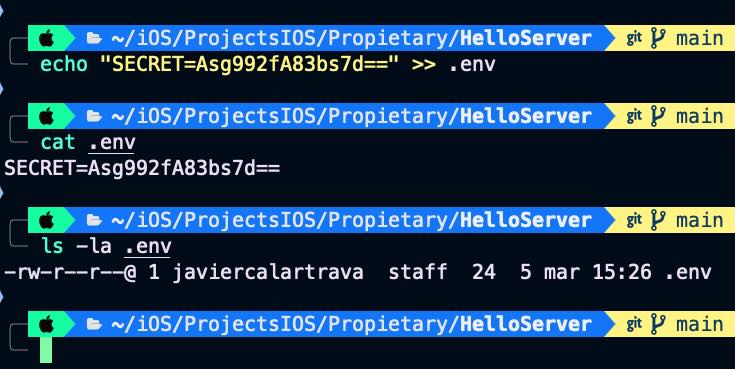
    In this guide, we will store the secrets in a .env file. The first step is to create a text file containing the key-value pairs, naming it .env.

    echo "SECRET=Asg992fA83bs7d==" >> .env

    Keep the file in a safe place but never in a repository.

    Update endpoint code for also fetching SECRET:

    import Vapor
    
    func routes(_ app: Application) throws {
        app.get("hello") { req -> String in
            let name = Environment.get("CUSTOM_VARIABLE") ?? "World"
            let secret = Environment.get("SECRET") ?? "---"
            return "Hello, \(name)! secret is \(secret)"
        }
    }
    

    Build a the new docker image:

    docker build -t hello-vapor .

    For executing container, as input parameter we provide the .env file that conains the secret:

    docker run --env-file .env -p 8080:8080 hello-vapor

    Server iss ready again:

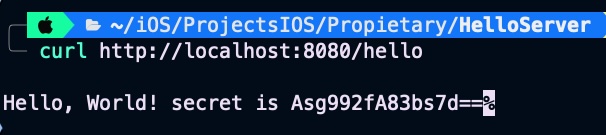
    Calling endpoint again:


    curl http://localhost:8080/hello

    Secreta is now fetched by the endpoint.

    Conclusions

    For entering environment variables there is an standarized way of doing but we can not say the same when it comes to talk about secrets. Depending on the degree of security that we want to achieve we will have to apply one method or other.

    You can find source code used for writing this post in following repository

    References

  • Protect sensitive information in SwiftUI

    Protect sensitive information in SwiftUI

    The goal of this post is to present some techniques for obfuscating or preventing easy access to highly sensitive information, such as account or credit card numbers.

    Allow copy

    The first thing to clarify is which pieces of information can be copied and which cannot. This behavior is controlled by the .textSelection() modifier.

    struct SensitiveCard: View {
        let title: String
        let primary: String
        let secondary: String
        let icon: String
        let isSelectable: Bool
    
        var body: some View {
            VStack(alignment: .leading, spacing: 12) {
                HStack(spacing: 12) {
                    Image(systemName: icon)
                        .font(.title2)
                        .padding(10)
                        .background(.ultraThinMaterial, in: RoundedRectangle(cornerRadius: 14))
                    Text(title)
                        .font(.title3.weight(.semibold))
                    Spacer()
                }
                Text(primary)
                    .font(.system(.title2, design: .monospaced).weight(.semibold))
                    .conditionalTextSelection(isSelectable)
                Text(secondary)
                    .font(.subheadline)
                    .foregroundStyle(.secondary)
            }
            .padding(18)
            .background(
                RoundedRectangle(cornerRadius: 22, style: .continuous)
                    .fill(.regularMaterial)
                    .shadow(radius: 12, y: 6)
            )
        }
    }
    
    
    struct ConditionalTextSelection: ViewModifier {
        let enable: Bool
        
        func body(content: Content) -> some View {
            if enable {
                content.textSelection(.enabled)
            } else {
                content
            }
        }
    }
    
    extension View {
        func conditionalTextSelection(_ enable: Bool) -> some View {
            self.modifier(ConditionalTextSelection(enable: enable))
        }
    }

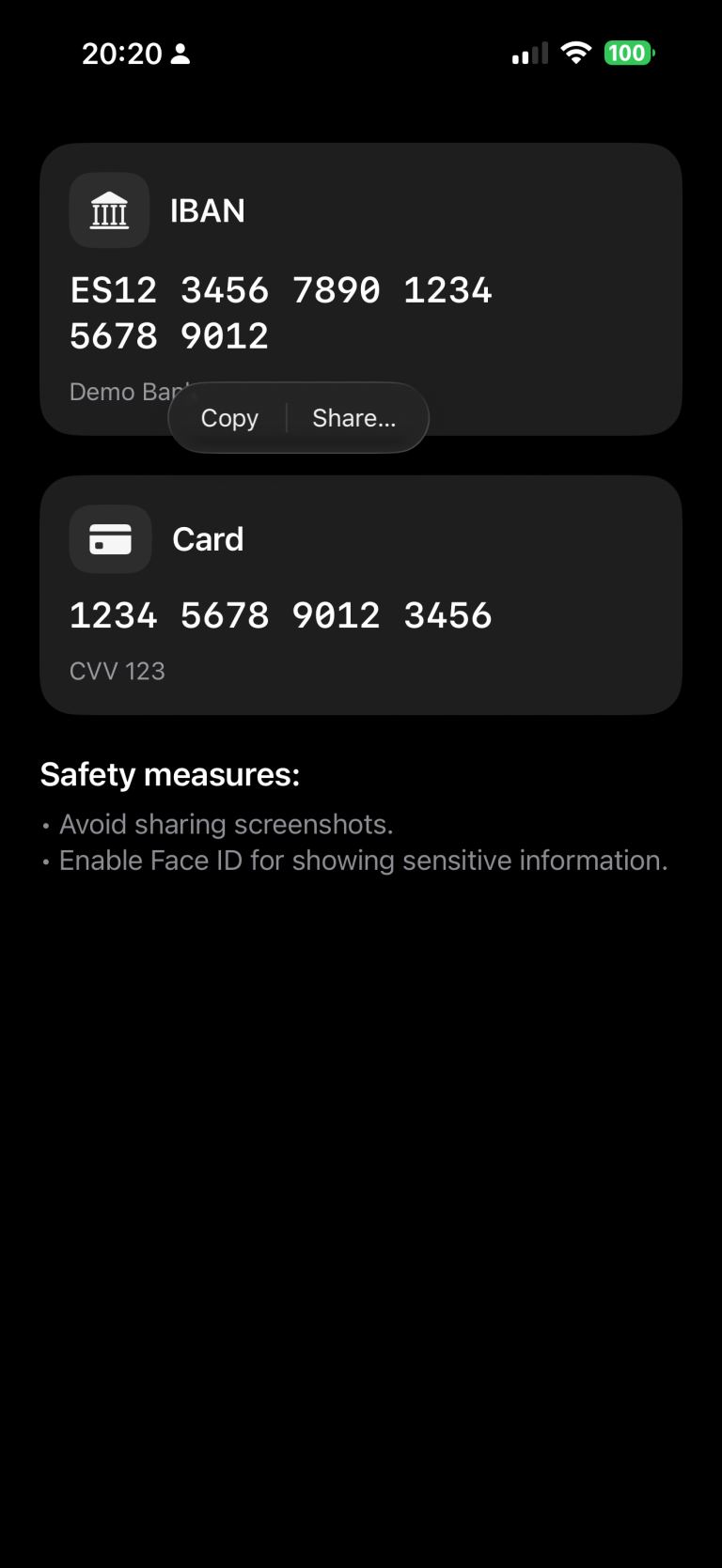
    In this example, we’ve chosen to make the IBAN copyable, while the card number remains restricted.

    struct ContentView: View {
        @State private var cardNumber = "1234 5678 9012 3456"
        @State private var cvv = "123"
        @State private var iban = "ES12 3456 7890 1234 5678 9012"
        @State private var textSelectability: TextSelectability = .disabled
    
        var body: some View {
            ScrollView {
                VStack(alignment: .leading, spacing: 24) {
                    
                    SensitiveCard(title: "IBAN",
                                  primary: iban,
                                  secondary: "Demo Bank",
                                  icon: "building.columns.fill",
                                  isSelectable: true)
                    
                    SensitiveCard(title: "Card",
                                  primary: cardNumber,
                                  secondary: "CVV \(cvv)",
                                  icon: "creditcard.fill",
                                  isSelectable: false)
    
                    VStack(alignment: .leading, spacing: 8) {
                        Text("Safety measures:")
                            .font(.title3.bold())
                        Text("• Avoid sharing screenshots.\n• Enable Face ID for showing sensitive information.")
                            .foregroundStyle(.secondary)
                    }
                }
                .padding(24)
            }
        }
    }

    Run the app and long-press the IBAN code. A contextual pop-up will appear — select “Copy.” Then switch to the Notes app and paste it. You’ll notice that the same operation cannot be performed with the card information.

    Privacy button

    A measure that can help build user trust is to provide a button that hides sensitive information:

    import SwiftUI
    
    struct ContentView: View {
        .....
        var body: some View {
            ScrollView {
                VStack(alignment: .leading, spacing: 24) {
                    ....
                    Button {
                        // Ejemplo: regenerar/limpiar datos
                        cardNumber = "•••• •••• •••• ••••"
                        cvv = "•••"
                        iban = "ES•• •••• •••• •••• •••• ••••"
                    } label: {
                        Label("Mask manually", systemImage: "eye.trianglebadge.exclamationmark.fill")
                    }
                    .buttonStyle(.borderedProminent)
                    .controlSize(.large)
                }
                .padding(24)
            }
        }
    }

    When changes are deployed:

    review

    Detect app activity

    An alternative to using a button, or a complementary feature, is detecting changes in the app’s activity — for example, when the app is moved to the background:

    import SwiftUI
    import UIKit
    
    struct ContentView: View {
        @Environment(\.scenePhase) private var scenePhase
        @State private var privacyMask = false
    ...
    
        var body: some View {
            ProtectedView {
                SensitiveView(hidden: $showScreenshotAlert)
            }
            .blur(radius: privacyMask ? 28 : 0)
            .overlay {
                if privacyMask {
                    ZStack {
                        Color.black.opacity(0.6).ignoresSafeArea()
                        VStack(spacing: 12) {
                            Image(systemName: "eye.slash.fill")
                                .font(.system(size: 36, weight: .semibold))
                            Text("Content hidden whilst app is not active")
                                .multilineTextAlignment(.center)
                                .font(.headline)
                        }
                        .foregroundColor(.white)
                        .padding()
                    }
                    .accessibilityHidden(true)
                }
            }
            .onChange(of: scenePhase) { phase in
                privacyMask = (phase != .active)
            }
            ...
    }

    Deploy and move app to background:

    review2

    Detect screenshot action

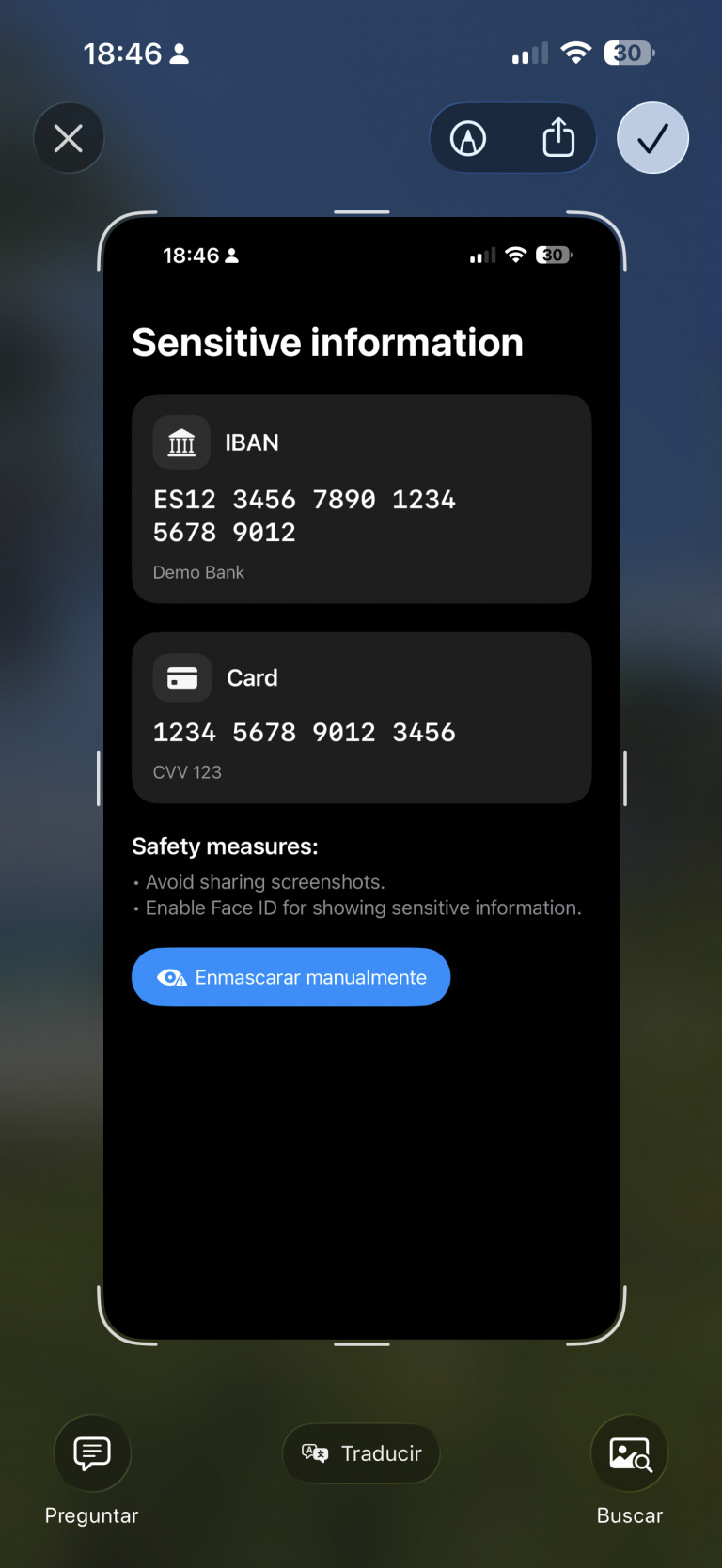
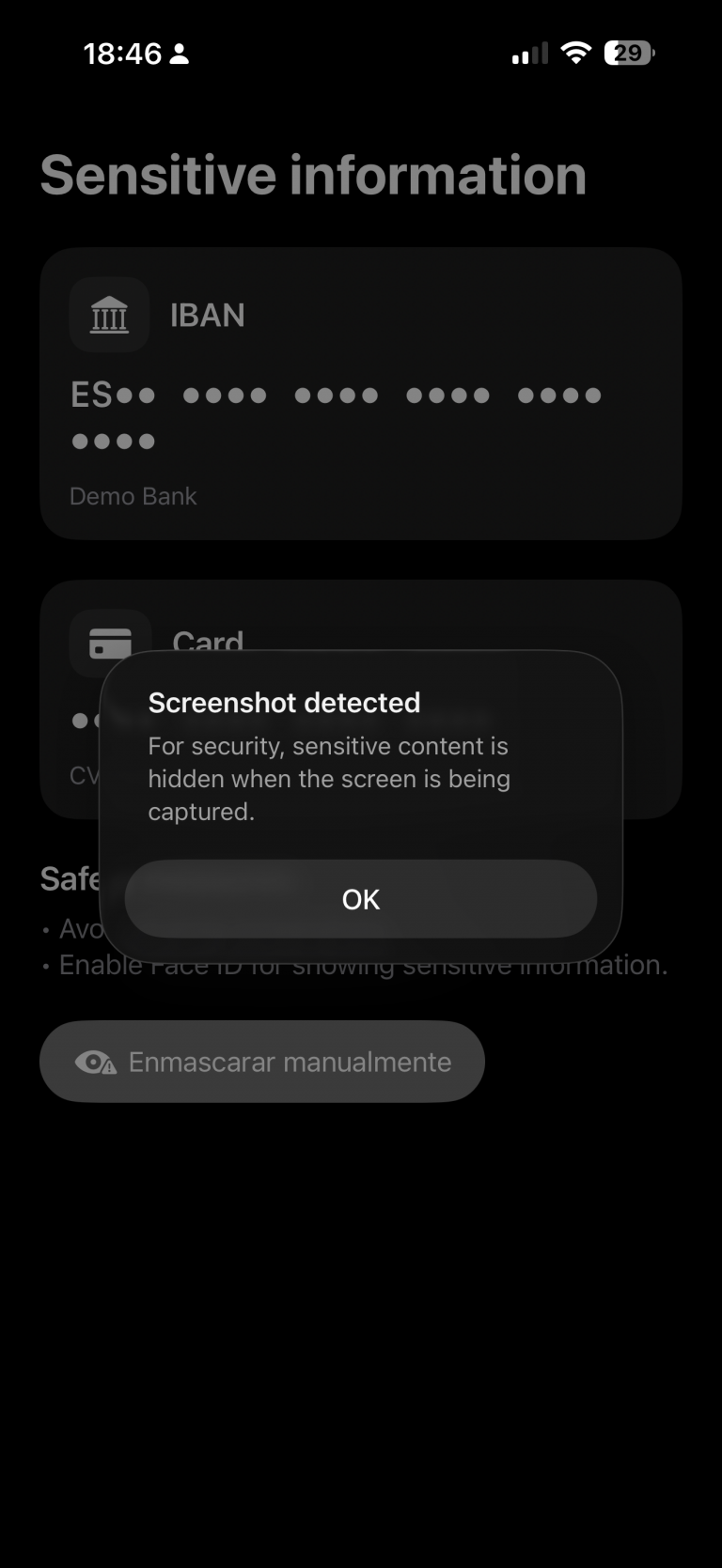
    An important point I discovered during this investigation is that, although the app can detect when a screenshot is taken — which sounds good — the screenshot is still captured anyway.

    My recommendation in that case would be to invalidate or regenerate the information if temporary keys are involved. Depending on the scenario, you could also notify the backend services that a screenshot has been taken.

    The code for detecting a screenshot is as follows:

    struct ContentView: View {
    ...
        @State private var showScreenshotAlert = false
    
        var body: some View {
            ProtectedView {
                SensitiveView(hidden: $showScreenshotAlert)
            }
           ...
            .onReceive(NotificationCenter.default.publisher(
                for: UIApplication.userDidTakeScreenshotNotification)) { _ in
                    showScreenshotAlert = true
                }
            .alert("Screenshot detected",
                   isPresented: $showScreenshotAlert) {
                Button("OK", role: .cancel) {}
            } message: {
                Text("For security, sensitive content is hidden when the screen is being captured.")
            }
        }
    }

    Ofuscate on Recording screen

    The final measure is to apply obfuscation when a screen recording is in progress:

    struct ProtectedView<Content: View>: View {
        @State private var isCaptured = UIScreen.main.isCaptured
        @ViewBuilder var content: () -> Content
    
        var body: some View {
            content()
                .blur(radius: isCaptured ? 25 : 0)
                .overlay {
                    if isCaptured {
                        ZStack {
                            Color.black.opacity(0.65).ignoresSafeArea()
                            VStack(spacing: 12) {
                                Image(systemName: "lock.fill")
                                    .font(.system(size: 32, weight: .bold))
                                Text(String(localized: "protected.overlay.title",
                                            defaultValue: "Content hidden while the screen is being captured"))
                                    .multilineTextAlignment(.center)
                                    .font(.headline)
                                    .padding(.horizontal)
                            }
                            .foregroundColor(.white)
                        }
                        .accessibilityHidden(true)
                    }
                }
                .onReceive(NotificationCenter.default.publisher(
                    for: UIScreen.capturedDidChangeNotification)) { _ in
                        isCaptured = UIScreen.main.isCaptured
                    }
        }
    }

    When a screen recording session is active and the user switches to our privacy app, the app detects the recording and can respond by displaying an overlay.

    recording

    Conclusions

    It’s not possible to achieve complete protection against data forgery or privacy breaches, but the more countermeasures you apply, the better your security becomes. That’s what I wanted to demonstrate in this post.

    You can find the source code for this example in the following GitHub repository.

    References

  • Rules to write Clean Code in Swift

    Rules to write Clean Code in Swift

    In this post we will focusfocus on showing how principles like KISS, DRY, and SOLID directly improve Swift code in everyday situations—such as structuring a ViewModel, reducing boilerplate in SwiftUI views, or designing protocols for networking.

    In this post we will revieew some roles principles by examples in Swift. This is could be considerered a continuation of a past post called ‘S.O.L.I.D. principles in Swift’

    Clean Code

    Clean code is code that is simple to read, easy to understand, and straightforward to maintain. It avoids unnecessary complexity by following principles like clarity, consistency, and separation of concerns, ensuring that each part of the code has a clear purpose. Clean code favors meaningful names, small and focused functions, and eliminates duplication, making it easier for other developers (and your future self) to work with. The goal is not just to make the computer run the program, but to make the code itself communicate its intent clearly to humans.

    Clean Code is the overarching goal of writing software that is easy to read, understand, and maintain, while the SOLID principles are a concrete set of guidelines that help achieve this goal by structuring classes and dependencies in a clear, flexible way. In essence, Clean Code defines what good code should feel like, and SOLID offers how to design object-oriented code that stays true to that vision, ensuring maintainability, scalability, and clarity.

    SOC – Separation Of Concepts

    Separation of Concerns (SoC) is a clean code principle that says each part of your code should focus on a single, well-defined responsibility. By splitting concerns, you reduce complexity, improve readability, and make code easier to maintain and test. In iOS/Swift, this often means separating data models, networking logic, business logic (ViewModel), and UI (View) instead of mixing them in one place.

    import SwiftUI
    import Foundation
    
    // MARK: - Model (data only)
    struct Post: Decodable, Identifiable {
        let id: Int
        let title: String
    }
    
    // MARK: - Networking (concern: fetching data)
    final class PostService {
        func fetchPosts() async throws -> [Post] {
            let url = URL(string: "https://jsonplaceholder.typicode.com/posts")!
            let (data, _) = try await URLSession.shared.data(from: url)
            return try JSONDecoder().decode([Post].self, from: data)
        }
    }
    
    // MARK: - ViewModel (concern: state & business logic)
    @MainActor
    final class PostListViewModel: ObservableObject {
        @Published var posts: [Post] = []
        @Published var errorMessage: String?
    
        private let service = PostService()
    
        func loadPosts() async {
            do {
                posts = try await service.fetchPosts()
            } catch {
                errorMessage = "Failed to load posts"
            }
        }
    }
    
    // MARK: - View (concern: UI)
    struct PostListView: View {
        @StateObject private var vm = PostListViewModel()
    
        var body: some View {
            NavigationView {
                List(vm.posts) { post in
                    Text(post.title)
                }
                .navigationTitle("Posts")
                .task { await vm.loadPosts() }
            }
        }
    }
    

    Where’s the SoC?

    • Model (Post) → defines the data only.

    • Service (PostService) → knows how to fetch posts from the network.

    • ViewModel (PostListViewModel) → manages state and error handling.

    • View (PostListView) → displays UI and reacts to state changes.

    Each layer does one thing well, instead of mixing networking, logic, and UI together.

    DRY – Do not repeat yourself

    DRY (Don’t Repeat Yourself) is a clean code principle that says you should avoid duplicating logic across your codebase. Instead, extract common behavior into reusable functions, extensions, or abstractions. This reduces errors, makes updates easier, and improves maintainability.

    ❌ Without DRY (duplicated logic)

    struct User {
        let name: String
        let email: String
    }
    
    struct Product {
        let title: String
        let price: Double
    }
    
    func printUser(_ user: User) {
        print("----")
        print("Name: \(user.name)")
        print("Email: \(user.email)")
        print("----")
    }
    
    func printProduct(_ product: Product) {
        print("----")
        print("Title: \(product.title)")
        print("Price: \(product.price)")
        print("----")
    }
    

    The logic for printing the separators (----) and formatting output is repeated in both functions.

    ✅ With DRY (reusable abstraction)

    protocol Printable {
        var descriptionLines: [String] { get }
    }
    
    struct User: Printable {
        let name: String
        let email: String
        
        var descriptionLines: [String] {
            [
                "Name: \(name)",
                "Email: \(email)"
            ]
        }
    }
    
    struct Product: Printable {
        let title: String
        let price: Double
        
        var descriptionLines: [String] {
            [
                "Title: \(title)",
                "Price: \(price)"
            ]
        }
    }
    
    // Generic reusable function
    func printEntity(_ entity: Printable) {
        print("----")
        entity.descriptionLines.forEach { print($0) }
        print("----")
    }
    
    // Usage
    let user = User(name: "Alice", email: "alice@email.com")
    let product = Product(title: "iPhone", price: 999.99)
    
    printEntity(user)
    printEntity(product)
    

    Now, the separator and printing logic exist in one place (printEntity). If we want to change the format, we update it once, not in every function.

    KISS-Keep it simple stupid

    KISS (Keep It Simple, Stupid) is a clean code principle that emphasizes writing code in the simplest way possible, avoiding unnecessary complexity or over-engineering. The goal is clarity: solve the problem directly instead of anticipating extra cases you don’t need yet.

    ❌ Not KISS (too complex for a simple counter)

    import SwiftUI
    
    struct ComplexCounterView: View {
        @State private var count = 0
        
        var body: some View {
            VStack {
                Text("Count: \(count)")
                    .font(.largeTitle)
                
                HStack {
                    Button("Increment") { updateCount(by: 1) }
                    Button("Decrement") { updateCount(by: -1) }
                }
            }
        }
        
        // Over-abstracted logic for a simple task
        private func updateCount(by value: Int) {
            let newValue = count + value
            if newValue >= 0 {
                count = newValue
            } else {
                count = 0
            }
        }
    }
    

    Too much abstraction (updateCount) and rules for a trivial counter.


    ✅ KISS (straightforward and clear)

    import SwiftUI
    
    struct SimpleCounterView: View {
        @State private var count = 0
        
        var body: some View {
            VStack {
                Text("Count: \(count)")
                    .font(.largeTitle)
                
                HStack {
                    Button("−") { if count > 0 { count -= 1 } }
                    Button("+") { count += 1 }
                }
            }
        }
    }
    

    The code is direct, easy to read, and does only what’s needed.

    DYC-Document your code

    DYC (Document Your Code) is a clean code principle that emphasizes writing code that is self-explanatory whenever possible, but also adding clear, concise documentation when something isn’t obvious. In Swift, this is often done with /// doc comments, which Xcode uses to show inline documentation when hovering over symbols. The idea is to make the code not just work, but also easy to understand and use for other developers (or your future self).

    ✅ Example in Swift using DYC

    import Foundation
    
    /// Represents a user in the system.
    struct User {
        /// Unique identifier for the user.
        let id: Int
        
        /// The user's display name.
        let name: String
        
        /// The user's email address.
        let email: String
    }
    
    /// Protocol defining operations to fetch users.
    protocol UserRepository {
        /// Fetches all available users from a data source.
        /// - Returns: An array of `User` objects.
        /// - Throws: An error if fetching fails.
        func fetchUsers() async throws -> [User]
    }
    
    /// Remote implementation of `UserRepository` that calls an API.
    final class RemoteUserRepository: UserRepository {
        private let baseURL: URL
        
        /// Creates a new repository with the given API base URL.
        /// - Parameter baseURL: The base URL of the remote API.
        init(baseURL: URL) {
            self.baseURL = baseURL
        }
        
        /// Calls the `/users` endpoint and decodes the response into a list of `User`.
        /// - Throws: `URLError` if the network call fails or the response is invalid.
        /// - Returns: An array of users retrieved from the server.
        func fetchUsers() async throws -> [User] {
            let url = baseURL.appendingPathComponent("users")
            let (data, response) = try await URLSession.shared.data(from: url)
            
            guard (response as? HTTPURLResponse)?.statusCode == 200 else {
                throw URLError(.badServerResponse)
            }
            
            return try JSONDecoder().decode([User].self, from: data)
        }
    }
    

    Why this follows DYC

    • Each type and method has a short description of what it does.

    • Methods document parameters, return values, and possible errors.

    • Xcode can show these comments in Quick Help (Option + Click) for better developer experience.

    YAGNI-You’re not going to need it

    YAGNI (You Aren’t Gonna Need It) is a clean code principle that reminds developers not to add functionality until it’s actually needed. Writing “just in case” code leads to complexity, unused features, and harder maintenance. Instead, implement only what the current requirements demand, and extend later when there’s a real need.


    ❌ Violating YAGNI (adding unnecessary features)

    import SwiftUI
    
    struct OverEngineeredCounterView: View {
        @State private var count = 0
        
        var body: some View {
            VStack {
                Text("Count: \(count)")
                    .font(.largeTitle)
                
                HStack {
                    Button("Increment") { updateCount(by: 1) }
                    Button("Decrement") { updateCount(by: -1) }
                    Button("Reset") { resetCount() }          // Not needed (yet)
                    Button("Multiply ×2") { multiplyCount() } // Not needed (yet)
                }
            }
        }
        
        private func updateCount(by value: Int) {
            count += value
        }
        
        private func resetCount() { count = 0 }
        private func multiplyCount() { count *= 2 }
    }
    

    Only increment and decrement are required, but reset and multiply were added “just in case.”


    ✅ Following YAGNI (keep it simple until needed)

    import SwiftUI
    
    struct SimpleCounterView: View {
        @State private var count = 0
        
        var body: some View {
            VStack {
                Text("Count: \(count)")
                    .font(.largeTitle)
                
                HStack {
                    Button("−") { count -= 1 }
                    Button("+") { count += 1 }
                }
            }
        }
    }
    

    The code contains only the features needed today. If requirements change, new functionality can be added later.

    LoD-Law of Demeter

    The Law of Demeter (LoD), also called the principle of least knowledge, says:
    A unit of code should only talk to its immediate collaborators (“friends”), not to the internals of those collaborators (“friends of friends”)’.

    In practice, this means avoiding long chains like order.customer.address.city, because it creates tight coupling and makes the code fragile if internal structures change. Instead, each object should expose only what is necessary.

    ❌ Violating the Law of Demeter

    struct Address {
        let city: String
    }
    
    struct Customer {
        let address: Address
    }
    
    struct Order {
        let customer: Customer
    }
    
    func printOrderCity(order: Order) {
        // ❌ Too many “hops” (order → customer → address → city)
        print(order.customer.address.city)
    }
    

    If the internal structure of Customer or Address changes, this function breaks.


    ✅ Following the Law of Demeter

    struct Address {
        let city: String
    }
    
    struct Customer {
        private let address: Address
        
        init(address: Address) {
            self.address = address
        }
        
        /// Expose only what’s needed
        func getCity() -> String {
            return address.city
        }
    }
    
    struct Order {
        private let customer: Customer
        
        init(customer: Customer) {
            self.customer = customer
        }
        
        /// Expose only what’s needed
        func getCustomerCity() -> String {
            return customer.getCity()
        }
    }
    
    func printOrderCity(order: Order) {
        // ✅ Only talks to Order, not Order’s internals
        print(order.getCustomerCity())
    }
    

    Now printOrderCity only knows about Order. The details of Customer and Address are hidden, so changes in those types won’t ripple outward.

    Lesson:

    • ❌ Don’t chain through multiple objects (a.b.c.d).

    • ✅ Provide methods that expose the needed behavior directly.

    Conclusions

    We have demonstrated how the Clean principles align with Swift, so there is no excuse for not applying them. 

  • Xcode 16: Alternate App Icons in iOS

    Xcode 16: Alternate App Icons in iOS

    Changing an iOS app icon can create both user and business value by offering personalization, seasonal or event-based marketing opportunities, and fresh ways to engage users without requiring an App Store resubmission. It allows apps to feel dynamic and relevant—whether through holiday icons, unlockable rewards for loyal users, or collectible designs tied to achievements. This flexibility also supports monetization strategies (e.g., premium icons for subscribers), strengthens community connection (such as sports teams or fan apps), and enables practical use cases like localization or representing different brands. In short, dynamic icons turn the app’s presence on the home screen into a living extension of the product experience. In this post, we’ll build a sample iOS app that demonstrates how to implement app icon switching.

    Project Setup

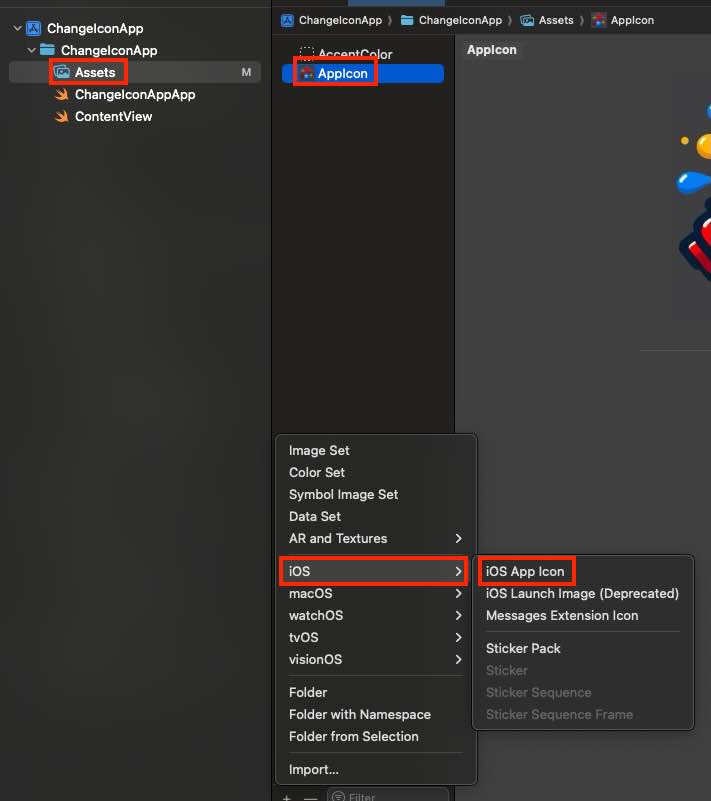
    First step is create a new App Icon:

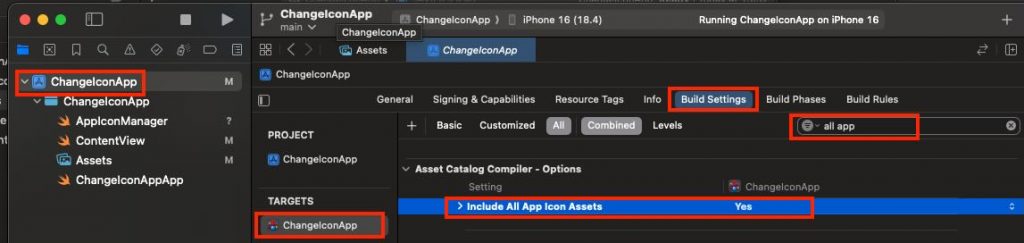
    After adding a second app icon asset, select your app target, open Build Settings, and set Include All App Icon Assets to Yes. Note: verify your Xcode version—I’m using Xcode 16, and earlier versions configure this slightly differently.

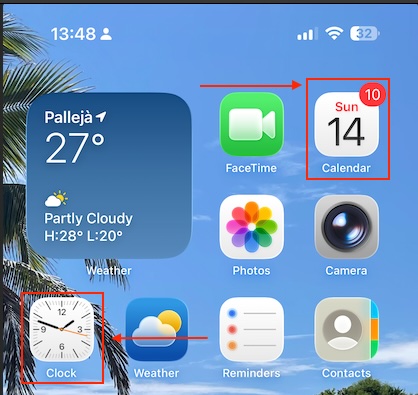
    At that point, you might be tempted to create an app with a live icon—like Calendar or Clock.


    Unfortunately, third-party apps can’t do this—dynamic icons are a system-only capability enabled by Apple’s private entitlements. For everyone else, the app icon is a static resource in the signed bundle and can only be swapped for another prepackaged icon via setAlternateIconName(_:).

    App Icon Manager

    The component that where all icon changeability will be centered is following:

    import UIKit
    
    enum AppIconName: String {
        case primary = ""          // Default icon
        case dark = "AppIconB"     // exact name for the alternative icon (no extension)
    }
    
    enum AppIconManager {
        static var supportsAlternateIcons: Bool {
            UIApplication.shared.supportsAlternateIcons
        }
    
        static var currentAlternateIconName: String? {
            UIApplication.shared.alternateIconName
        }
    
        static func setAppIcon(_ icon: AppIconName, completion: ((Error?) -> Void)? = nil) {
            guard supportsAlternateIcons else {
                completion?(NSError(domain: "AppIcon", code: -1, userInfo: [NSLocalizedDescriptionKey: "This device does not support alternative icons"]))
                return
            }
    
            let nameToSet: String? = (icon == .primary) ? nil : icon.rawValue
    
            if UIApplication.shared.alternateIconName == nameToSet {
                completion?(nil)
                return
            }
    
            UIApplication.shared.setAlternateIconName(nameToSet) { error in
                completion?(error)
            }
        }
    }
    

    The AppIconName enum represents the available icons (the default primary and an alternate one named AppIconB). The AppIconManager enum provides helper properties and a method: it checks if the device supports alternate icons, retrieves the currently active icon, and lets you switch to a new icon with setAppIcon. If the device doesn’t support icon changes or if the requested icon is already active, it gracefully exits, otherwise it uses UIApplication.shared.setAlternateIconName to apply the new icon and calls the completion handler with either an error or success.

    View

    This SwiftUI ContentView provides a simple UI that lets users toggle between the app’s default and alternative icons. It shows a large sun or moon symbol depending on the selected icon, and includes a switch labeled “Use alternative icon” that triggers AppIconManager to change the app icon when toggled. If the device doesn’t support alternate icons, the toggle is disabled and a warning message is displayed. The view also shows which icon is currently active, updates the user with a status message after each change (or error), and ensures the correct icon is applied when the view first appears.

    struct ContentView: View {
        @AppStorage("useAltIcon") private var useAltIcon: Bool = false
        @State private var statusMsg: String = ""
    
        var body: some View {
            VStack(spacing: 20) {
                Image(systemName: useAltIcon ? "moon.fill" : "sun.max.fill")
                    .font(.system(size: 56))
                    .symbolRenderingMode(.hierarchical)
    
                Toggle("Use alternative icon", isOn: $useAltIcon)
                    .onChange(of: useAltIcon) { _, newValue in
                        AppIconManager.setAppIcon(newValue ? .dark : .primary) { err in
                            if let err = err {
                                statusMsg = "It was not possible replacie icon: \(err.localizedDescription)"
                                // revertir el toggle si algo falla
                                useAltIcon.toggle()
                            } else {
                                statusMsg = newValue ? "Alternative icon activated." : "Default icon restored."
                            }
                        }
                    }
                    .disabled(!AppIconManager.supportsAlternateIcons)
                    .padding(.horizontal)
    
                if !AppIconManager.supportsAlternateIcons {
                    Text("This device does not support alternative icons.")
                        .font(.footnote)
                        .foregroundStyle(.secondary)
                }
    
                if let current = AppIconManager.currentAlternateIconName {
                    Text("Current icon: \(current)")
                        .font(.footnote)
                        .foregroundStyle(.secondary)
                } else {
                    Text("Curent icon: default")
                        .font(.footnote)
                        .foregroundStyle(.secondary)
                }
    
                if !statusMsg.isEmpty {
                    Text(statusMsg)
                        .font(.footnote)
                        .foregroundStyle(.secondary)
                        .multilineTextAlignment(.center)
                        .padding(.top, 4)
                }
    
                Spacer()
            }
            .padding()
            .onAppear {
                let shouldBeAlt = useAltIcon
                AppIconManager.setAppIcon(shouldBeAlt ? .dark : .primary) { _ in }
            }
        }
    }

    Deploy the code on a simulator to validate its behavior (or real device):

    review

    The app icon is being replaced by the app itself.

    Conclusions

    In this post, I’ve shared a quick and easy feature you can implement to make your app more engaging. You can find source code that we have used for conducting this post in following GitHub repository.

    References

  • iOS Dev between Combine and Delegate/Closure

    iOS Dev between Combine and Delegate/Closure

    When to use Combine versus the delegate and closure approaches is a great point to clarify because many developers struggle to choose the right tool for different scenarios, especially as Apple continues to expand its reactive frameworks while traditional patterns remain widely used. This post pretends to highlight the trade-offs—such as Combine’s power in managing complex, asynchronous data streams and chaining operators, versus the simplicity and low-overhead of closures for one-off callbacks or delegates for structured, reusable communication.

    The dilemma

    Combine, delegates, and closures all solve the same core problem: communicating results or events between components asynchronously.

    Here’s what they share in common:

    • Asynchronous communication → all three let one part of your app notify another when “something happened” without blocking.

    • Decoupling → the caller doesn’t need to know how the callee works, only what result or event it sends back.

    • Custom API design → you can choose the style (reactive stream, callback, or protocol) that best fits your use case, but under the hood they’re all just passing messages across boundaries.

    • Memory management concerns → all require care with retain cycles ([weak self] in closures, weak delegates, cancellables in Combine).

    • Interoperability → you can wrap one into another (e.g., turn a delegate or closure into a Publisher, or call a closure inside a delegate method).

    In short: they’re different abstractions over the same idea of event handling and result delivery, just with different levels of structure and power.

    The rule of thumb

    Use Combine when…

    • You’re dealing with streams of values over time (state updates, network retries, text search with debounce, multi-source merges).

    • You need operator chains (map/filter/flatMap/throttle/retry/catch) and cancellable pipelines you can pause or tear down with a single AnyCancellable.

    • You’re deep in SwiftUI (@Published, ObservableObject, view models) or want fan-out to multiple subscribers.

    • Testing with schedulers and time (virtual clocks) matters.

    Use delegates/closures when…

    • It’s a one-shot or simple callback (“user picked photo”, “request finished”, “button tapped”).

    • You want minimal overhead & maximal clarity in local APIs; fewer allocations and less indirection.

    • The interaction is structured and two-way (classic UIKit delegate lifecycles) or you’re writing a library that shouldn’t force a reactive dependency.

    Examples

    Example (type-ahead search with debouncing & cancellation):

    import Combine
    import UIKit
    
    final class SearchViewModel {
        @Published var query: String = ""
        @Published private(set) var results: [Repo] = []
    
        private var bag = Set<AnyCancellable>()
        private let api = GitHubAPI()
    
        init() {
            $query
                .debounce(for: .milliseconds(300), scheduler: RunLoop.main)
                .removeDuplicates()
                .map { $0.trimmingCharacters(in: .whitespacesAndNewlines) }
                .filter { !$0.isEmpty }
                .flatMap { q in
                    self.api.searchRepos(query: q)              // -> AnyPublisher<[Repo], Error>
                        .replaceError(with: [])                 // surface errors as empty for UX
                }
                .receive(on: RunLoop.main)
                .assign(to: &$results)
        }
    }
    
    struct Repo: Decodable { let name: String }
    
    final class GitHubAPI {
        func searchRepos(query: String) -> AnyPublisher<[Repo], Error> {
            let url = URL(string: "https://api.github.com/search/repositories?q=\(query)")!
            return URLSession.shared.dataTaskPublisher(for: url)
                .map(\.data)
                .decode(type: SearchResponse.self, decoder: JSONDecoder())
                .map(\.items)
                .eraseToAnyPublisher()
        }
    }
    
    struct SearchResponse: Decodable { let items: [Repo] }
    

    Example (delegate for a child picker reporting a single selection):

    protocol ColorPickerViewControllerDelegate: AnyObject {
        func colorPicker(_ picker: ColorPickerViewController, didSelect color: UIColor)
    }
    
    final class ColorPickerViewController: UIViewController {
        weak var delegate: ColorPickerViewControllerDelegate?
    
        // call once when a color is chosen
        private func didChoose(_ color: UIColor) {
            delegate?.colorPicker(self, didSelect: color)
            dismiss(animated: true)
        }
    }
    
    // Parent sets itself as delegate
    final class SettingsViewController: UIViewController, ColorPickerViewControllerDelegate {
        func presentPicker() {
            let picker = ColorPickerViewController()
            picker.delegate = self
            present(picker, animated: true)
        }
    
        func colorPicker(_ picker: ColorPickerViewController, didSelect color: UIColor) {
            view.backgroundColor = color
        }
    }
    

    Closure variant (simple one-shot completion):

    final class ImageLoader {
        func load(_ url: URL, completion: @escaping (Result<UIImage, Error>) -> Void) {
            URLSession.shared.dataTask(with: url) { data, _, error in
                if let e = error { completion(.failure(e)); return }
                guard let data = data, let image = UIImage(data: data) else {
                    completion(.failure(NSError(domain: "decode", code: -1)))
                    return
                }
                completion(.success(image))
            }.resume()
        }
    }
    

    Quick decision checklist

    • Do I expect multiple values over time that I want to transform/combine? → Combine

    • Is it a single, directed callback (child → parent or one network response)? → Delegate/Closure

    • Do I need easy cancellation, debouncing, retries, or operator chains? → Combine

    • Is simplicity, minimal dependencies, or pre–iOS 13 support important? → Delegate/Closure

    💡Tip: don’t force reactive patterns everywhere—use Combine where its composability shines, and keep the rest lightweight.

    Bridge between them

    Combine and delegates/closures can absolutely be mixed in the same project, and in fact that’s often the most pragmatic approach. They aren’t mutually exclusive, they just solve different layers of the problem:

    • Frameworks & SDKs: Many Apple and third-party APIs still expose delegates or completion handlers (e.g. CLLocationManager, URLSession).

    • Your app architecture: You might want to stay “Combine-first” in your view models, but still need to talk to APIs that rely on delegate or closure callbacks.

    Example: turning a delegate into a Combine publisher:
    import Combine
    import CoreLocation
    
    final class LocationManagerDelegateProxy: NSObject, CLLocationManagerDelegate {
        let subject = PassthroughSubject<CLLocation, Never>()
    
        func locationManager(_ manager: CLLocationManager, didUpdateLocations locations: [CLLocation]) {
            if let loc = locations.last {
                subject.send(loc)
            }
        }
    }
    
    // Usage
    let locationManager = CLLocationManager()
    let proxy = LocationManagerDelegateProxy()
    locationManager.delegate = proxy
    
    let cancellable = proxy.subject
        .sink { location in
            print("Got location:", location)
        }
    

    Example: wrapping a closure in a publisher

    func loadImagePublisher(from url: URL) -> AnyPublisher<UIImage, Error> {
        Future { promise in
            URLSession.shared.dataTask(with: url) { data, _, error in
                if let e = error {
                    promise(.failure(e))
                } else if let data, let image = UIImage(data: data) {
                    promise(.success(image))
                } else {
                    promise(.failure(NSError(domain: "decode", code: -1)))
                }
            }.resume()
        }
        .eraseToAnyPublisher()
    }
    

    Conclusions

    I hope this helped clarify when it makes sense to use Combine and when a delegate or closure is the better fit. Most importantly, remember that these approaches are not mutually exclusive—you don’t need to force reactive patterns into every situation. Instead, use Combine where its strengths truly shine, and rely on delegates or closures when simplicity is all you need.

    References

    • Combine

      Apple Developer Documentation
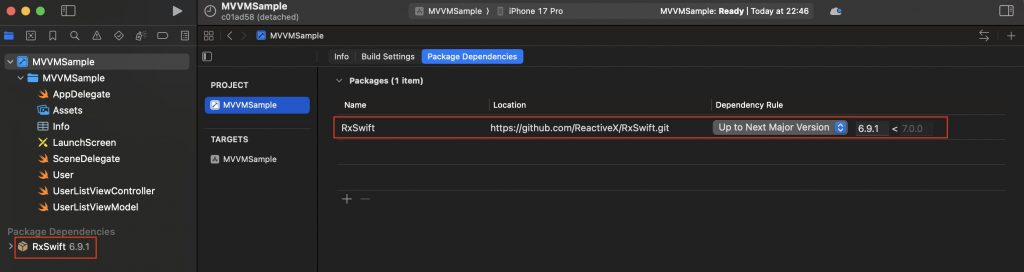
  • Goodbye Raw Strings, Hello swift-tagged

    Goodbye Raw Strings, Hello swift-tagged

    There is a subtle but common problem in Swift development: relying on raw types like String or UUID for identifiers leads to fragile code where values can be accidentally swapped or misused without the compiler noticing. By explaining how swift-tagged introduces zero-cost, strongly typed wrappers, I wanted to show you how other iOS developers how to prevent whole categories of bugs at compile time, while keeping APIs clean, expressive, and fully compatible with Codable, Hashable, and other Swift protocols. It’s a practical, easy-to-adopt tool that makes codebases more robust, and many developers may not even realize how much type safety they’re leaving on the table until they see a real-world example.

    The problem

    The following code is syntactically correct, but semantically wrong.

        struct UserRaw { let id: UUID }
        struct ProductRaw { let id: UUID }
    
        func registerPurchaseRaw(userID: UUID, productID: UUID) {
            log("✅ Purchase registered (RAW): user=\(userID) product=\(productID)")
        }
    
        func demoRaw() {
            log("— RAW demo —")
            let rawUser = UserRaw(id: UUID())
            let rawProduct = ProductRaw(id: UUID())
    
            // ❌ Compiles, BUT CODE SEMANTICALLY IS WRONG (crossed arguments)
            registerPurchaseRaw(userID: rawProduct.id, productID: rawUser.id)
            log("")
        }

    This code defines two structs, UserRaw and ProductRaw, each holding an id of type UUID, and a function registerPurchaseRaw(userID:productID:) that logs a message about a registered purchase. In demoRaw(), it creates a user and a product, then mistakenly calls registerPurchaseRaw with the arguments swapped (userID is given the product’s ID and productID is given the user’s ID). The key issue is that both IDs are plain UUIDs, so the compiler cannot distinguish between them—this compiles without error even though it is logically wrong. The problem is a lack of type safety, which can lead to subtle bugs where mismatched identifiers are passed to functions unnoticed until runtime.

    swift-tagged library

    The swift-tagged library is a lightweight Swift package from Point-Free that lets you create strongly typed wrappers around existing primitive types like String, Int, or UUID. Instead of passing around raw values (e.g. using plain UUID for both UserID and OrderID), you can “tag” them with distinct types so the compiler enforces correct usage—preventing accidental mix-ups that would otherwise compile but cause logic bugs. It’s a zero-cost abstraction, meaning it adds no runtime overhead, and it integrates seamlessly with protocols like Codable, Hashable, and Equatable. In practice, swift-tagged helps make Swift code more expressive, self-documenting, and safer, especially when modeling identifiers and domain-specific values in iOS or server-side Swift apps.

    This is new proposal with swift-tagged library:

        struct UserTag {}
        struct ProductTag {}
    
        typealias UserID = Tagged<UserTag, UUID>
        typealias ProductID = Tagged<ProductTag, UUID>
    
        struct User {
            let id: UserID
        }
        struct Product {
            let id: ProductID
        }
    
        func registerPurchase(userID: UserID, productID: ProductID) {
            log("✅ Purchase registered (Tagged): user=\(userID) product=\(productID)")
        }
    
        func demoTagged() {
            log("— Tagged demo —")
            let user = User(id: UserID(UUID()))
            let product = Product(id: ProductID(UUID()))
            registerPurchase(userID: user.id, productID: product.id)
    
            // ❌ This no longer compiles (type mismatch): // registerPurchase(userID: product.id, productID: user.id
            registerPurchase(userID: product.id, productID: user.id)
            log("")
        }

    Now at compile time, semantic error is being detected:

    Codable types

    swift-tagged works with Codable types because its Tagged wrapper is designed to forward encoding and decoding responsibilities to the underlying raw type (such as String, Int, or UUID) that already conforms to Codable. This means when you use a Tagged<User, UUID> as a property in a model, Swift’s Codable machinery simply encodes or decodes the inner UUID as usual, while still preserving the type-safe distinction at compile time. As a result, you get the safety of strongly typed identifiers without having to write custom Codable implementations or change how your models interact with JSON or other encoded data.

            log("— Codable + JSON —")
    
            let user = User(id: UserID(UUID()))
            let product = Product(id: ProductID(UUID()))
            let request = PurchaseRequest(userID: user.id, productID: product.id)
    
            // Encode → JSON
            do {
                let encoder = JSONEncoder()
                encoder.outputFormatting = [.prettyPrinted, .sortedKeys]
                let jsonData = try encoder.encode(request)
                if let jsonString = String(data: jsonData, encoding: .utf8) {
                    log("📤 JSON sent to server:")
                    log(jsonString)
                }
            } catch {
                log("Encoding error:", error.localizedDescription)
            }
    
            // Decode ← JSON
            let jsonInput = """
            {
                "userID": "\(UUID())",
                "productID": "\(UUID())"
            }
            """.data(using: .utf8)!
    
            do {
                let decoded = try JSONDecoder().decode(PurchaseRequest.self, from: jsonInput)
                log("📥 JSON received and decoded to Swift struct:")
                log("userID: \(decoded.userID)")
                log("productID: \(decoded.productID)")
            } catch {
                log("Decoding error:", error.localizedDescription)
            }
    
            log("")

    This code demonstrates how a PurchaseRequest that uses swift-tagged identifiers can be seamlessly encoded to and decoded from JSON. First, it creates a User and a Product, builds a PurchaseRequest with their strongly typed IDs, and then uses JSONEncoder to serialize it into a nicely formatted JSON string, simulating data being sent to a server. Next, it constructs a JSON string containing new random UUIDs for userID and productID, converts it to Data, and decodes it back into a PurchaseRequest instance with JSONDecoder. The output shows that although the code benefits from type safety at compile time, the wrapped values still encode and decode just like plain UUIDs, ensuring compatibility with standard JSON APIs.

    Hashable

    Yes—swift-tagged works with Hashable types because its Tagged<Tag, RawValue> wrapper automatically conforms to Hashable whenever the underlying RawValue does (e.g., UUID, String, Int). This means tagged IDs like UserID or ProductID can be used directly in Sets to enforce uniqueness, as keys in Dictionarys, or inside other Hashable models without extra boilerplate. In practice, you get the benefits of type safety and domain clarity while still leveraging Swift’s built-in hashing behavior, all with zero runtime overhead.

            // ---------------------------------------------------------
            // 🔢 4. Using swift-tagged with Hashable collections
            // ---------------------------------------------------------
    
            // Sets of tagged IDs
            let user = User(id: UserID(UUID()))
            var seenUsers = Set<UserID>()
            seenUsers.insert(user.id)                 // from earlier code
            seenUsers.insert(UserID(UUID()))          // a different user
            seenUsers.insert(user.id)                 // duplicate; Set ignores it
    
            log("👥 Seen users (unique count): \(seenUsers.count)")
    
            // Dictionaries with tagged IDs as keys
            let product = Product(id: ProductID(UUID()))
            var productStock: [ProductID: Int] = [:]
            productStock[product.id] = 10             // from earlier code
            let anotherProductID = ProductID(UUID())
            productStock[anotherProductID] = 5
    
            log("📦 Product stock:")
            for (pid, qty) in productStock {
                log(" - \(pid): \(qty)")
            }
    
            // Using tagged IDs inside Hashable models
            struct CartItem: Hashable {
                let productID: ProductID
                let quantity: Int
            }
    
            var cart = Set<CartItem>()
            cart.insert(CartItem(productID: product.id, quantity: 1))
            cart.insert(CartItem(productID: product.id, quantity: 1)) // duplicate CartItem; Set ignores it
            cart.insert(CartItem(productID: product.id, quantity: 2)) // different (quantity), so distinct
            cart.insert(CartItem(productID: anotherProductID, quantity: 1))
    
            log("🛒 Cart unique items: \(cart.count)")

    This code shows how swift-tagged identifiers can be used in Swift collections that rely on Hashable. First, it creates a Set<UserID> and demonstrates that inserting the same tagged ID twice does not create duplicates, while a new tagged ID is treated as unique. Next, it builds a dictionary [ProductID: Int] to associate stock counts with product IDs, proving that tagged IDs work seamlessly as dictionary keys. Finally, it defines a CartItem struct containing a tagged ProductID and makes it Hashable, then inserts several items into a Set<CartItem>—duplicates with identical values collapse into one entry, while items that differ in quantity or product ID remain distinct. Overall, the snippet illustrates how swift-tagged provides type-safe IDs that integrate naturally with Set and Dictionary without extra work.
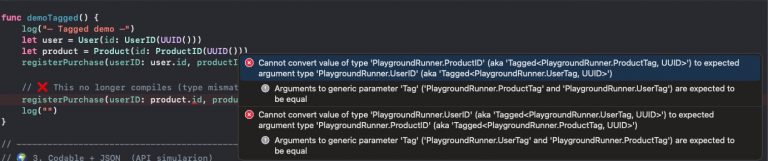
    Conclusions

    Swift’s capabilities are growing year by year. I’m not a big fan of using third-party libraries, but to avoid the problem presented here I would highly recommend this one.


    You can find the source code from this example in the following GitHub repository link.

    References