In our previous posts, we explained how to run an ANSI C component on iOS and Android. This time, we are moving to a backend platform using Vapor.
This post covers the necessary add-ons for the C code and details how to configure a Vapor project to implement a service that consumes the exported component functionality. This setup will allow you to develop and debug the backend locally. Finally, I will explain how to deploy the backend using Docker.
The Core ANSI C Functionality
Our goal is to cross-compile and export this ANSI C functionality beyond iOS and Android to include a Vapor-based backend server.
#include "core_component.h"
#include <stdio.h>

/**
 * Gets the version in X.Y.Z format.
 * * @param out_version Pointer to the buffer where the version string will be stored.
 * @param max_len     Maximum size of the buffer.
 * @return            0 if successful, or -1 if the buffer is too small.
 */
int getVersion(char *out_version, size_t max_len) {
    /* Simulated version numbers */
    int major = 1;
    int minor = 4;
    int patch = 12;

    /* Safely format the string and prevent buffer overflows */
    int written = snprintf(out_version, max_len, "%d.%d.%d", major, minor, patch);

    /* Check if the string was truncated or if an encoding error occurred */
    if (written < 0 || (size_t)written >= max_len) {
        return VERSION_ERR_INSUFFICIENT_BUF;
    }

    return VERSION_SUCCESS;
}
Create a blank Vapor Backend project
To create a blank Vapor sample project, follow these steps:
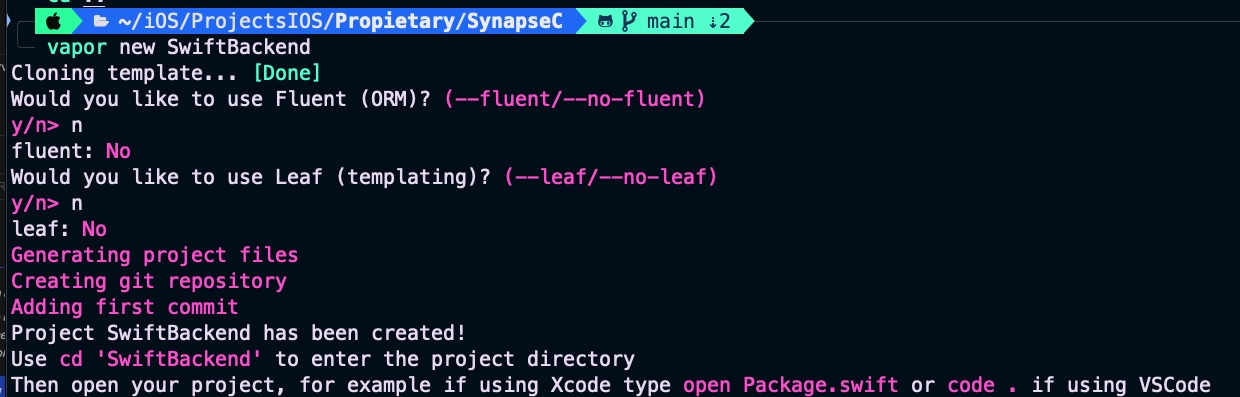
For our purposes, we do not need an ORM, database support, or Leaf HTML rendering.
Setting Up the ANSI C Component for Vapor
The philosophy behind this series of posts is to share the same functionality across multiple platforms without ever sharing the underlying source code. The following script provides the ANSI C binaries for the Vapor backend server:
#!/bin/bash

# Stop the script if any error occurs
set -e

echo "🚀 Starting compilation of core_component for Vapor..."

# 1. Define relative paths
SCRIPT_DIR="$( cd "$( dirname "${BASH_SOURCE[0]}" )" && pwd )"
OUTPUT_DIR="$SCRIPT_DIR/build_vapor"
BACKEND_DIR="$SCRIPT_DIR/../SwiftBackend"

# NEW: Target paths following the native SPM standard
BACKEND_LIBS_DIR="$BACKEND_DIR/Libs"
BACKEND_INCLUDE_DIR="$BACKEND_DIR/Sources/SwiftBackend/include"

# 2. Create output folders if they do not exist
mkdir -p "$OUTPUT_DIR"
mkdir -p "$BACKEND_LIBS_DIR"
mkdir -p "$BACKEND_INCLUDE_DIR" # 👈 NEW: Creates the 'include' folder inside Vapor's source code

# 3. Compile the C code into an object file (.o)
echo "📦 Compiling core_component.c..."
gcc -c "$SCRIPT_DIR/core_component.c" -o "$OUTPUT_DIR/core_component.o" -fPIC

# 4. Package the object file into a static library (.a)
echo "📚 Creating static library libcore_component.a..."
ar rcs "$OUTPUT_DIR/libcore_component.a" "$OUTPUT_DIR/core_component.o"

# 5. Copy the required files to the Vapor project
echo "🚚 Copying binaries to the libraries directory..."
cp "$OUTPUT_DIR/libcore_component.a" "$BACKEND_LIBS_DIR/"

echo "📂 Copying header (.h) to the native Target structure (Sources/.../include)..."
cp "$SCRIPT_DIR/core_component.h" "$BACKEND_INCLUDE_DIR/"

echo "✅ Process completed successfully!"
echo "Binary copied to: $BACKEND_LIBS_DIR"
echo "Header copied to: $BACKEND_INCLUDE_DIR"
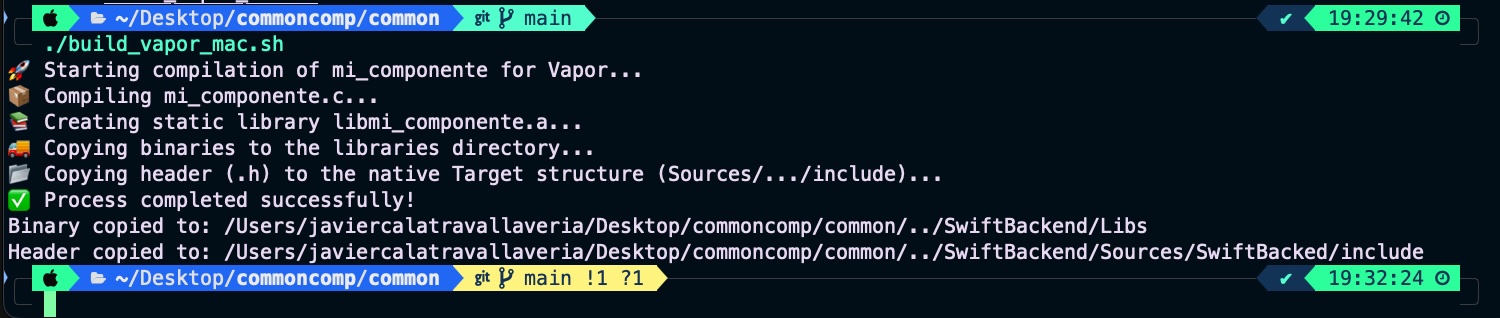
Run the script form coreC folder and check that all is working fine:
Consuming the ANSI C Component in Vapor
The first file we need to update in the Vapor project is Package.swift:
// swift-tools-version:6.0
import PackageDescription
import Foundation

let package = Package(
    name: "SwiftBackend",
    platforms: [
       .macOS(.v13)
    ],
    dependencies: [
        // 💧 A server-side Swift web framework.
        .package(url: "https://github.com/vapor/vapor.git", from: "4.115.0"),
        // 🔵 Non-blocking, event-driven networking for Swift. Used for custom executors
        .package(url: "https://github.com/apple/swift-nio.git", from: "2.65.0"),
    ],
    targets: [
        .executableTarget(
            name: "SwiftBackend",
            dependencies: [
                .product(name: "Vapor", package: "vapor"),
                .product(name: "NIOCore", package: "swift-nio"),
                .product(name: "NIOPosix", package: "swift-nio"),
            ],
            swiftSettings: swiftSettings,
            linkerSettings: [
                .unsafeFlags([
                    "-L", "\(URL(fileURLWithPath: #filePath).deletingLastPathComponent().path)/Libs"
                ]),
                .linkedLibrary("core_component")
            ]
        ),
        .testTarget(
            name: "SwiftBackendTests",
            dependencies: [
                .target(name: "SwiftBackend"),
                .product(name: "VaporTesting", package: "vapor"),
            ],
            swiftSettings: swiftSettings
        )
    ]
)

var swiftSettings: [SwiftSetting] { [
    .enableUpcomingFeature("ExistentialAny"),
] }
It defines a Swift Package Manager (Package.swift) configuration for a server-side backend application named SwiftBackend, setting up a macOS executable that depends on the Vapor web framework and SwiftNIO networking libraries. Specifically, the linkerSettings block instructs the compiler where to find and how to integrate external binaries not written in Swift; the .unsafeFlags line dynamically determines the absolute path to a local directory named Libs relative to this configuration file and passes it via the -L search flag so the linker knows where to look, while .linkedLibrary("core_component") explicitly tells the linker to bind the precompiled static or dynamic library file (such as libcore_component.a) located inside that folder into the final executable.
Next is bridging header file:
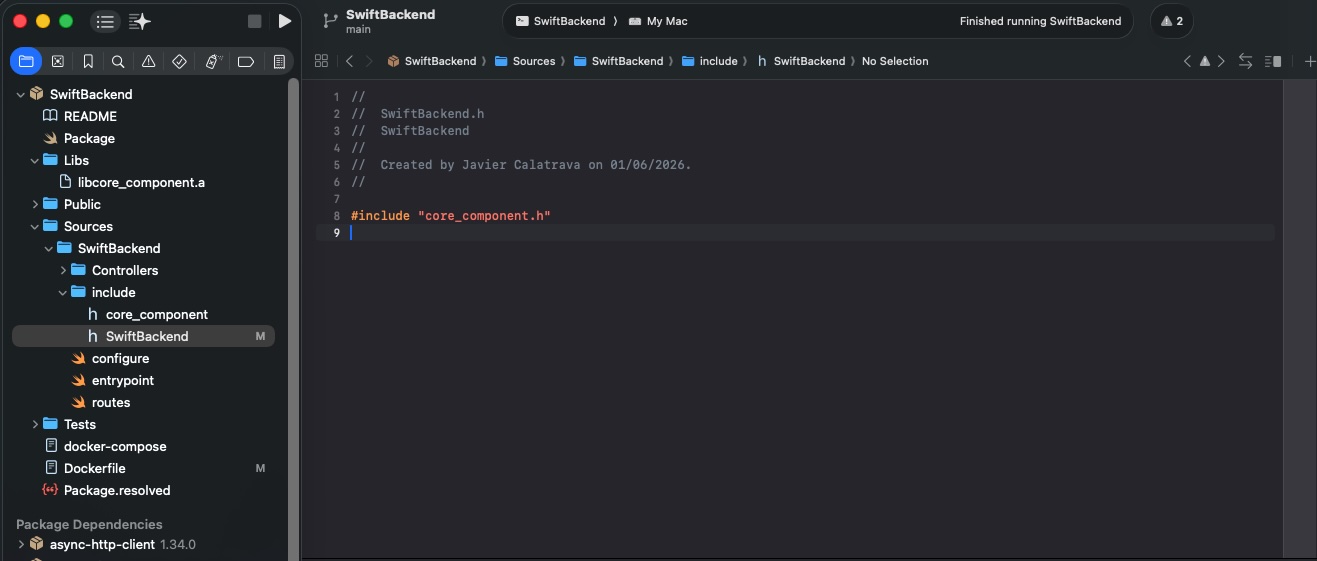
The SwiftBackend.h file is necessary because it serves as the umbrella header required by Swift Package Manager (SPM) to bridge C and Swift. SPM strictly mandates that a mixed-language target contains a header file matching the exact name of the target (SwiftBackend) inside its include directory to define the module’s public C interface. By writing #include "mi_componente.h" inside it, this file acts as the official gateway that exposes your underlying C functions and the compiled static library (libcore_component.a) to your Swift code, allowing them to interface seamlessly without compilation errors.
Finally, implement the service that provides access to the ANSI C component:
    app.get("version") { req -> String in
        // Allocate an output buffer array safe for an X.Y.Z string
        let bufferSize = 32
        var outputBuffer = [Int8](repeating: 0, count: bufferSize)

        // Execute the mapped global C function
        let statusCode = c_getVersion(&outputBuffer, bufferSize)

        // Process the return code matching your C macro definitions
        switch statusCode {
        case 0: // VERSION_SUCCESS
            return String(cString: outputBuffer)
        case -1: // VERSION_ERR_INSUFFICIENT_BUF
            throw Abort(.internalServerError, reason: "Error from C: Insufficient buffer size")
        default:
            throw Abort(.internalServerError, reason: "Unknown native version fetching error")
        }
    }
This code defines a Vapor HTTP GET route handler at the /version endpoint that safely exposes an underlying C function to the web. It allocates a fixed-size, 32-byte integer array (outputBuffer) to safely receive a string from the C function, then executes c_getVersion by passing a reference to this buffer and its maximum size. Finally, it evaluates the returned status code using a switch statement: if successful (case 0), it converts the null-terminated C string buffer into a native Swift String and returns it as the HTTP response, whereas if an error occurs (such as an insufficient buffer size or an unknown failure), it throws a structured HTTP 500 Internal Server Error using Vapor’s Abort mechanism.
Finally check in any browser the service response:
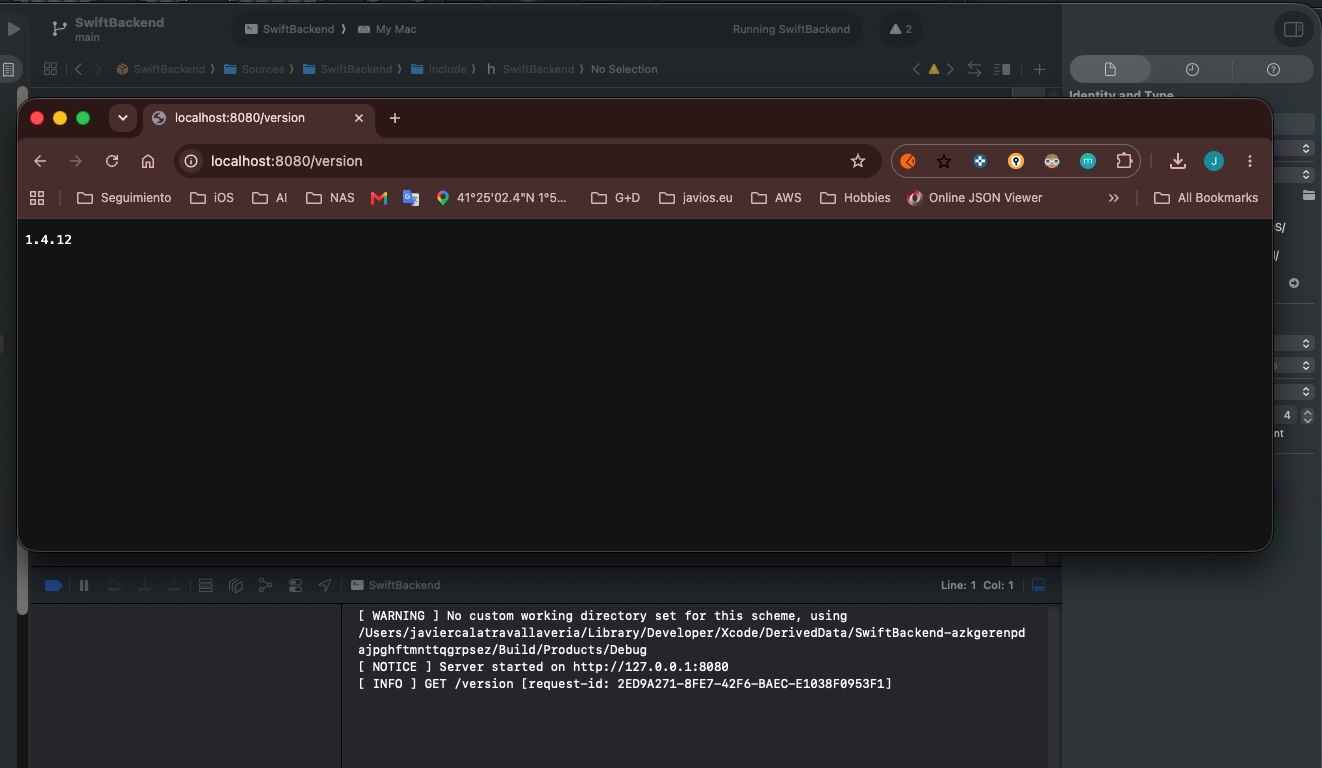
This is a debugable Vapor project, but not deployable yet.
Dockerizing the Vapor Server
Once the Vapor backend server is ready for release, let’s build the Docker image:
# ================================
# Build image
# ================================
FROM swift:6.1-noble AS build

# Install OS updates and build tools
RUN export DEBIAN_FRONTEND=noninteractive DEBCONF_NONINTERACTIVE_SEEN=true \
    && apt-get -q update \
    && apt-get -q dist-upgrade -y \
    && apt-get install -y libjemalloc-dev build-essential

# Set base root folder
WORKDIR /build

# 1. Copy manifest respecting the project structure
COPY ./SwiftBackend/Package.* ./SwiftBackend/

# We are going the fix dependencies for doing that we move to project folder
WORKDIR /build/SwiftBackend
RUN swift package resolve \
        $([ -f ./Package.resolved ] && echo "--force-resolved-versions" || true)

# 2. Get back to the compilation folder for pouring real code
WORKDIR /build
COPY ./coreC ./coreC
COPY ./SwiftBackend ./SwiftBackend

# 3. Provide execution permission and run the script
RUN chmod +x ./coreC/build_linux.sh && ./coreC/build_linux.sh

# 4. Get back to SwiftBackend for executiong oficial vapor compilation
WORKDIR /build/SwiftBackend

RUN mkdir /staging

# Build the application, with optimizations, with static linking, and using jemalloc
RUN --mount=type=cache,target=/build/SwiftBackend/.build \
    swift build -c release \
        --product SwiftBackend \
        --static-swift-stdlib \
        -Xlinker -ljemalloc && \
    # Copy main executable to staging area
    cp "$(swift build -c release --show-bin-path)/SwiftBackend" /staging && \
    # Copy resources bundled by SPM to staging area
    find -L "$(swift build -c release --show-bin-path)" -regex '.*\.resources$' -exec cp -Ra {} /staging \;


# Switch to the staging area
WORKDIR /staging

# Copy static swift backtracer binary to staging area
RUN cp "/usr/libexec/swift/linux/swift-backtrace-static" ./

# Adjust verification resource routes because we are into/build/SwiftBackend
RUN [ -d /build/SwiftBackend/Public ] && { mv /build/SwiftBackend/Public ./Public && chmod -R a-w ./Public; } || true
RUN [ -d /build/SwiftBackend/Resources ] && { mv /build/SwiftBackend/Resources ./Resources && chmod -R a-w ./Resources; } || true

# ================================
# Run image
# ================================
FROM ubuntu:noble

RUN export DEBIAN_FRONTEND=noninteractive DEBCONF_NONINTERACTIVE_SEEN=true \
    && apt-get -q update \
    && apt-get -q dist-upgrade -y \
    && apt-get -q install -y \
      libjemalloc2 \
      ca-certificates \
      tzdata \
    && rm -r /var/lib/apt/lists/*

RUN useradd --user-group --create-home --system --skel /dev/null --home-dir /app vapor

WORKDIR /app

COPY --from=build --chown=vapor:vapor /staging /app

ENV SWIFT_BACKTRACE=enable=yes,sanitize=yes,threads=all,images=all,interactive=no,swift-backtrace=./swift-backtrace-static

USER vapor:vapor

EXPOSE 8080

ENTRYPOINT ["./SwiftBackend"]
CMD ["serve", "--env", "production", "--hostname", "0.0.0.0", "--port", "8080"]
This Dockerfile implements a multi-stage build tailored to securely and efficiently compile and run your Vapor backend while incorporating your external C component. The first stage (build) utilizes a full Swift 6.1 environment on Ubuntu Noble to install required compilation tools (like build-essential and libjemalloc-dev), resolve Swift package dependencies, and fetch cache layers. It intentionally copies your proprietary source code (./coreC and ./SwiftBackend), grants execution permissions to run your standalone compilation script (build_linux.sh) to build the C binaries safely in isolation, and compiles the final Vapor executable optimized for production (-c release) with memory-efficient static linking (--static-swift-stdlib, -ljemalloc). All necessary runtime assets, public resources, and the static backtracer are then consolidated into a temporary /staging directory.
The second stage (run) creates a stripped-down, secure production image starting from a clean Ubuntu Noble base, completely throwing away the compiler tools and your original .c and .swift source code to minimize the final container size and protect your intellectual property. It installs only minimal required runtime libraries (libjemalloc2, certificates, and timezone data) and sets up an unprivileged, isolated system user named vapor. The final steps pull exclusively the compiled binaries and public assets from the first stage’s /staging area into the /app folder under strict vapor user ownership, configures production environment variables for safety and crash-tracking, exposes port 8080, and commands the container to run the production Vapor server on 0.0.0.0:8080.
Let’s build the Docker image:
docker build -t swift-backend-app -f SwiftBackend/Dockerfile . 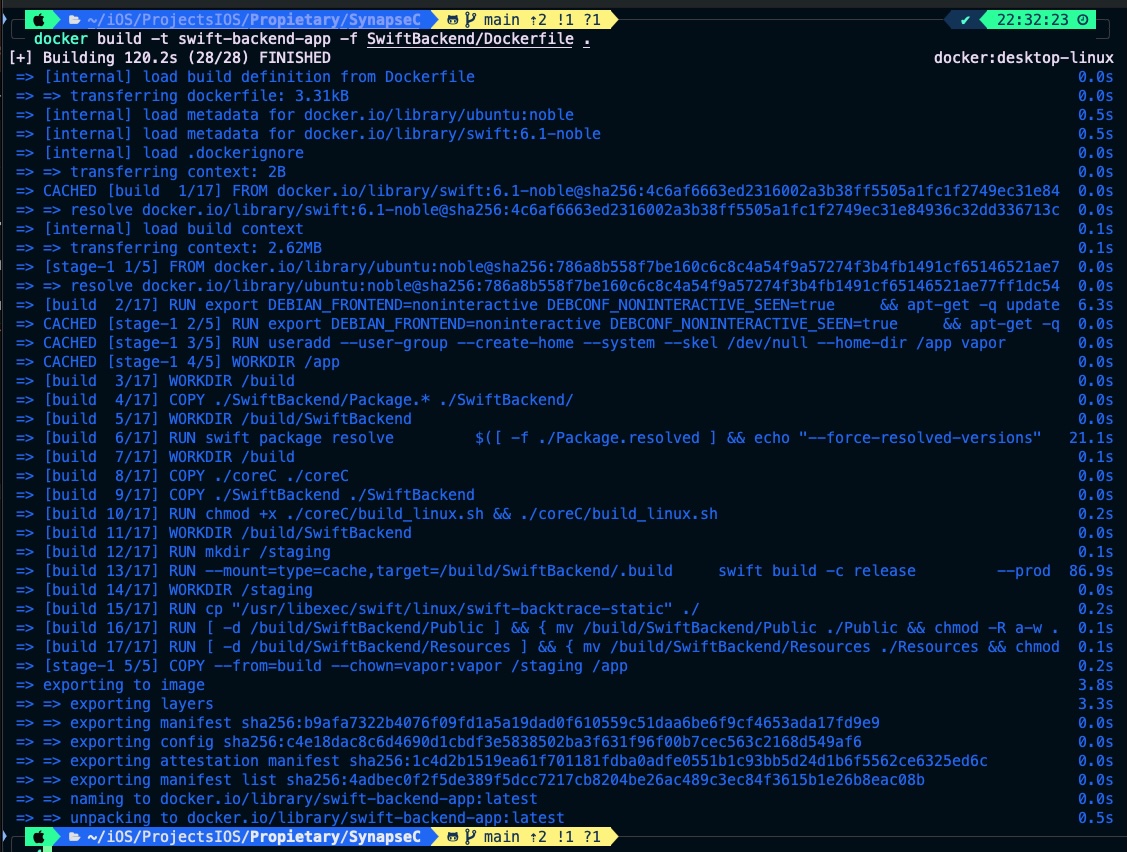
Deploy a docker container with the image generated:
docker run -d -p 8080:8080 --name mi-servidor-vapor swift-backend-app 
This time, instead of using a web browser, we will test the service using the curl command:
curl -i "http://localhost:8080/version" 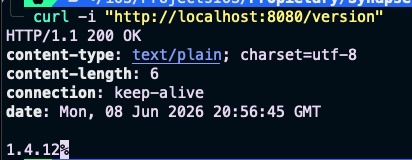
docker run -d -p 8080:8080 --name mi-servidor-vapor swift-backend-app Conclusions
n this post, we successfully migrated our ANSI C functionality to a backend platform. Throughout this three-part series, we have demonstrated how to reuse a single binary component across iOS, Android, and a server-side framework like Vapor.
You can find source code used for writing this post in following repository
References
- Multiplatform ANSI C on iOS
JaviOS Blog
- Multiplatform ANSI C on Android (and iOS)
JaviOS Blog