SynapseC is the heart of this post. The main idea here is to connect different frontend and backend worlds using a central "nervous system" written in ANSI C. We are going to build a simple native C component that acts as the shared core logic for iOS, Android, and a Dockerized Vapor server. One of the best parts about this approach? We never expose the raw ANSI C code to other platforms. The end consumer will only ever deal with a clean binary, never the source code.
In this first part of our three-part series, we’ll kick things off by building that common ANSI C core and plugging it into an iOS app as an SPM package.
Core ANSI C component
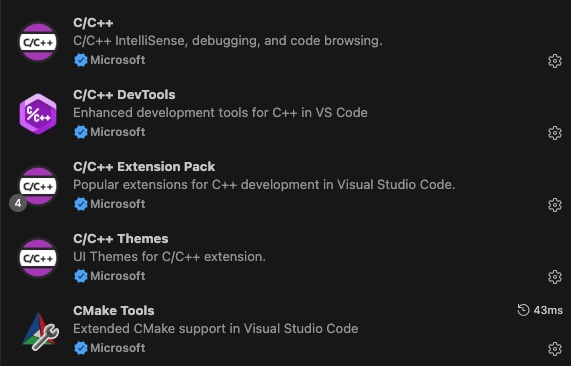
The IDE of choice for this ANSI C project is Visual Studio Code. To build and run the code seamlessly, these are the essential extensions I used:
As a starting point, we will create a simple function that returns the component’s version. This will be highly useful for future troubleshooting and tracking as the project grows.
#include "core_component.h"
#include <stdio.h>

/**
 * Gets the version in X.Y.Z format.
 * * @param out_version Pointer to the buffer where the version string will be stored.
 * @param max_len     Maximum size of the buffer.
 * @return            0 if successful, or -1 if the buffer is too small.
 */
int getVersion(char *out_version, size_t max_len) {
    /* Simulated version numbers */
    int major = 1;
    int minor = 4;
    int patch = 12;

    /* Safely format the string and prevent buffer overflows */
    int written = snprintf(out_version, max_len, "%d.%d.%d", major, minor, patch);

    /* Check if the string was truncated or if an encoding error occurred */
    if (written < 0 || (size_t)written >= max_len) {
        return VERSION_ERR_INSUFFICIENT_BUF;
    }

    return VERSION_SUCCESS;
}
Our main.c entry point will handle running some unit tests. Granted, this isn’t the ideal architecture for a growing project—as it would quickly become unbearable to maintain—but for this post, it gets the job done perfectly.
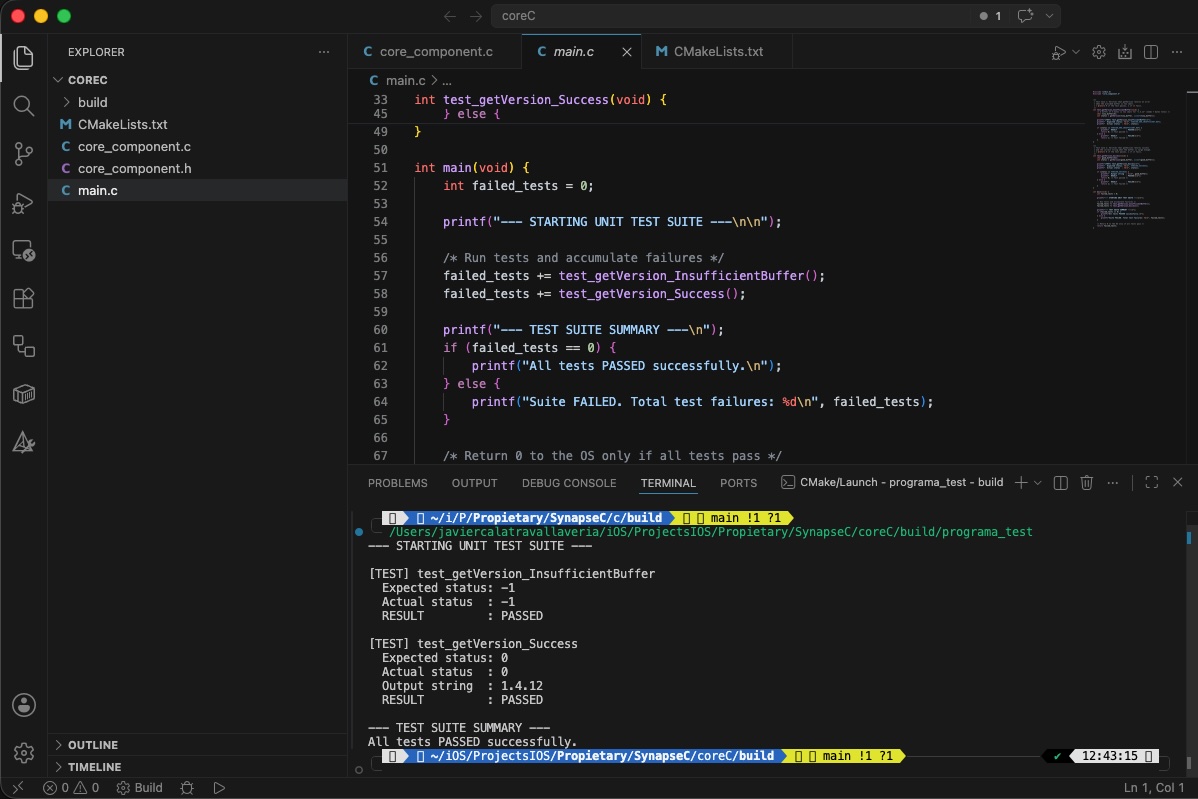
Now, let’s run the code to ensure the syntax is correct and our unit tests pass successfully.
Generate SPM component
Once we have assured that component code sanity. Next step is generate the SPM, for make it simplier we have created following script:
#!/bin/bash
set -e

# 0. Assure script is run from its own directory (robustly)
SCRIPT_DIR="$(cd "$(dirname "${BASH_SOURCE[0]}")" && pwd)"
cd "$SCRIPT_DIR"

# 1. Clean up previous artifacts
echo "🧹 Cleaning up previous builds..."
rm -rf "$SCRIPT_DIR/build_ios" \
       "$SCRIPT_DIR/build_sim_arm" \
       "$SCRIPT_DIR/build_sim_x86" \
       "$SCRIPT_DIR/build_xcf" \
       "$SCRIPT_DIR/CoreC.xcframework" \
       "$SCRIPT_DIR/Package.swift"

# 2. Compile for Physical Device (iOS arm64) using native Makefiles
echo "📱 Compiling for iOS device (arm64)..."
cmake -B "$SCRIPT_DIR/build_ios" \
  -G "Unix Makefiles" \
  -DCMAKE_SYSTEM_NAME=iOS \
  -DCMAKE_OSX_ARCHITECTURES=arm64 \
  -DCMAKE_BUILD_TYPE=Release > /dev/null 2>&1

cmake --build "$SCRIPT_DIR/build_ios" --target core_c_lib --config Release
echo "✅ iOS device built successfully!"

# 3. Compile for Simulator (arm64)
echo "💻 Compiling for iOS Simulator (arm64)..."
cmake -B "$SCRIPT_DIR/build_sim_arm" \
  -G "Unix Makefiles" \
  -DCMAKE_SYSTEM_NAME=iOS \
  -DCMAKE_OSX_SYSROOT=iphonesimulator \
  -DCMAKE_OSX_ARCHITECTURES=arm64 \
  -DCMAKE_BUILD_TYPE=Release > /dev/null 2>&1

cmake --build "$SCRIPT_DIR/build_sim_arm" --target core_c_lib --config Release > /dev/null 2>&1

# 4. Compile for Simulator (x86_64)
echo "💻 Compiling for iOS Simulator (x86_64)..."
cmake -B "$SCRIPT_DIR/build_sim_x86" \
  -G "Unix Makefiles" \
  -DCMAKE_SYSTEM_NAME=iOS \
  -DCMAKE_OSX_SYSROOT=iphonesimulator \
  -DCMAKE_OSX_ARCHITECTURES=x86_64 \
  -DCMAKE_BUILD_TYPE=Release > /dev/null 2>&1

cmake --build "$SCRIPT_DIR/build_sim_x86" --target core_c_lib --config Release > /dev/null 2>&1
echo "✅ iOS Simulators built successfully!"

# 5. Merge simulator architectures and prepare environments
echo "🔍 Processing and merging simulator architectures..."
mkdir -p "$SCRIPT_DIR/build_xcf/products/ios" \
         "$SCRIPT_DIR/build_xcf/products/sim" \
         "$SCRIPT_DIR/build_xcf/headers"

# With "Unix Makefiles", CMake outputs .a files EXACTLY at the root of each build folder.
LIB_IOS="$SCRIPT_DIR/build_ios/libcore_c_lib.a"
LIB_SIM_ARM="$SCRIPT_DIR/build_sim_arm/libcore_c_lib.a"
LIB_SIM_X86="$SCRIPT_DIR/build_sim_x86/libcore_c_lib.a"

# Ensure physical device library is copied
cp "$LIB_IOS" "$SCRIPT_DIR/build_xcf/products/ios/libcore_c_lib.a"

# Create the universal binary for the simulator
lipo -create "$LIB_SIM_ARM" "$LIB_SIM_X86" -output "$SCRIPT_DIR/build_xcf/products/sim/libcore_c_lib.a"

# Copy the public header
cp "$SCRIPT_DIR/core_component.h" "$SCRIPT_DIR/build_xcf/headers/"

# Crear el mapa de módulo para que Swift reconozca la librería C
cat << 'EOF' > "$SCRIPT_DIR/build_xcf/headers/module.modulemap"
module CoreC {
    header "core_component.h"
    export *
}
EOF

# 6. Create the temporary XCFramework in the build directory
echo "🚀 Packaging into CoreC.xcframework..."
xcodebuild -create-xcframework \
  -library "$SCRIPT_DIR/build_xcf/products/ios/libcore_c_lib.a" -headers "$SCRIPT_DIR/build_xcf/headers" \
  -library "$SCRIPT_DIR/build_xcf/products/sim/libcore_c_lib.a" -headers "$SCRIPT_DIR/build_xcf/headers" \
  -output "$SCRIPT_DIR/build_xcf/CoreC.xcframework"

# 7. Organize the definitive isolated SPM environment (Isolate from source code)
echo "📦 Organizing isolated Swift Package Manager environment..."
SPM_DIR="$SCRIPT_DIR/build_xcf/spm"
mkdir -p "$SPM_DIR"

# Move the generated .xcframework into the spm directory
mv "$SCRIPT_DIR/build_xcf/CoreC.xcframework" "$SPM_DIR/"

# Dynamically generate the Package.swift DIRECTLY inside the spm directory
cat << 'EOF' > "$SPM_DIR/Package.swift"
// swift-tools-version: 5.10
import PackageDescription

let package = Package(
    name: "CoreC",
    products: [
        .library(name: "CoreC", targets: ["CoreC"])
    ],
    targets: [
        .binaryTarget(
            name: "CoreC",
            path: "CoreC.xcframework" // Path relative to Package.swift
        )
    ]
)
EOF

echo "🎉 ABSOLUTE VICTORY! Your isolated SPM is ready at: $SPM_DIR"
This Bash script automates the compilation and packaging of a native C library (core_c_lib) into an isolated Swift Package Manager (SPM) dependency for Apple platforms. After establishing its execution directory and clearing out old build artifacts, the script uses CMake to compile the source code into static libraries (.a) across three distinct target architectures. It generates binaries for physical iOS devices (arm64), M-series Mac iOS Simulators (arm64), and Intel-based Mac iOS Simulators (x86_64).
Once the compilation is complete, the script merges the two simulator binaries into a single universal library using the lipo tool and groups it alongside the physical device library. Crucially, it injects a custom module.modulemap file next to the public C header file to ensure Swift can seamlessly read the native C interfaces. Finally, it uses xcodebuild to package these components into a unified CoreC.xcframework bundle, places it into a dedicated folder, and automatically writes a Package.swift manifest file, delivering a turnkey binary Swift package ready to be imported into any Xcode project.
SPM integration into an iOS App
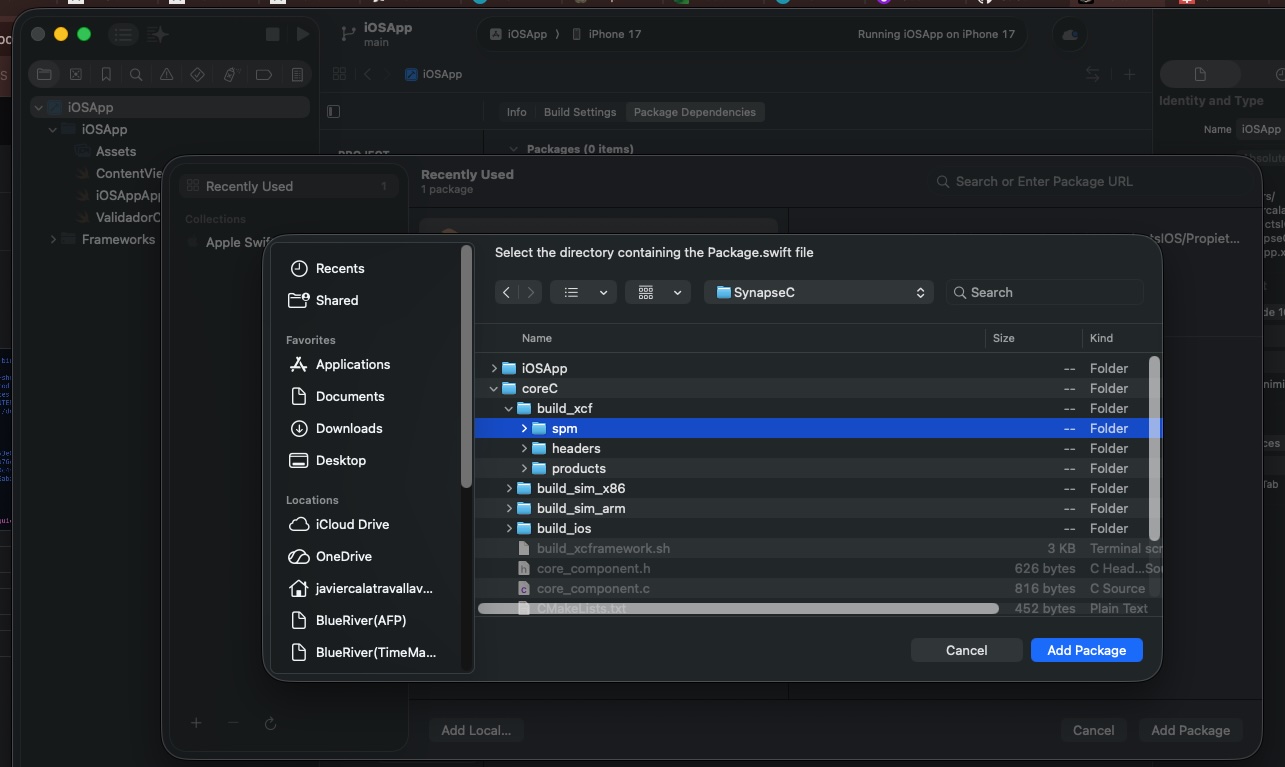
The final stage involves integrating the newly minted Swift Package into a production environment. To demonstrate this, we will initialize a clean iOS Application project and import the local SPM dependency we just generated.
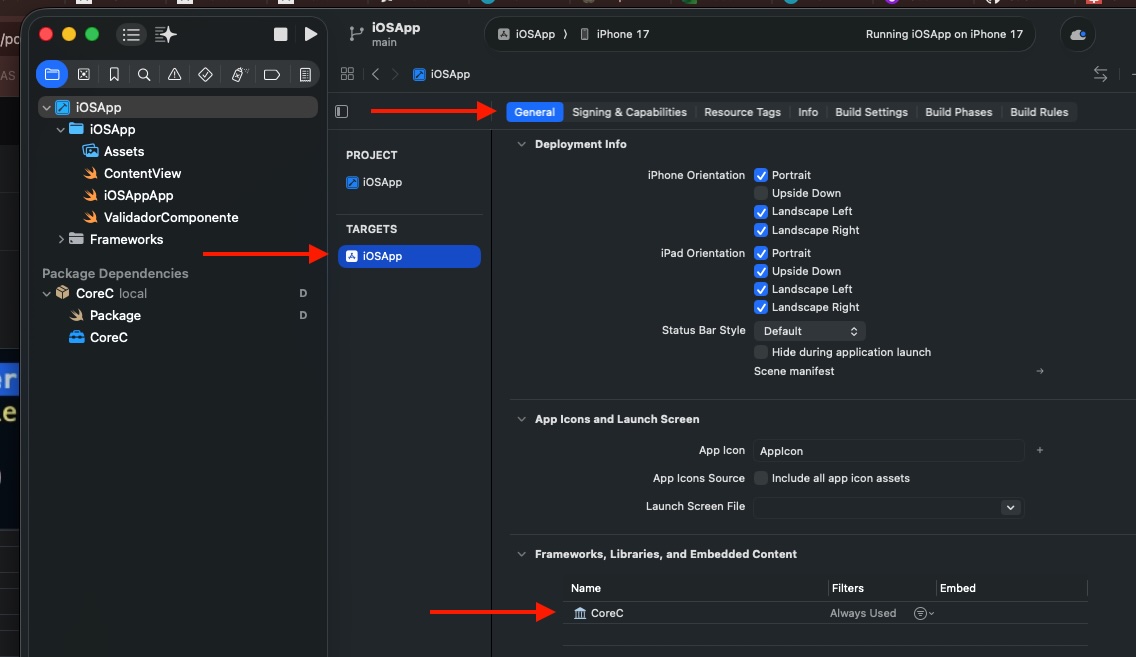
Be sure that in target appears the new imported framework:
Next step we will create a wrapper for the SPM package:
import Foundation
import CoreC

struct CoreCWrapper {


    /// Safe Swift wrapper for the ANSI C function 'getVersion'
        /// Renamed to 'fetchVersion()' to avoid shadowing the global C function name.
        static func fetchVersion() -> String {
            // 1. Allocate a byte array with enough space for an "X.Y.Z" string
            let bufferSize = 32
            var outputBuffer = [Int8](repeating: 0, count: bufferSize)

            // 2. Call the global ANSI C function safely without naming conflicts
            let statusCode = getVersion(&outputBuffer, bufferSize)

            // 3. Evaluate the status code matching the C macro logic
            switch statusCode {
            case 0: // VERSION_SUCCESS
                if let versionSwiftString = String(cString: outputBuffer, encoding: .utf8) {
                    return versionSwiftString
                } else {
                    return "Error: Could not decode version string from C."
                }
            case -1: // VERSION_ERR_INSUFFICIENT_BUF
                return "Error from C: Insufficient buffer size."
            default:
                return "Unknown error in native getVersion component."
            }
        }
}
This wrapper approach is highly valuable because it abstracts the low-level, error-prone complexities of inter-language communication, presenting a clean, «Swifty» API to the rest of the application. Instead of forcing consumer code to manually manage C-style memory allocations ([Int8] buffers), handle unsafe pointers, or decipher cryptic integer status codes (like 0 or -1), the wrapper centralizes this dangerous boilerplate in one isolated place. By safely evaluating the execution status and converting raw C-strings into native Swift String types, it guarantees type-safety and robust error handling at the boundary, ensuring that the main application remains idiomatic, safe, and entirely decoupled from the underlying C implementation details.
Finally use the wrapper:
import SwiftUI

struct ContentView: View {
    var body: some View {
        VStack {
            Image(systemName: "globe")
                .imageScale(.large)
                .foregroundStyle(.tint)
                Text("Version: \(CoreCWrapper.fetchVersion())")
                .font(.title)
                .bold()
        }
        .padding()
    }
}
Deploy in the simulator for watching results:

Conclusions
In this opening installment, we explored the complete lifecycle of integrating an isolated, native C component directly into an iOS application using modern Swift Package Manager workflows. However, this is only the first step toward building a truly unified, multi-platform ecosystem. In the upcoming parts of this series, we will leverage this exact same C core across entirely different environments—reusing the component to power a native Android application and embedding it inside a containerized Vapor Backend server running on Docker.
You can find source code used for writing this post in following repository.
References
- Multiplatform ANSI C on Android (and iOS)
JaviOS Blog
- Dockerizing a C Component with Vapor
JaviOS Blog