Why Attesting Keys Matter
When your app creates a standard public/private key pair inside the Secure Enclave, the private key never leaves the hardware chip. However, if you send just the public key to a backend server, the server has a trust problem: How does it know that public key actually belongs to a secure hardware component on a genuine device, and not an attacker’s script pretending to be one?
An attesting key solves this by providing a cryptographic chain of custody:
The Attested Key: The regular key pair you generated for your app’s workflow (e.g., signing data).
The Attestation Object: A cryptographic package generated by the Secure Enclave that bundles your attested public key together with device properties (like hardware identifiers and boot state).
The Root of Trust (The Attesting Key/Certificate): The Secure Enclave signs this entire package using a built-in, unextractable hardware-level key (backed ultimately by Apple’s manufacturing root certificates).
When your server receives this package, it can verify the signature back to Apple’s root authority. This gives the server mathematical proof that your app’s key is hardware-bound and untampered.
Here is a quick summary of the Secure Enclave attestation process:
Challenge: The backend server sends a random, one-time challenge (nonce) to the app.
Signing: The Secure Enclave signs this challenge using the hardware-bound key, bundling the generated public key and device metadata.
Verification: The app sends this signed package to the backend, which cryptographically verifies it against Apple’s root certificates to prove the key genuinely originated from physical hardware.
Challenge
We will start on the receiver in our case we handle it in a new python script:
TEAM_ID = "9999999999"       # Example: "ABCDE12345"
BUNDLE_ID = "xxx.yyy.zzz" # Exact Bundle ID of your app in Xcode
ENVIRONMENT = "development"             # "development" or "production"

def run_attestation_server():
    print("=== STEP 1: Generate Challenge for the App ===")
    challenge_bytes = os.urandom(32)
    challenge_base64 = base64.b64encode(challenge_bytes).decode('utf-8')
In this chunk you will have also to define some Security App project identifiers, for easily retrieve DEVELOPMENT_TEAM and PRODUCT_BUNDLE_IDENTIFIER just type following command on terminal:
grep -rn -E "DEVELOPMENT_TEAM|PRODUCT_BUNDLE_IDENTIFIER" Next generates a cryptographically secure, 32-byte random challenge using the operating system’s secure random source and encodes it into a Base64 string so that it can be safely transmitted over a network to a client device for validation.
Now execute python script for generating challenge:
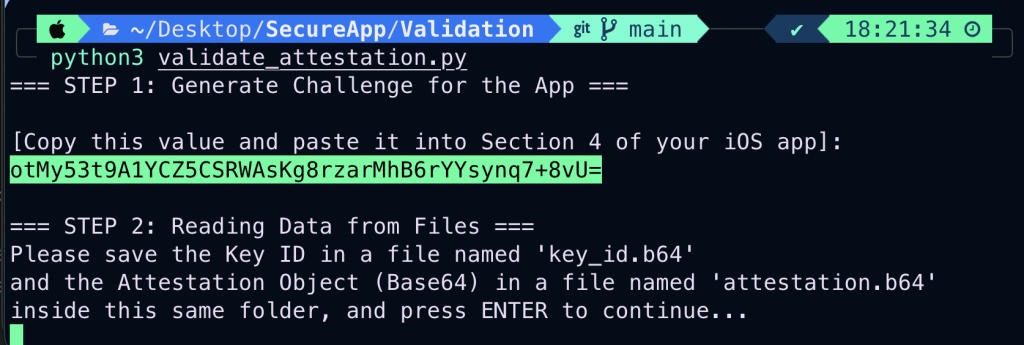
We will need to copy base64 challenge in iOS Security App for continuing with Signing process.
Signing
First step on adapting changes on Security app is adding App Test Capability on SegureApp target:
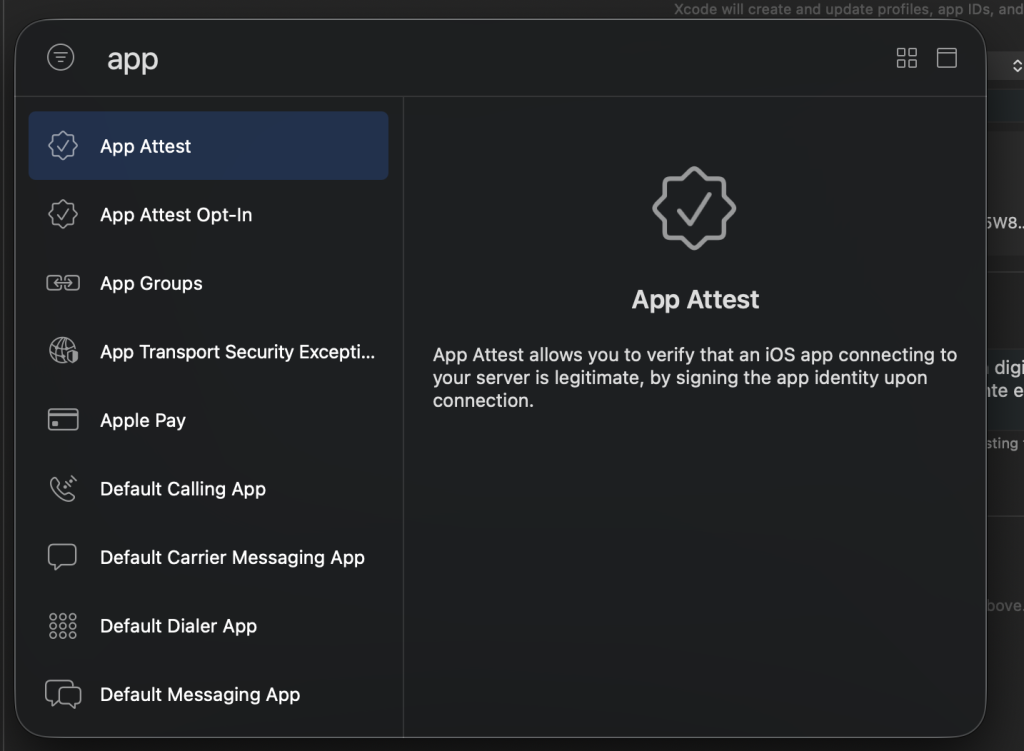
Now move on to Security App for generating the attesting signature:
    @State private var attestationChallengeInput = ""
    @State private var attestedKeyId: String = ""
    @State private var attestationResultDisplay = "No attestation performed yet..."
These three SwiftUI state variables manage the data flow and user interface state for the Security App Attest verification workflow, where attestationChallengeInput captures the Base64 challenge pasted from Python to compute its SHA-256 hash for Apple’s service, attestedKeyId stores the unique hardware key identifier returned by Apple to link the public key with the backend validation, and attestationResultDisplay controls the text label providing real-time feedback or displaying the resulting Base64 Attestation Object upon success.
func performAppAttestation() {
            let service = DCAppAttestService.shared

            guard service.isSupported else {
                attestationResultDisplay = "Error: App Attest not supported on this device/simulator."
                return
            }

            guard let challengeData = Data(base64Encoded: attestationChallengeInput) else {
                attestationResultDisplay = "Error: Invalid Base64 challenge string."
                return
            }

            let clientDataHash = SHA256.hash(data: challengeData)

            service.generateKey { keyId, error in
                if let error = error {
                    DispatchQueue.main.async {
                        attestationResultDisplay = "Error generating attest key: \(error.localizedDescription)"
                    }
                    return
                }

                guard let keyId = keyId else { return }
                self.attestedKeyId = keyId

                service.attestKey(keyId, clientDataHash: Data(clientDataHash)) { attestationObject, error in
                    DispatchQueue.main.async {
                        if let error = error {
                            attestationResultDisplay = "Attestation failed: \(error.localizedDescription)"
                            return
                        }

                        guard let attestationObject = attestationObject else {
                            attestationResultDisplay = "Error: Empty attestation object received."
                            return
                        }

                        let attestationBase64 = attestationObject.base64EncodedString()
                        self.attestationResultDisplay = attestationBase64

                        print("\n--- ATTESTATION OBJECT FOR PYTHON ---")
                        print("Key ID: \(keyId)")
                        print("Attestation Object (Base64): \(attestationBase64)")
                        print("-------------------------------------\n")

                        statusLog = "App Attest completed successfully 🛡️!"
                    }
                }
            }
        }
This function handles the core logic for executing Apple’s App Attest service on iOS, verifying device integrity and generating hardware-backed cryptographic credentials.
Here is a step-by-step breakdown of what it does:
Environment & Input Validation: It first checks if App Attest is supported on the current device/simulator via
DCAppAttestService.shared.isSupported. Then, it decodes the Base64 challenge string (attestationChallengeInput) provided by the user.Client Data Hash Computation: It computes a SHA-256 cryptographic hash of the decoded challenge (
clientDataHash), which prevents replay attacks by binding the challenge to the upcoming hardware attestation request.Secure Enclave Key Generation: It calls
service.generateKeyto command the device’s Secure Enclave to generate a new public/private key pair, saving the resulting identifier (keyId) intoattestedKeyId.Hardware Attestation: It takes that
keyIdand theclientDataHashand invokesservice.attestKey, asking Apple’s servers to cryptographically certify that the key was genuinely created in the device’s Secure Enclave.Result Processing & Output: Upon success, it converts the received attestation object into a Base64 string, updates the UI display state, prints the formatted data directly to the Xcode console (for copying into your Python backend files), and logs a completion message.
Finally add a new SwiftUI section on the app for pasting previous base64 generated challenge:
                Section(header: Text("4. App Attest Verification")) {
                    TextField("Paste challenge from Python (Base64)", text: $attestationChallengeInput)
                        .textFieldStyle(.roundedBorder)
                        .autocapitalization(.none)
                        .disableAutocorrection(true)

                    Button(action: performAppAttestation) {
                        HStack {
                            Image(systemName: "checkmark.shield.fill")
                            Text("Verify Key with Apple App Attest")
                        }
                    }
                    .disabled(!isKeyCreated || attestationChallengeInput.isEmpty)

                    Text(attestationResultDisplay)
                        .font(.system(.caption2, design: .monospaced))
                        .foregroundColor(.purple)
                        .textSelection(.enabled)
                }
Important! Deploy the app in in real iPhone device and keep opened debuging XCode windows because there will be presented Key Id and Attestation Object
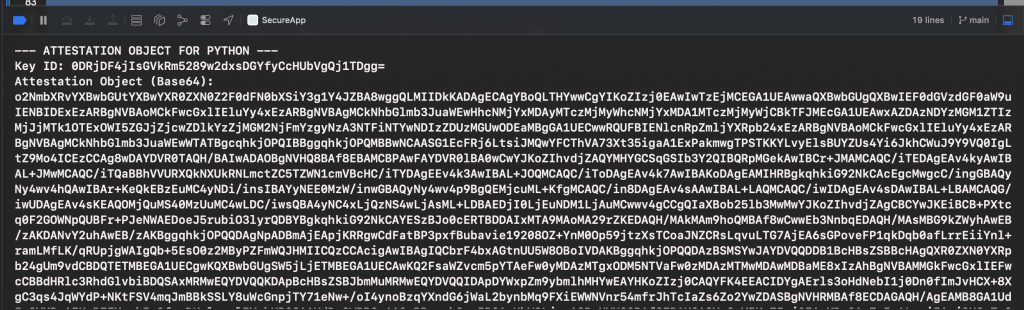
Save the key ID and the attestation object to a file. A file is necessary because the attestation object is too large to copy and paste manually.
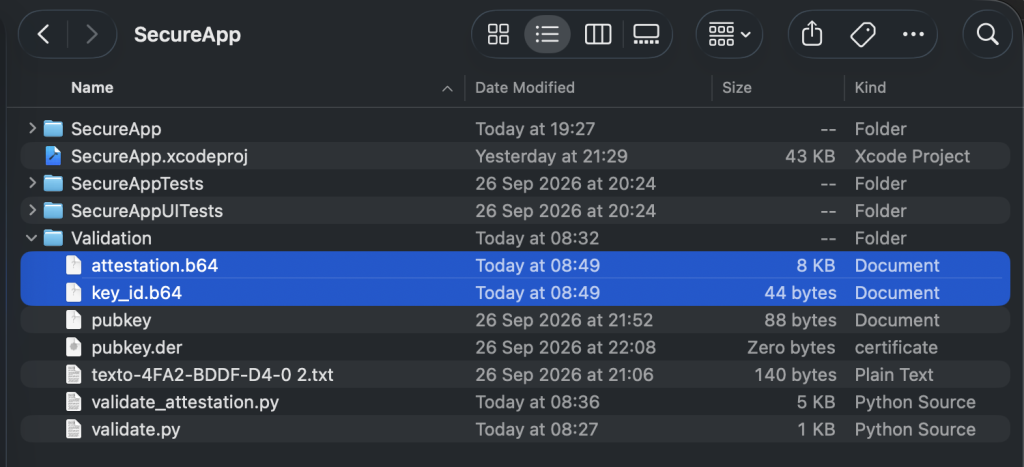
Verification
Once the key ID and attestation data are properly saved to their respective files, we can move on to the second and final part of the Python verification script.
    print("=== STEP 2: Reading Data from Files ===")
    print("Please save the Key ID in a file named 'key_id.b64'")
    print("and the Attestation Object (Base64) in a file named 'attestation.b64'")
    print("inside this same folder, and press ENTER to continue...")
    input()

    try:
        with open("key_id.b64", "r") as f:
            key_id_input = f.read().strip()

        with open("attestation.b64", "r") as f:
            attestation_base64_input = f.read().strip().replace("\n", "").replace(" ", "")

    except FileNotFoundError as e:
        print(f"❌ One of the required files was not found: {e}")
        return

    try:
        key_id_bytes = base64.b64decode(key_id_input)
        attestation_bytes = base64.b64decode(attestation_base64_input)
    except Exception as e:
        print(f"❌ Error decoding Base64 (check that there are no extra line breaks or spaces): {e}")
        return

    print("\n=== STEP 3: Validating Apple Attestation Object ===")

    try:
        attestation_object = loads(attestation_bytes)
    except Exception as e:
        print(f"❌ Error decoding CBOR: {e}")
        return

    fmt = attestation_object.get('fmt')
    if fmt != 'apple-appattest':
        print(f"❌ Invalid attestation format: {fmt}")
        return

    auth_data = attestation_object['authData']
    att_stmt = attestation_object['attStmt']
    x5c = att_stmt['x5c']

    if not x5c or len(x5c) < 1:
        print("❌ No certificates found in the x5c chain.")
        return

    cred_cert_bytes = x5c[0]
    cred_cert = x509.load_der_x509_certificate(cred_cert_bytes)

    aaguid = auth_data[37:53]
    expected_aaguid = b'appattestdev\x00\x00\x00\x00' if ENVIRONMENT == "development" else b'appattest\x00\x00\x00\x00\x00\x00\x00'

    if aaguid != expected_aaguid:
        print(f"⚠️️ Warning: AAGUID does not match the expected environment. Received: {aaguid}")
    else:
        print("✅ AAGUID verified successfully.")

    app_id = f"{TEAM_ID}.{BUNDLE_ID}"
    expected_rp_id_hash = hashlib.sha256(app_id.encode('utf-8')).digest()
    rp_id_hash_from_auth = auth_data[0:32]

    if rp_id_hash_from_auth != expected_rp_id_hash:
        print("❌ RP ID Hash does not match your Team ID and Bundle ID.")
        return
    print("✅ RP ID Hash verified successfully.")

    client_data_hash = hashlib.sha256(challenge_bytes).digest()
    nonce = hashlib.sha256(auth_data + client_data_hash).digest()

    nonce_extracted = None
    for extension in cred_cert.extensions:
        if extension.oid.dotted_string == "1.2.840.113635.100.8.2":
            ext_value = extension.value.value
            try:
                idx = ext_value.find(b'\x04\x20')
                if idx != -1:
                    nonce_extracted = ext_value[idx+2 : idx+2+32]
            except Exception:
                pass

    if nonce_extracted == nonce:
        print("✅ Nonce verified successfully (The device signed the current challenge).")
    else:
        print("❌ Nonce does not match! The attestation might be fake or replayed.")
        return

    public_key = cred_cert.public_key()
    pub_key_bytes = public_key.public_bytes(
        encoding=serialization.Encoding.X962,
        format=serialization.PublicFormat.UncompressedPoint
    )
    pub_key_hash = hashlib.sha256(pub_key_bytes).digest()

    if pub_key_hash == key_id_bytes:
        print("✅ Key ID and Public Key linked successfully.")
    else:
        print("❌ Key ID does not match the public key in the certificate.")
        return

    print("\n🎉 ATTESTATION SUCCESSFULLY VALIDATED! The device is genuine and the key
Here is a breakdown of what each section does:
Reading and Decoding Files (Step 2):
The script pauses and waits for you to save the generated
Key IDintokey_id.b64and theAttestation Objectintoattestation.b64.It reads these files, strips any stray whitespace or newlines, and decodes them from Base64 back into raw bytes (
key_id_bytesandattestation_bytes).
CBOR Decoding and Format Check:
It decodes the binary attestation object using the
cbor2library and verifies that its format identifier (fmt) is strictly set toapple-appattest.
AAGUID and Environment Verification:
It extracts the Authenticator Attestation GUID (AAGUID) from the
authDatastructure to ensure the hardware environment matches your configuration (appattestdevfor development).
RP ID Hash Verification:
It hashes your combined
TEAM_IDandBUNDLE_IDand compares it against the application identifier hash embedded inside the attestation data to confirm ownership.
Nonce / Challenge Verification:
It recomputes the expected nonce using the original challenge and extracts Apple’s custom cryptographic extension (
1.2.840.113635.100.8.2) from the leaf certificate to guarantee the device signed a live request (preventing replay attacks).
Public Key & Key ID Linkage:
It extracts the public key from the hardware certificate, hashes it, and verifies that it precisely matches the
Key IDprovided by the app.
Final Result:
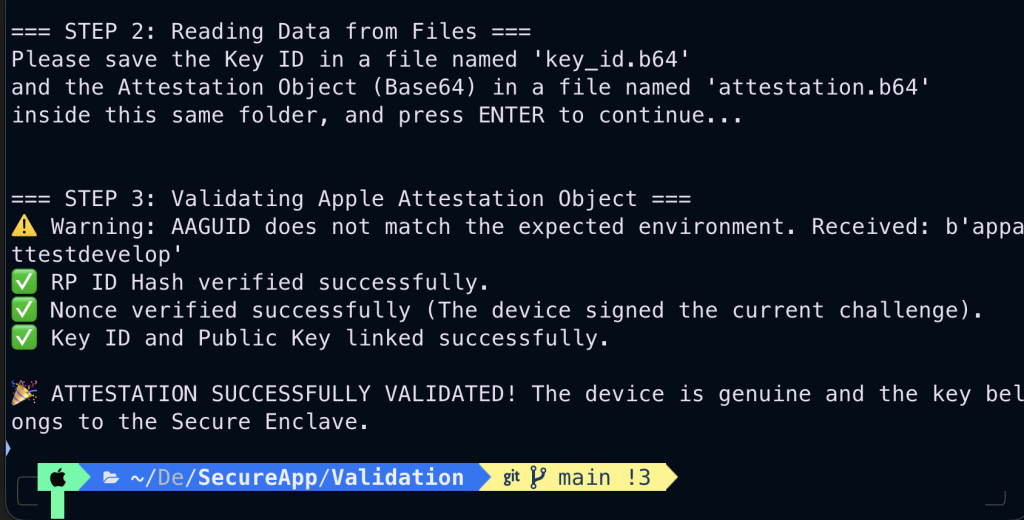
If all cryptographic checks pass successfully, it outputs a final success message confirming that the device is genuine and backed by the Secure Enclave.
Get back to termina python execution script, and if files were propperly set, then just press enter:
Conclusions
In our previous post, we explained how to sign data using the Secure Enclave. In this article, we will show you how to validate that a key pair was genuinely generated inside physical Apple Secure Enclave hardware.
The Secure Enclave is integrated into the system-on-chip (SoC) of the following Apple devices:
iPhone (iPhone 5s and later)
iPad (iPad Air, iPad Pro, iPad mini, and standard iPad models)
Mac (All Apple Silicon M-series Macs, Intel Macs with the Apple T2 security chip, and MacBook Pro models with the T1 chip)
Apple Watch (Series 1 and later)
Apple TV (Apple TV HD and later)
Apple Vision Pro
HomePod & HomePod mini
References
- Signing iOS App data using Secure Enclave
JaviOS Post
- App Attest & Integrity Validation
Apple Developer Documentation
- Secure Enclave Key Protection:
Apple Developer Documentation
- Deep-Dive Hardware Attestation Security
Apple Developer Documentation