Categoría: Security

  • Attesting Secure Enclave generated keys

    Attesting Secure Enclave generated keys

    Why Attesting Keys Matter

    When your app creates a standard public/private key pair inside the Secure Enclave, the private key never leaves the hardware chip. However, if you send just the public key to a backend server, the server has a trust problem: How does it know that public key actually belongs to a secure hardware component on a genuine device, and not an attacker’s script pretending to be one?

    An attesting key solves this by providing a cryptographic chain of custody:

    1. The Attested Key: The regular key pair you generated for your app’s workflow (e.g., signing data).

    2. The Attestation Object: A cryptographic package generated by the Secure Enclave that bundles your attested public key together with device properties (like hardware identifiers and boot state).

    3. The Root of Trust (The Attesting Key/Certificate): The Secure Enclave signs this entire package using a built-in, unextractable hardware-level key (backed ultimately by Apple’s manufacturing root certificates).

    When your server receives this package, it can verify the signature back to Apple’s root authority. This gives the server mathematical proof that your app’s key is hardware-bound and untampered.

    Here is a quick summary of the Secure Enclave attestation process:

    • Challenge: The backend server sends a random, one-time challenge (nonce) to the app.

    • Signing: The Secure Enclave signs this challenge using the hardware-bound key, bundling the generated public key and device metadata.

    • Verification: The app sends this signed package to the backend, which cryptographically verifies it against Apple’s root certificates to prove the key genuinely originated from physical hardware.

    Challenge

    We will start on the receiver in our case we handle it in a new python script:

    TEAM_ID = "9999999999"       # Example: "ABCDE12345"
    BUNDLE_ID = "xxx.yyy.zzz" # Exact Bundle ID of your app in Xcode
    ENVIRONMENT = "development"             # "development" or "production"
    
    def run_attestation_server():
        print("=== STEP 1: Generate Challenge for the App ===")
        challenge_bytes = os.urandom(32)
        challenge_base64 = base64.b64encode(challenge_bytes).decode('utf-8')

    In this chunk you will have also to define some Security App project identifiers, for easily retrieve DEVELOPMENT_TEAM and PRODUCT_BUNDLE_IDENTIFIER just type following command on terminal:

    grep -rn -E "DEVELOPMENT_TEAM|PRODUCT_BUNDLE_IDENTIFIER"

    Next generates a cryptographically secure, 32-byte random challenge using the operating system’s secure random source and encodes it into a Base64 string so that it can be safely transmitted over a network to a client device for validation.

    Now execute python script for generating challenge:
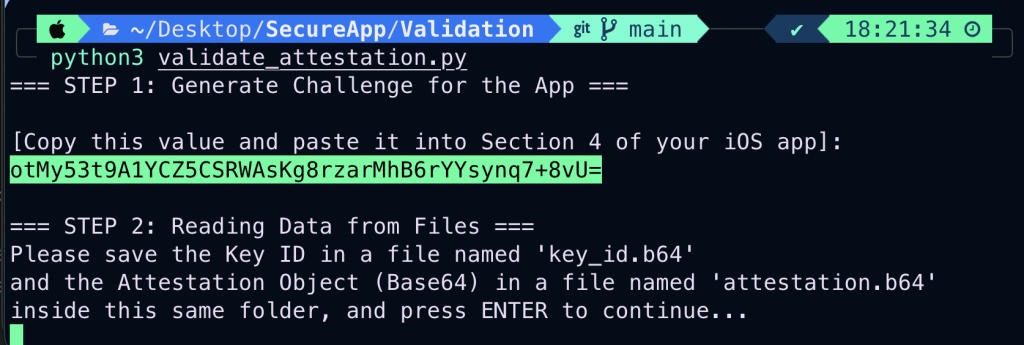
    We will need to copy base64 challenge in iOS Security App for continuing with Signing process.

    Signing

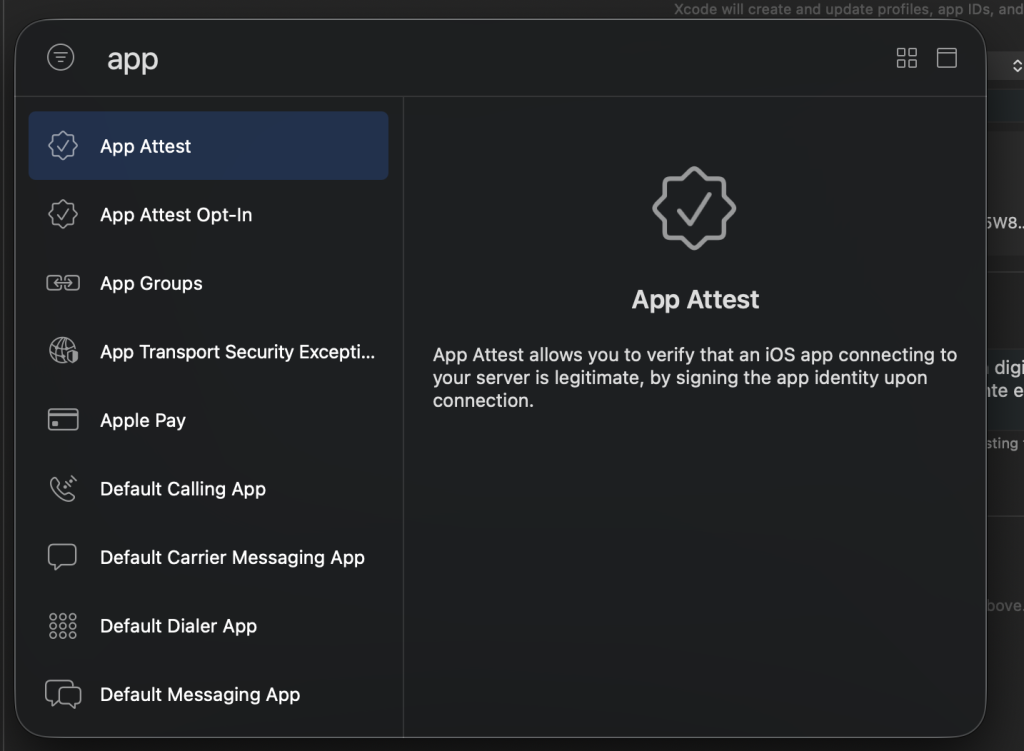
    First step on adapting changes on Security app is adding App Test Capability on SegureApp target:
    Now move on to Security App for generating the attesting signature:

        @State private var attestationChallengeInput = ""
        @State private var attestedKeyId: String = ""
        @State private var attestationResultDisplay = "No attestation performed yet..."

    These three SwiftUI state variables manage the data flow and user interface state for the Security App Attest verification workflow, where attestationChallengeInput captures the Base64 challenge pasted from Python to compute its SHA-256 hash for Apple’s service, attestedKeyId stores the unique hardware key identifier returned by Apple to link the public key with the backend validation, and attestationResultDisplay controls the text label providing real-time feedback or displaying the resulting Base64 Attestation Object upon success.

    func performAppAttestation() {
                let service = DCAppAttestService.shared
                
                guard service.isSupported else {
                    attestationResultDisplay = "Error: App Attest not supported on this device/simulator."
                    return
                }
                
                guard let challengeData = Data(base64Encoded: attestationChallengeInput) else {
                    attestationResultDisplay = "Error: Invalid Base64 challenge string."
                    return
                }
                
                let clientDataHash = SHA256.hash(data: challengeData)
                
                service.generateKey { keyId, error in
                    if let error = error {
                        DispatchQueue.main.async {
                            attestationResultDisplay = "Error generating attest key: \(error.localizedDescription)"
                        }
                        return
                    }
                    
                    guard let keyId = keyId else { return }
                    self.attestedKeyId = keyId
                    
                    service.attestKey(keyId, clientDataHash: Data(clientDataHash)) { attestationObject, error in
                        DispatchQueue.main.async {
                            if let error = error {
                                attestationResultDisplay = "Attestation failed: \(error.localizedDescription)"
                                return
                            }
                            
                            guard let attestationObject = attestationObject else {
                                attestationResultDisplay = "Error: Empty attestation object received."
                                return
                            }
                            
                            let attestationBase64 = attestationObject.base64EncodedString()
                            self.attestationResultDisplay = attestationBase64
                            
                            print("\n--- ATTESTATION OBJECT FOR PYTHON ---")
                            print("Key ID: \(keyId)")
                            print("Attestation Object (Base64): \(attestationBase64)")
                            print("-------------------------------------\n")
                            
                            statusLog = "App Attest completed successfully 🛡️!"
                        }
                    }
                }
            }

    This function handles the core logic for executing Apple’s App Attest service on iOS, verifying device integrity and generating hardware-backed cryptographic credentials.

    Here is a step-by-step breakdown of what it does:

    • Environment & Input Validation: It first checks if App Attest is supported on the current device/simulator via DCAppAttestService.shared.isSupported. Then, it decodes the Base64 challenge string (attestationChallengeInput) provided by the user.

    • Client Data Hash Computation: It computes a SHA-256 cryptographic hash of the decoded challenge (clientDataHash), which prevents replay attacks by binding the challenge to the upcoming hardware attestation request.

    • Secure Enclave Key Generation: It calls service.generateKey to command the device’s Secure Enclave to generate a new public/private key pair, saving the resulting identifier (keyId) into attestedKeyId.

    • Hardware Attestation: It takes that keyId and the clientDataHash and invokes service.attestKey, asking Apple’s servers to cryptographically certify that the key was genuinely created in the device’s Secure Enclave.

    • Result Processing & Output: Upon success, it converts the received attestation object into a Base64 string, updates the UI display state, prints the formatted data directly to the Xcode console (for copying into your Python backend files), and logs a completion message.

    Finally add a new SwiftUI section on the app for pasting previous base64 generated challenge:

                    Section(header: Text("4. App Attest Verification")) {
                        TextField("Paste challenge from Python (Base64)", text: $attestationChallengeInput)
                            .textFieldStyle(.roundedBorder)
                            .autocapitalization(.none)
                            .disableAutocorrection(true)
                        
                        Button(action: performAppAttestation) {
                            HStack {
                                Image(systemName: "checkmark.shield.fill")
                                Text("Verify Key with Apple App Attest")
                            }
                        }
                        .disabled(!isKeyCreated || attestationChallengeInput.isEmpty)
                        
                        Text(attestationResultDisplay)
                            .font(.system(.caption2, design: .monospaced))
                            .foregroundColor(.purple)
                            .textSelection(.enabled)
                    }

    Important! Deploy the app in in real iPhone device and keep opened debuging XCode windows because there will be presented Key Id and Attestation Object
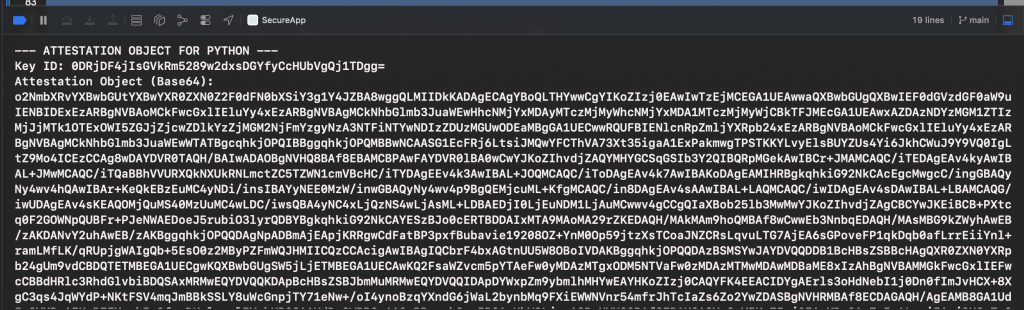
    Save the key ID and the attestation object to a file. A file is necessary because the attestation object is too large to copy and paste manually.
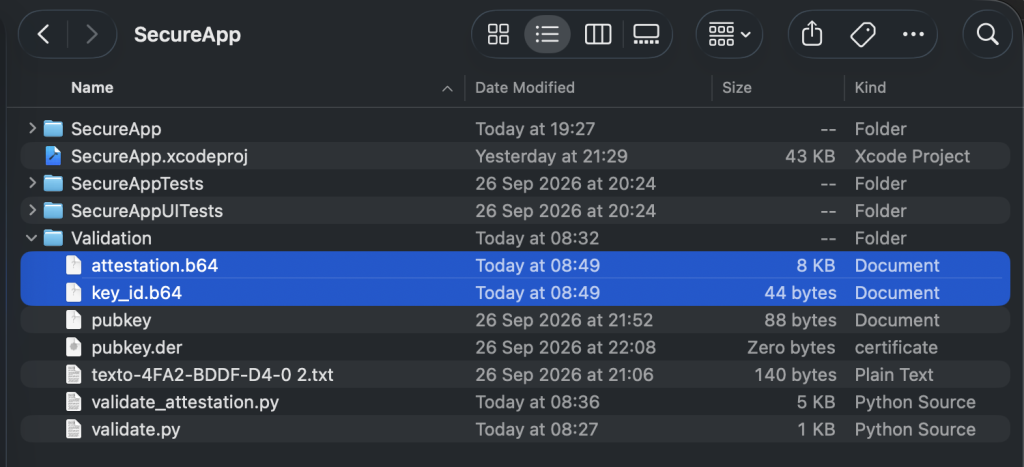
    Verification

    Once the key ID and attestation data are properly saved to their respective files, we can move on to the second and final part of the Python verification script.

        print("=== STEP 2: Reading Data from Files ===")
        print("Please save the Key ID in a file named 'key_id.b64'")
        print("and the Attestation Object (Base64) in a file named 'attestation.b64'")
        print("inside this same folder, and press ENTER to continue...")
        input()
        
        try:
            with open("key_id.b64", "r") as f:
                key_id_input = f.read().strip()
                
            with open("attestation.b64", "r") as f:
                attestation_base64_input = f.read().strip().replace("\n", "").replace(" ", "")
                
        except FileNotFoundError as e:
            print(f"❌ One of the required files was not found: {e}")
            return
    
        try:
            key_id_bytes = base64.b64decode(key_id_input)
            attestation_bytes = base64.b64decode(attestation_base64_input)
        except Exception as e:
            print(f"❌ Error decoding Base64 (check that there are no extra line breaks or spaces): {e}")
            return
    
        print("\n=== STEP 3: Validating Apple Attestation Object ===")
        
        try:
            attestation_object = loads(attestation_bytes)
        except Exception as e:
            print(f"❌ Error decoding CBOR: {e}")
            return
    
        fmt = attestation_object.get('fmt')
        if fmt != 'apple-appattest':
            print(f"❌ Invalid attestation format: {fmt}")
            return
        
        auth_data = attestation_object['authData']
        att_stmt = attestation_object['attStmt']
        x5c = att_stmt['x5c']
        
        if not x5c or len(x5c) < 1:
            print("❌ No certificates found in the x5c chain.")
            return
    
        cred_cert_bytes = x5c[0]
        cred_cert = x509.load_der_x509_certificate(cred_cert_bytes)
    
        aaguid = auth_data[37:53]
        expected_aaguid = b'appattestdev\x00\x00\x00\x00' if ENVIRONMENT == "development" else b'appattest\x00\x00\x00\x00\x00\x00\x00'
        
        if aaguid != expected_aaguid:
            print(f"⚠️️ Warning: AAGUID does not match the expected environment. Received: {aaguid}")
        else:
            print("✅ AAGUID verified successfully.")
    
        app_id = f"{TEAM_ID}.{BUNDLE_ID}"
        expected_rp_id_hash = hashlib.sha256(app_id.encode('utf-8')).digest()
        rp_id_hash_from_auth = auth_data[0:32]
        
        if rp_id_hash_from_auth != expected_rp_id_hash:
            print("❌ RP ID Hash does not match your Team ID and Bundle ID.")
            return
        print("✅ RP ID Hash verified successfully.")
    
        client_data_hash = hashlib.sha256(challenge_bytes).digest()
        nonce = hashlib.sha256(auth_data + client_data_hash).digest()
    
        nonce_extracted = None
        for extension in cred_cert.extensions:
            if extension.oid.dotted_string == "1.2.840.113635.100.8.2":
                ext_value = extension.value.value
                try:
                    idx = ext_value.find(b'\x04\x20')
                    if idx != -1:
                        nonce_extracted = ext_value[idx+2 : idx+2+32]
                except Exception:
                    pass
    
        if nonce_extracted == nonce:
            print("✅ Nonce verified successfully (The device signed the current challenge).")
        else:
            print("❌ Nonce does not match! The attestation might be fake or replayed.")
            return
    
        public_key = cred_cert.public_key()
        pub_key_bytes = public_key.public_bytes(
            encoding=serialization.Encoding.X962,
            format=serialization.PublicFormat.UncompressedPoint
        )
        pub_key_hash = hashlib.sha256(pub_key_bytes).digest()
    
        if pub_key_hash == key_id_bytes:
            print("✅ Key ID and Public Key linked successfully.")
        else:
            print("❌ Key ID does not match the public key in the certificate.")
            return
    
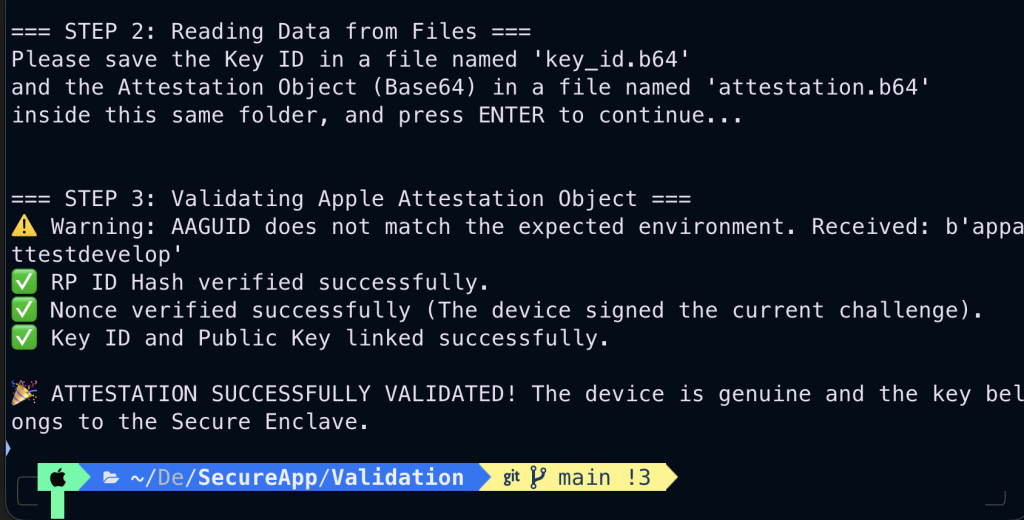
        print("\n🎉 ATTESTATION SUCCESSFULLY VALIDATED! The device is genuine and the key

    Here is a breakdown of what each section does:

    • Reading and Decoding Files (Step 2):

      • The script pauses and waits for you to save the generated Key ID into key_id.b64 and the Attestation Object into attestation.b64.

      • It reads these files, strips any stray whitespace or newlines, and decodes them from Base64 back into raw bytes (key_id_bytes and attestation_bytes).

    • CBOR Decoding and Format Check:

      • It decodes the binary attestation object using the cbor2 library and verifies that its format identifier (fmt) is strictly set to apple-appattest.

    • AAGUID and Environment Verification:

      • It extracts the Authenticator Attestation GUID (AAGUID) from the authData structure to ensure the hardware environment matches your configuration (appattestdev for development).

    • RP ID Hash Verification:

      • It hashes your combined TEAM_ID and BUNDLE_ID and compares it against the application identifier hash embedded inside the attestation data to confirm ownership.

    • Nonce / Challenge Verification:

      • It recomputes the expected nonce using the original challenge and extracts Apple’s custom cryptographic extension (1.2.840.113635.100.8.2) from the leaf certificate to guarantee the device signed a live request (preventing replay attacks).

    • Public Key & Key ID Linkage:

      • It extracts the public key from the hardware certificate, hashes it, and verifies that it precisely matches the Key ID provided by the app.

    • Final Result:

      • If all cryptographic checks pass successfully, it outputs a final success message confirming that the device is genuine and backed by the Secure Enclave.

    Get back to termina python execution script, and if files were propperly set, then just press enter:
    Conclusions

    In our previous post, we explained how to sign data using the Secure Enclave. In this article, we will show you how to validate that a key pair was genuinely generated inside physical Apple Secure Enclave hardware.

    The Secure Enclave is integrated into the system-on-chip (SoC) of the following Apple devices:

    • iPhone (iPhone 5s and later)

    • iPad (iPad Air, iPad Pro, iPad mini, and standard iPad models)

    • Mac (All Apple Silicon M-series Macs, Intel Macs with the Apple T2 security chip, and MacBook Pro models with the T1 chip)

    • Apple Watch (Series 1 and later)

    • Apple TV (Apple TV HD and later)

    • Apple Vision Pro

    • HomePod & HomePod mini

    References

  • Signing iOS App data using Secure Enclave

    Signing iOS App data using Secure Enclave

    The aim of this pos is demystify Apple’s hardware-backed security, bridging the gap between low-level cryptographic APIs and practical application development. It addresses a high industry demand for robust mobile security—especially in fintech and authentication—by demonstrating a complete end-to-end workflow from biometric authorization on an iPhone to backend cryptographic verification in Python.

    Secure enclave

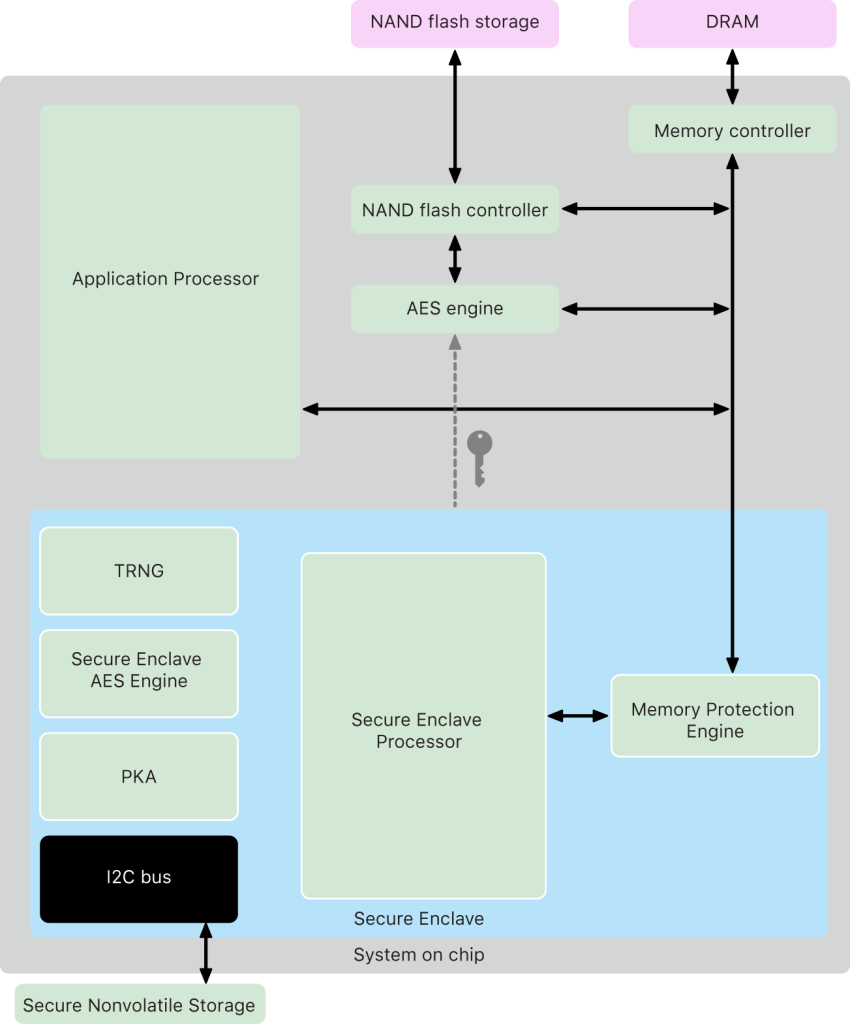
    The Secure Enclave is a dedicated, hardware-based security subsystem built directly into Apple’s system-on-chip (SoC). It operates completely isolated from the main processor (the Application Processor) and the operating system (iOS) to provide an extra layer of security.

    Here are its key hardware characteristics:

    • Isolated Processing & Storage: It features its own boot ROM, hardware random number generator (RNG), and dedicated cryptographic engines, with its memory encrypted dynamically.

    • Hardware-Bound Keys: Private keys generated within the Secure Enclave are physically bound to the device’s silicon. They cannot be exported, extracted, or backed up to iCloud, making them immune to software-based extraction even if the main OS kernel is compromised.

    • Biometric Integration: It works closely with the Secure Enclave processor to securely process and authorize actions via Touch ID or Face ID without exposing biometric templates to the rest of the system.

    Between iOS (running on the Application Processor) and the Secure Enclave, there is no traditional external communication bus (such as an open I2C, SPI, or UART trace running across a circuit board) because both components reside physically inside the same System on a Chip (SoC).

    Instead, they communicate internally through advanced hardware mechanisms and strict isolation protocols. Here is how the communication takes place and how it is secured:

    1. The Communication Channel: Hardware Mailboxes

    The Application Processor (AP) and the Secure Enclave Processor (SEP) communicate via a dedicated hardware mailbox system.

    • How it works: This is an internal, hardware-level messaging interface integrated directly into the silicon. The AP writes a request or command (e.g., asking to evaluate a keychain item or process a cryptographic operation) into a specific memory-mapped mailbox register, triggering an interrupt (doorbell signal) to the Secure Enclave.
    • Request/Response Only: The AP can only drop messages into this mailbox and wait for a reply. It cannot execute code inside the Secure Enclave, peek into its execution registers, or manipulate its internal state.

    2. How the Communications Are Secured (If No Bus Exists)

    Since there is no open physical bus to tap or eavesdrop on externally, security relies on deep hardware-level enforcement:

    • Strict Memory Isolation (The Memory Protection Engine):
      Although the Secure Enclave shares access to the device’s main DRAM for running its OS (sepOS), it uses a dedicated, cryptographically protected region. Every time the Secure Enclave reads or writes to its memory, hardware logic called the Memory Protection Engine (MPE) encrypts and decrypts the data on-the-fly using AES in XEX mode alongside cryptographic authentication tags (CMAC). If the Application Processor attempts to read this memory space directly, it only sees randomized ciphertext.
    • Independent Execution and Microkernel:
      The Secure Enclave runs its own stripped-down, highly secure microkernel (sepOS, based on L4) completely separate from iOS. Even if the entire iOS kernel is compromised by malware or a jailbreak, the attacker still has zero administrative control over the Secure Enclave because the software boundary and CPU privilege rings are strictly enforced by the SoC hardware.
    • Crypto-Bound Operations (OS-Bound Keys):
      When data or keys pass back and forth via the mailbox, they are heavily encrypted. Furthermore, keys generated inside the Secure Enclave are bound to the hardware via a unique device ID (UID) and the cryptographic hash of the operating system image itself, ensuring that intercepted data packets are entirely useless if captured or replayed outside of that precise hardware context.

    Key pair generation from Secure Sample iOS App

    Our sample app what it does is just sign a message. But for doing that first thing that app does is request to Secure Enclave element to generate a public and private key pair:

            let deleteQuery: [String: Any] = [
                kSecClass as String: kSecClassKey,
                kSecAttrApplicationTag as String: keyTag.data(using: .utf8)!,
                kSecAttrKeyType as String: kSecAttrKeyTypeEC
            ]
            SecItemDelete(deleteQuery as CFDictionary)

    Cleanup Existing Keys (SecItemDelete)

    • Before generating a new key, it checks if a key with the same application tag already exists in the iOS Keychain and deletes it to prevent conflicts.

            var error: Unmanaged<CFError>?
            guard let accessControl = SecAccessControlCreateWithFlags(
                nil,
                kSecAttrAccessibleAfterFirstUnlockThisDeviceOnly,
                [.privateKeyUsage, .biometryCurrentSet],
                &error
            ) else {
                statusLog = "Access control error: \(error.debugDescription)"
                return
            }
    

    Define Security and Biometric Policies (SecAccessControlCreateWithFlags)

    • kSecAttrAccessibleAfterFirstUnlockThisDeviceOnly: Ensures the key can only be accessed after the user has unlocked the device at least once since boot, and it will not be included in iCloud backups.

    • [.privateKeyUsage, .biometryCurrentSet]: Enforces that any usage of the private key requires Face ID or Touch ID authentication. Furthermore, .biometryCurrentSet ensures that if a user adds a new fingerprint or face to the device later, this specific key is automatically invalidated, protecting against unauthorized additions.

            let attributes: [String: Any] = [
                kSecAttrKeyType as String: kSecAttrKeyTypeEC,
                kSecAttrKeySizeInBits as String: 256,
                kSecAttrTokenID as String: kSecAttrTokenIDSecureEnclave,
                kSecPrivateKeyAttrs as String: [
                    kSecAttrIsPermanent as String: true,
                    kSecAttrApplicationTag as String: keyTag.data(using: .utf8)!,
                    kSecAttrAccessControl: accessControl
                ]
            ]

    Configure Key Attributes (attributes)

    • Type & Size: Specifies an Elliptic Curve (EC) key of 256 bits (kSecAttrKeyTypeEC), which is the standard curve used for modern secure communications (like P-256 / secp256r1).

    • Token ID (kSecAttrTokenIDSecureEnclave): This is the most critical line. It commands iOS to route the key generation request down to the hardware Secure Enclave, ensuring the private key never leaves the secure coprocessor’s isolated memory.

    • Persistence: Sets kSecAttrIsPermanent to true so the reference is safely stored in the system Keychain.

            var publicKeyRef, privateKeyRef: SecKey?
            let status = SecKeyGeneratePair(attributes as CFDictionary, &publicKeyRef, &privateKeyRef)
    
            guard status == errSecSuccess, let pubKey = publicKeyRef else {
                statusLog = "Error generating key: (Code: \(status))"
                return
            }

    Generate the Key Pair (SecKeyGeneratePair)

    • Triggers the Secure Enclave hardware to mathematically generate the private/public key pair. The private key remains locked inside the Secure Enclave forever; it cannot be read by iOS or any app.

            var exportError: Unmanaged<CFError>?
            guard let pubKeyData = SecKeyCopyExternalRepresentation(pubKey, &exportError) else {
                statusLog = "Error exporting key"
                return
            }
            
            let pubKeyBase64 = (pubKeyData as Data).base64EncodedString()
            publicKeyDisplay = "Key ready (See console for PEM)"
            
            print("\n--- COPY THIS PUBLIC KEY FOR PYTHON ---")
            print(pubKeyBase64)
            print("---------------------------------------\n")
    
            isKeyCreated = true
            statusLog = "Success: Key created in Secure Enclave 🔒"

    Export and Print the Public Key

    • Extracts the raw bytes of the public key (SecKeyCopyExternalRepresentation), converts them into a Base64-encoded string, and prints them to the Xcode console.

    • Why? Because the public key is safe to share. You would typically send this Base64 string to a backend server or a script (like Python) so the server can use it to verify signatures created by your iOS app.

    Secure iOS App message signature

    Second task that sample iOS app does is request message signature. Message is as simple and as critical as a money transfer authorization.

    @State private var messageToSign = "Authorize transfer of 500€"

    What signature process does is following:

            let query: [String: Any] = [
                kSecClass as String: kSecClassKey,
                kSecAttrApplicationTag as String: keyTag.data(using: .utf8)!,
                kSecAttrKeyType as String: kSecAttrKeyTypeEC,
                kSecReturnRef as String: true
            ]
    
            var item: CFTypeRef?
            let status = SecItemCopyMatching(query as CFDictionary, &item)
    
            guard status == errSecSuccess, let rawItem = item else {
                signatureResult = "Could not retrieve the private key."
                return
            }
            let privateKey = rawItem as! SecKey

    Retrieve the Private Key (SecItemCopyMatching)

    • When you get that SecKey object in Swift, you do not hold the raw private key bytes. Instead, you hold a local cryptographic proxy object (a reference handle).

            guard let dataToSign = messageToSign.data(using: .utf8) else { return }
    
            var error: Unmanaged<CFError>?
            guard let signature = SecKeyCreateSignature(
                privateKey,
                .ecdsaSignatureMessageX962SHA256,
                dataToSign as CFData,
                &error
            ) as Data? else {
                signatureResult = "Signature cancelled or failed"
                return
            }
    
            let hexSig = signature.map { String(format: "%02hhx", $0) }.joined()
            signatureResult = hexSig
            
            print("\n--- COPY THIS HEXADECIMAL SIGNATURE FOR PYTHON ---")
            print(hexSig)
            print("------------------------------------------------\n")
            
            statusLog = "Signature successfully generated by hardware!"

    Trigger Biometric Prompt & Execution

    When you call SecKeyCreateSignature passing that reference:

    1. iOS sends a command down the hardware mailbox to the Secure Enclave saying: «Hey, use the private key associated with this handle to sign this specific message data.»

    2. The Secure Enclave pops up the Face ID / Touch ID prompt.

    3. Once authenticated, the Secure Enclave performs the mathematical signing operation entirely inside its own secure silicon, using the private key that lives safely in its isolated memory.

    4. The Secure Enclave spits out only the resulting signature back to iOS.

    Secure iOS App wrap up

    From user point of view what app does is request user for key generation  and generate the signature (Cryptographic result) for a fixed message:

    For facilitating validation in XCode logs windows are printed out public key in base64 and also an hexa string with the generated signature:

    --- COPY THIS PUBLIC KEY FOR PYTHON ---
    BFKD2YajWTN+yF9SOmAk6mebyJMuqbc/suP1uu0azpmp+55xYRhKCL3nmQJgYyau8z5GgtuSf3EPT0yEdwZg8WA=
    ---------------------------------------
    
    --- COPY THIS HEXADECIMAL SIGNATURE FOR PYTHON ---
    3045022035b35a8779457aa631858c1b48008d50b343e3b44ed4102e6730c70784c76bd5022100d63a02633ee2f899b4d00d3a6651df13f881968b58a5dbe2f4c46f7cb8e1ed36
    ------------------------------------------------

    Validator script

    For validating signature we have created a Python script, let’s going to analyze it:

    # 1. Paste here only the Base64 string (without PEM headers)
    pub_key_base64 = "BFKD2YajWTN+yF9SOmAk6mebyJMuqbc/suP1uu0azpmp+55xYRhKCL3nmQJgYyau8z5GgtuSf3EPT0yEdwZg8WA="
    # 2. Your signature in Hexadecimal exactly as returned by the app
    hex_signature = "3045022035b35a8779457aa631858c1b48008d50b343e3b44ed4102e6730c70784c76bd5022100d63a02633ee2f899b4d00d3a6651df13f881968b58a5dbe2f4c46f7cb8e1ed36"
    
    # 3. The exact original message you signed in the app
    message = "Authorize transfer of 5000€".encode('utf-8')

    Inputs Preparation

    • pub_key_base64: Takes the Base64-encoded public key string that your iOS app printed to the console during key generation.

    • hex_signature: Takes the hexadecimal signature string produced by the iOS app when you signed the message using Face ID/Touch ID.

    • message: Recreates the exact original message string (Authorize transfer of 5000€) and encodes it into bytes using UTF-8. (Note: This must match the exact text signed on iOS, down to the last character and the euro symbol).

    •  Look out! message has been altered transfer value has been set to 5000 instead of  500

    try:
        # A. Decode the public key from Base64 to raw bytes
        pub_key_bytes = base64.b64decode(pub_key_base64)
    
        # B. Reconstruct the public key using the P-256 (secp256r1) curve
        public_key = ec.EllipticCurvePublicKey.from_encoded_point(
            ec.SECP256R1(), 
            pub_key_bytes
        )
    
        # C. Convert the hexadecimal signature to DER binary
        der_signature = binascii.unhexlify(hex_signature)
    
        # D. Verify the cryptographic signature
        public_key.verify(
            der_signature,
            message,
            ec.ECDSA(hashes.SHA256())
        )

    Execution and Verification (try...except block)

    • Step A: Decode the Public Key

      • base64.b64decode(pub_key_base64) converts the Base64 text string back into its raw binary byte format.

    • Step B: Reconstruct the Public Key Object

      • ec.EllipticCurvePublicKey.from_encoded_point(...) rebuilds the public key object in Python using the P-256 curve (secp256r1), which is the exact same elliptic curve standard used by the iOS Secure Enclave.

    • Step C: Convert the Signature

      • binascii.unhexlify(hex_signature) transforms the hexadecimal signature string back into binary DER format so the cryptographic library can read it.

    • Step D: Mathematical Verification

      • public_key.verify(...) runs the cryptographic math. It checks whether the public key can successfully verify that the provided signature matches the message using ECDSA with SHA-256 (ec.ECDSA(hashes.SHA256())).

        print("\nVERIFICATION SUCCESSFUL! 🟢")
        print("The cryptogram was legitimately signed by the Secure Enclave of your iOS device.\n")
    
    except Exception as e:
        print("\nVERIFICATION FAILED! 🔴")
        print("Error detail:", e, "\n")

    Result Output

    • If successful (VERIFICATION SUCCESSFUL! 🟢): The math checks out. Python confirms that the signature could only have been created by the corresponding private key living securely inside the iOS device’s hardware.

    • If it fails (VERIFICATION FAILED! 🔴): An exception is thrown (e.g., if someone tampered with the message text, if the signature was altered, or if the public/private key pairs don’t match), indicating an invalid or fraudulent signature.

    On executing validation script we can check that message was altered, as it was:

    After restoring back the original message:

    # 3. The exact original message you signed in the app
    message = "Authorize transfer of 500€".encode('utf-8')

    Conclusions

    Across this example I have presented how easily is to guarante that information that is generated on device can be securely signed.

    You can find the source code for this example in the following GitHub repository.

    References